




 12
12









- My Forums
- Tiger Rant
- LSU Recruiting
- SEC Rant
- Saints Talk
- Pelicans Talk
- More Sports Board
- Coaching Changes
- Fantasy Sports
- Golf Board
- Soccer Board
- O-T Lounge
- Tech Board
- Home/Garden Board
- Outdoor Board
- Health/Fitness Board
- Movie/TV Board
- Book Board
- Music Board
- Political Talk
- Money Talk
- Fark Board
- Gaming Board
- Travel Board
- Food/Drink Board
- Ticket Exchange
- TD Help Board
Customize My Forums- View All Forums
- Show Left Links
- Topic Sort Options
- Trending Topics
- Recent Topics
- Active Topics
Started By
Message
Can somebody help me figure my phone out.. It makes me want to redirect..(pic)
Posted on 7/17/26 at 9:59 pm
Posted on 7/17/26 at 9:59 pm
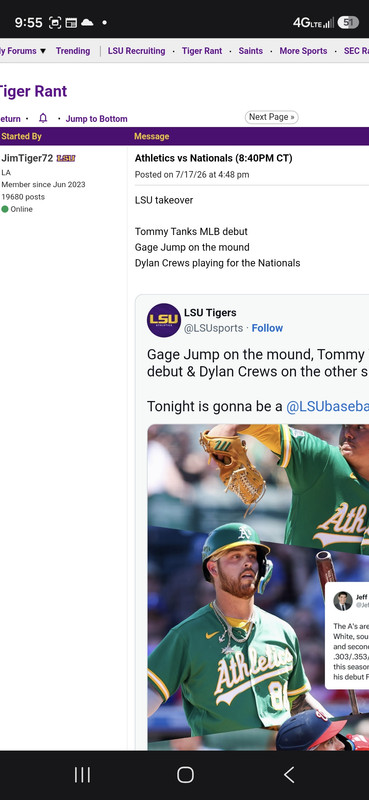
I just got a new phone..
I used to click right on the link and it would go straight to the article and the comments
Now it wants me to open Twitter app first to see the comments. Anyone else experienced this?
Posted on 7/17/26 at 10:02 pm to Islandboy777
Better question, why are you not using mobile version of TD?
Posted on 7/17/26 at 10:03 pm to beerJeep
I never have lol.
I went straight from desktop to cellphone since 2004
I went straight from desktop to cellphone since 2004
Posted on 7/17/26 at 10:08 pm to Islandboy777
What browser are you using?
Try downloading Chrome and try again.
Try downloading Chrome and try again.
This post was edited on 7/17/26 at 10:10 pm
Posted on 7/17/26 at 10:10 pm to gmac8604
I don't know.. I have an android 26..
Reddit did the same thing, but it cleared up somehow..
It is like twitter is forcing me to use its app to see any.Articles, instead of going straight from google
Reddit did the same thing, but it cleared up somehow..
It is like twitter is forcing me to use its app to see any.Articles, instead of going straight from google
Posted on 7/17/26 at 10:11 pm to Islandboy777
All I see is a Twitter conversation.
To what article are you referring?
To what article are you referring?
Posted on 7/17/26 at 10:13 pm to Islandboy777
You dont know what button you click on to access the internet?
Posted on 7/17/26 at 10:24 pm to gmac8604
Google
Posted on 7/17/26 at 10:46 pm to Islandboy777
Long press the link and tap open in background. From then on it will open in the browser. You will have to do that for other links too that you don’t want an app to open for.
Posted on 7/17/26 at 11:08 pm to Islandboy777
quote:
It is like twitter is forcing me to use its app to see any.Articles
That is exactly what they are doing. Twitter been trying to force people to use the app. You can use redirectors
Posted on 7/18/26 at 6:57 am to Islandboy777
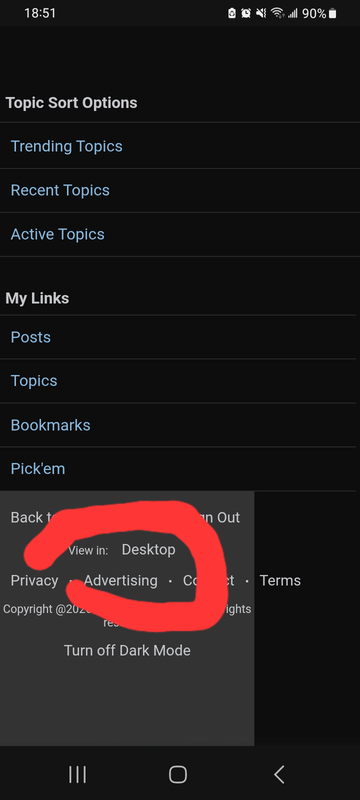
You’re on “request desktop version”. Click settings inside left of the browser text and select “use mobile version”.
Posted on 7/18/26 at 7:22 am to Islandboy777
Ask Grok, I'm off today
This post was edited on 7/18/26 at 7:24 am
Posted on 7/18/26 at 7:55 am to Islandboy777
Wrong board
Posted on 7/18/26 at 10:20 am to Traffic Circle
quote:
Phone aids?
PHAIDS.
Posted on 7/18/26 at 11:23 am to beerJeep
quote:
Better question, why are you not using mobile version of TD?
I know this is a stupid question but how does one do that. Iphone?
Is there a app?
Posted on 7/18/26 at 11:55 am to LanierSpots
Posted on 7/18/26 at 1:02 pm to Islandboy777
Hopefully you'll lose the post button next.
Posted on 7/18/26 at 1:03 pm to LanierSpots
Scroll to bottom they have an option.

 Page 1 of 2


Popular

Back to top
 Follow TigerDroppings for LSU Football News