




- My Forums
- Tiger Rant
- LSU Recruiting
- SEC Rant
- Saints Talk
- Pelicans Talk
- More Sports Board
- Fantasy Sports
- Golf Board
- Soccer Board
- O-T Lounge
- Tech Board
- Home/Garden Board
- Outdoor Board
- Health/Fitness Board
- Movie/TV Board
- Book Board
- Music Board
- Political Talk
- Money Talk
- Fark Board
- Gaming Board
- Travel Board
- Food/Drink Board
- Ticket Exchange
- TD Help Board
Customize My Forums- View All Forums
- Show Left Links
- Topic Sort Options
- Trending Topics
- Recent Topics
- Active Topics
Started By
Message
Computer Storage dilemma...
Posted on 8/27/26 at 12:20 pm

Posted on 8/27/26 at 12:20 pm
Bought a new Laptop. Went from 3TB in my old one (1Tb NVME and 2TB S/HDD (I honestly don't remember)) down to 1 TB. My 1 TB is already close to 1/2 full. My music library (which I need for my DJ software) is close to 120 GB alone. I'd like to increase storage somewhere either onboard of offline. My new laptop has an open NVME slot, but looking at NVME prices I'm not sure that's my best option. So considering some sort of offline storage mainly for photos (from the kids MTB team). The secondary use for the photos is I use them to build a video slide show. I'm not sure what bitrates that software needs, but I can't imagine it's daunting.
If it were you, what would you do? Looking for the most cost effective (bang for the buck) and flexible solution (when and where I can access the files). I've never done network storage, but not opposed to it.
Thanks in advance.
If it were you, what would you do? Looking for the most cost effective (bang for the buck) and flexible solution (when and where I can access the files). I've never done network storage, but not opposed to it.
Thanks in advance.
 1
1


Posted on 8/27/26 at 1:23 pm to Lonnie Utah
I would use an external hard drive.


Posted on 8/27/26 at 2:57 pm to Chromdome35
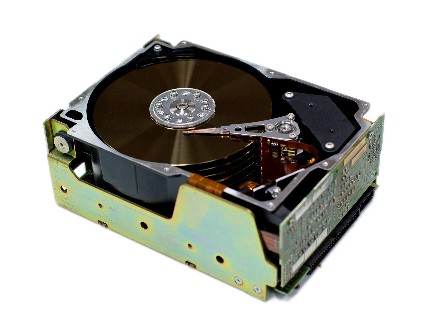
LOL, when I saw that, my first thought was "MFM or RLL?"
OP, the second you mention pictures, my first thought is redundancy. If you're going to go single external drive, make sure you're backing up with Backblaze or similar. Otherwise, you need a RAID capable (do not rely on O/S RAID) 2 bay enclosure or a starter NAS like this ($99 on eBay) with two 4 TB drives (under $100 ea used):

OP, the second you mention pictures, my first thought is redundancy. If you're going to go single external drive, make sure you're backing up with Backblaze or similar. Otherwise, you need a RAID capable (do not rely on O/S RAID) 2 bay enclosure or a starter NAS like this ($99 on eBay) with two 4 TB drives (under $100 ea used):
Posted on 8/27/26 at 3:00 pm to LemmyLives
g=c800:5


Posted on 8/27/26 at 7:02 pm to Chromdome35
quote:
would use an external hard drive.
This. Or cloud storage and pay the fee.
Posted on 8/27/26 at 7:19 pm to Chromdome35
quote:
g=c800:5
Do you mean wipe it with bleach?


Posted on 8/28/26 at 6:06 am to HailToTheChiz
quote:
This. Or cloud storage and pay the fee.
For no good reason, I am philosophically opposed to cloud storage...
Posted on 8/28/26 at 6:08 am to LemmyLives
quote:
OP, the second you mention pictures, my first thought is redundancy. If you're going to go single external drive, make sure you're backing up with Backblaze or similar. Otherwise, you need a RAID capable (do not rely on O/S RAID) 2 bay enclosure or a starter NAS like this ($99 on eBay) with two 4 TB drives (under $100 ea used):
Thanks. Step 2. How does a raid interface with my home network?

Posted on 8/28/26 at 6:24 am to Lonnie Utah
quote:
I am philosophically opposed to cloud storage
Make your own cloud storage

I would still have important documents/photos backed up to the cloud via a major vendor. 3-2-1 rule
Posted on 8/28/26 at 6:27 am to Lonnie Utah
quote:
How does a raid interface with my home network?
Raid isn't a storage type, it's how you can manipulate drives to create storage pools (individual hard drive redundancy). You would use qnap/sybology/truenas OS to create the raid arrays, and then host the storage pools on the network from there.
Raid itself isn't a backup. It's drive redundancy
This post was edited on 8/28/26 at 7:15 am


Posted on 8/28/26 at 6:46 am to bluebarracuda
quote:
Raid itself isn't a backup. It's drive redundancy
This is still one of the greatest misconceptions in the tech world. If you really care about the safety of media, you need it existing in at least two separate places, on two separate networks, on two separate grids.
Posted on 8/28/26 at 12:23 pm to bluebarracuda
quote:
I would still have important documents/photos backed up to the cloud via a major vendor. 3-2-1 rule
The "select ones" are stored on a shared team google drive...

Posted on 8/28/26 at 7:18 pm to TigerFanatic99
quote:
This is still one of the greatest misconceptions in the tech world. If you really care about the safety of media, you need it existing in at least two separate places, on two separate networks, on two separate grids.
Amen. If a client doesn't want to do this, I tell them I waice responsibility for their data. I have a client who spouts this BS about "I'm opposed to the cloud". Luddites are a PITA, go get another tech.
The same idiots who are opposed to datacenters. The Chinese love you morons.
This post was edited on 8/28/26 at 7:20 pm

 Page 1 of 1


Popular
Back to top
 Follow TigerDroppings for LSU Football News