




 1
1










- My Forums
- Tiger Rant
- LSU Recruiting
- SEC Rant
- Saints Talk
- Pelicans Talk
- More Sports Board
- Fantasy Sports
- Golf Board
- Soccer Board
- O-T Lounge
- Tech Board
- Home/Garden Board
- Outdoor Board
- Health/Fitness Board
- Movie/TV Board
- Book Board
- Music Board
- Political Talk
- Money Talk
- Fark Board
- Gaming Board
- Travel Board
- Food/Drink Board
- Ticket Exchange
- TD Help Board
Customize My Forums- View All Forums
- Show Left Links
- Topic Sort Options
- Trending Topics
- Recent Topics
- Active Topics
Started By
Message
Posted on 3/4/24 at 9:24 am to UltimateHog
quote:
Are you on bios 7E12v18?
Yes. I updated to that on upon installation.
Posted on 3/4/24 at 11:08 am to SaintEB
Might make sure it took it. Even bios updates in the bios can be funky. Even XMP memory should at least work at 6k.
Posted on 3/4/24 at 1:33 pm to hoojy
quote:
Might make sure it took it. Even bios updates in the bios can be funky. Even XMP memory should at least work at 6k.
Will do. I though I did verify but I can't remember. I'll follow up.
ETA: Bios Version says 1.80.
This post was edited on 3/4/24 at 1:44 pm
Posted on 3/4/24 at 2:47 pm to SaintEB
quote:
SaintEB
I checked earlier, my RAM is staying at 6000 and hasn't reverted back down. Basically identical setup. Strange
Posted on 3/5/24 at 7:55 am to Carson123987
quote:
I checked earlier, my RAM is staying at 6000 and hasn't reverted back down. Basically identical setup. Strange
Another strange thing, when I changed it back to 6000, it stayed in bios for 61s upon restart. Each time I checked in bios that the Expo profile was still active, it would take that long. Once it reverted back to 4800, it was a 12s bios. It is running fine at 4800 but this other stuff is weird. I just don't know if it could be a bigger issue (which i don't really think it is). I feel like i'm just missing a bios setting or something.
ETA: Is your PC booting normally at 6000? Like, normal time/speed?
This post was edited on 3/5/24 at 9:23 am
Posted on 3/5/24 at 11:25 am to SaintEB
Sounds like either your RAM or CPU can’t handle your RAM settings, so it’s failing to boot and then retraining.
Posted on 3/5/24 at 9:12 pm to Joshjrn
quote:
Sounds like either your RAM or CPU can’t handle your RAM settings, so it’s failing to boot and then retraining.
So, its staying at 6000 but its taking 60-61s in bios.
ETA: So, I'm an idiot. Memory Context Restore was set to Auto. Set it to Enabled and 1st restart was 60.9s in bios, second one was 12.9s at 6000.
This post was edited on 3/5/24 at 9:25 pm
Posted on 3/5/24 at 11:32 pm to SaintEB
That sounds about right, mine is around 10 seconds.
Posted on 3/6/24 at 10:59 am to UltimateHog
quote:
That sounds about right, mine is around 10 seconds.
Yep. Seems to be all good.
I'm pretty pumped about this build. One of my kids has the 3080 in his rig, and I gave my youngest the 11900K with his brother's 3060ti. We have PCs out the arse now.
Posted on 3/10/24 at 5:49 pm to GoGators1995
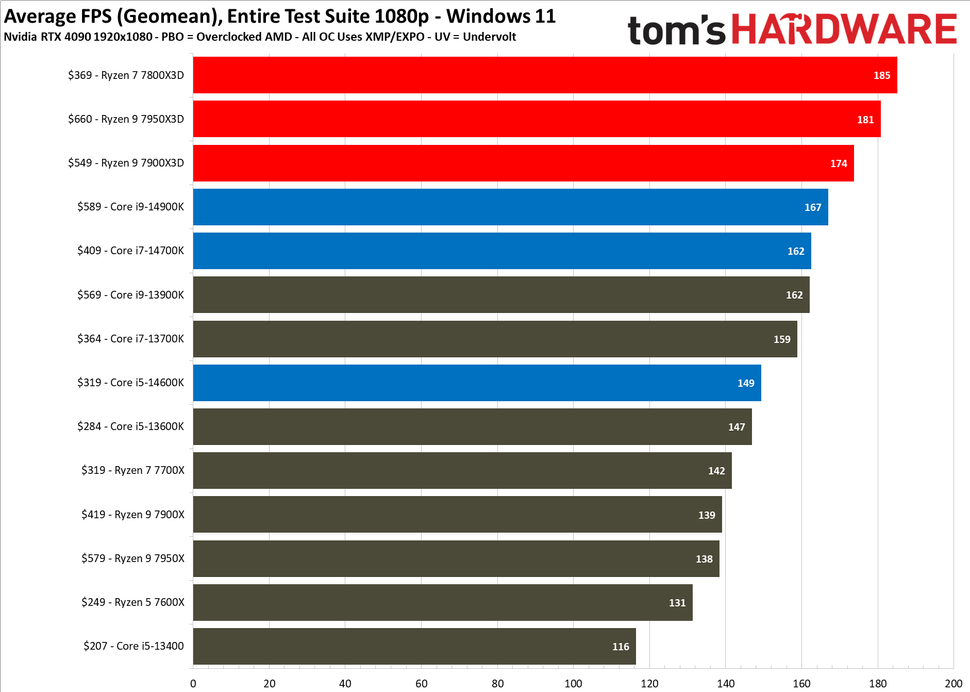
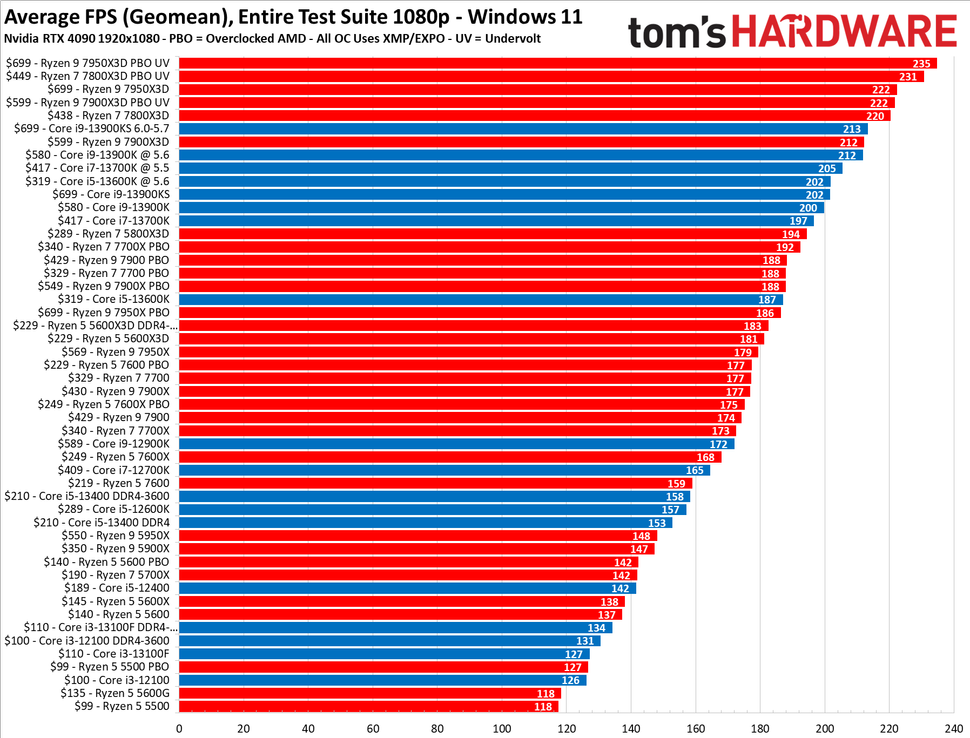
Two reasons. First, it’s a different test image:
Second, the bottom image includes PBO UV results as well as stock results, while the top image only has stock results.
For whatever reason, while the stock 7800x3D outperforms the 7950x3D in this test, an undervolted 7950x3D outperforms both an undervolted and stock 7800x3D.
Though, frankly, the difference is probably close to within the margin of error, so I wouldn’t concern myself with it. The punch line is that they perform nearly identically in both the old and new version of that particular test.
quote:
We have two sets of benchmarks in the album above. All of our Windows 11 tests above were conducted with the Nvidia GeForce RTX 4090, and we'll build out all future test results with this platform. We recently updated our test image, so we have a limited selection of benchmarks that include the latest Intel 14th-Gen processors. However, you can use the relative positioning of the processors to gauge performance differences to older chips by comparing them to the much broader set of CPU benchmarks found in the following slides. We are also adding new benchmarks of the older CPUs to our new test suite, and these two lists will merge into a single list in the coming weeks.
Second, the bottom image includes PBO UV results as well as stock results, while the top image only has stock results.
For whatever reason, while the stock 7800x3D outperforms the 7950x3D in this test, an undervolted 7950x3D outperforms both an undervolted and stock 7800x3D.
Though, frankly, the difference is probably close to within the margin of error, so I wouldn’t concern myself with it. The punch line is that they perform nearly identically in both the old and new version of that particular test.
This post was edited on 3/10/24 at 5:50 pm
Posted on 3/10/24 at 8:21 pm to Joshjrn
Gotcha. Just noticed the second one doesn't have 14th gen Intel. Thanks. 
Posted on 3/10/24 at 8:24 pm to GoGators1995
Another thing I saw at Microcenter is they are selling refurbished Founders Edition 30 series cards. The prices suck though.
3080 10GB: $550
3080 Ti: $700
3090: $750
3090 Ti: $800
I guess the 3090 Ti is an okay deal for stuff other than gaming maybe?
3080 10GB: $550
3080 Ti: $700
3090: $750
3090 Ti: $800
I guess the 3090 Ti is an okay deal for stuff other than gaming maybe?
Posted on 3/11/24 at 1:48 am to GoGators1995
quote:
3090: $750
3090 Ti: $800
These are insane deals if you are interested in AI shite... 24gb of vram at that price is unbeatable.
Posted on 3/16/24 at 9:45 pm to LSUGent
The 14900KS came out this week and it still can't beat the 7800X3D in gaming. 
Posted on 3/19/24 at 8:43 am to GoGators1995
I was messing around with 3DMark yesterday and the 4080S. I did undervolt my 3080, with Josh's help. Did some good. Josh, I went back on our discord chat and tried to follow but the 4080S is just different. That means I don't understand undervolting enough. I'll do some reading. I wonder if its even necessary or if I can even get a benefit. The card on first run started out at 2730Mhz and ended at 2760Mhz. It never dipped. I read that the card is stable at 2550 and .900mv. While dropping down the power consumption, the performance also dips at that setting.
Has anyone messed with UV on a 4080S here?
Has anyone messed with UV on a 4080S here?
This post was edited on 3/19/24 at 8:44 am
Posted on 3/19/24 at 9:58 am to SaintEB
I haven’t messed with the 40 series at all. With that said, I want to say that I remember reading early on that the 40 series is generally so over cooled that UV doesn’t have the impact that it did on previous generations, being the purpose was to limit heat by limiting voltage to then keep clock speed up. If the card isn’t heat soaking to begin with, you won’t see any benefit from UV and instead should just use a more traditional OC.
Posted on 3/19/24 at 11:15 am to Joshjrn
quote:
If the card isn’t heat soaking to begin with, you won’t see any benefit from UV and instead should just use a more traditional OC.
It doesn't seem like it is. The clock speed didn't dip at all during any of the tests.
Posted on 3/19/24 at 12:33 pm to SaintEB
quote:
It doesn't seem like it is. The clock speed didn't dip at all during any of the tests.
If you're not seeing clock sag, an UV won't do anything for you. If you want to play with it, start pushing an OC. Eventually, you'll either reach clock instability or temperature induced clock sagging. If you hit the former first, then you know your card's limits. If you hit the latter first, you can play with an "undervolt" from there and see how far it will take you.

 Page 1883 of 1914



Popular

Back to top
 Follow TigerDroppings for LSU Football News