





 1
1







- My Forums
- Tiger Rant
- LSU Recruiting
- SEC Rant
- Saints Talk
- Pelicans Talk
- More Sports Board
- Fantasy Sports
- Golf Board
- Soccer Board
- O-T Lounge
- Tech Board
- Home/Garden Board
- Outdoor Board
- Health/Fitness Board
- Movie/TV Board
- Book Board
- Music Board
- Political Talk
- Money Talk
- Fark Board
- Gaming Board
- Travel Board
- Food/Drink Board
- Ticket Exchange
- TD Help Board
Customize My Forums- View All Forums
- Show Left Links
- Topic Sort Options
- Trending Topics
- Recent Topics
- Active Topics
Started By
Message
re: PC Discussion - Gaming, Performance and Enthusiasts
Posted on 3/19/24 at 1:15 pm to Joshjrn
Posted on 3/19/24 at 1:15 pm to Joshjrn
quote:
If you're not seeing clock sag, an UV won't do anything for you. If you want to play with it, start pushing an OC. Eventually, you'll either reach clock instability or temperature induced clock sagging. If you hit the former first, then you know your card's limits. If you hit the latter first, you can play with an "undervolt" from there and see how far it will take you.
Sounds good. I'll do some more reading/watching about this stuff so I can try to understand it better.
Posted on 3/19/24 at 4:25 pm to SaintEB
OC is easy. Just go into afterburner where is says “core clock” and click on the +0, type in a multiple of 15 (15, 30, 45, etc), then hit enter. Run a benchmark. If you’re stable, put in a bigger number. If you’re not stable, put in a smaller number. Go until you find your biggest stable number (and then probably drop one level below that, or it will annoy you later).
Posted on 3/20/24 at 11:11 am to Joshjrn
Looks like DD2 coming in hot. 50% gpu utilization. 
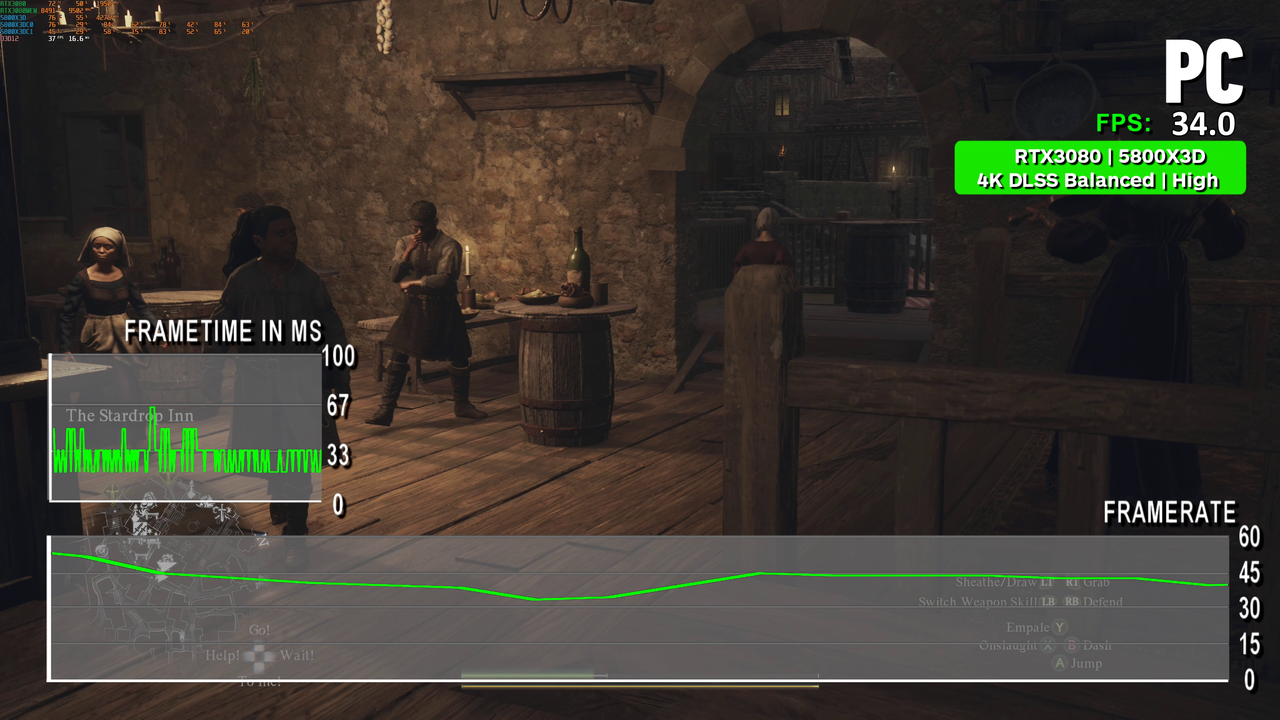
Unless the game doesn't care about cache. Then it would make more sense, but wouldn't be right.
Well, nvm. It appears to be just in the city. I can handle frame drops there. Game is very cpu intensive.
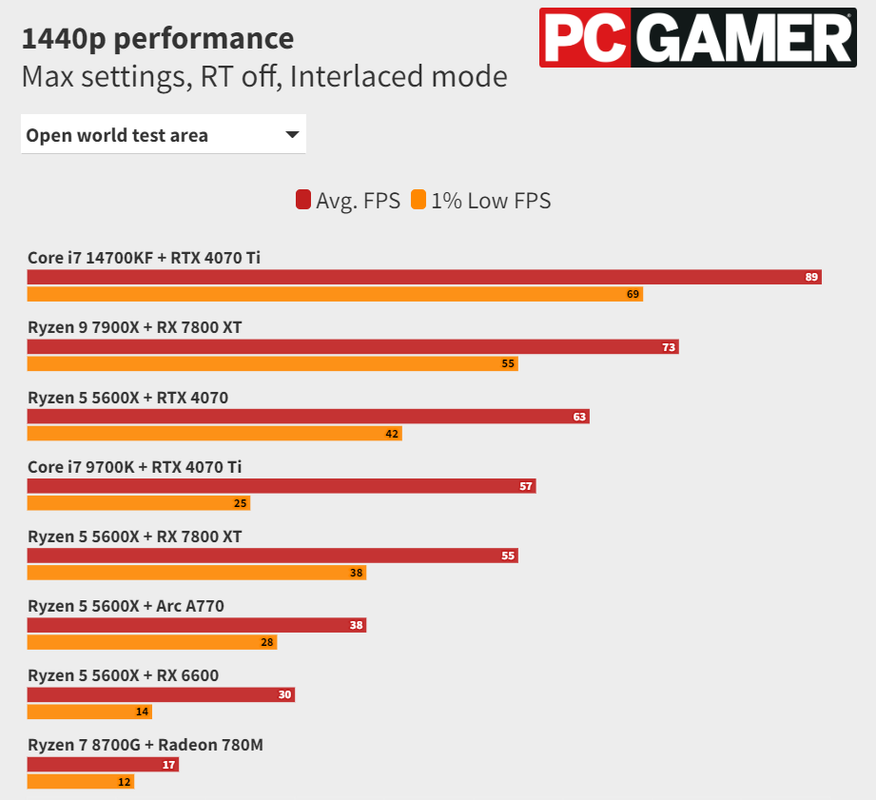
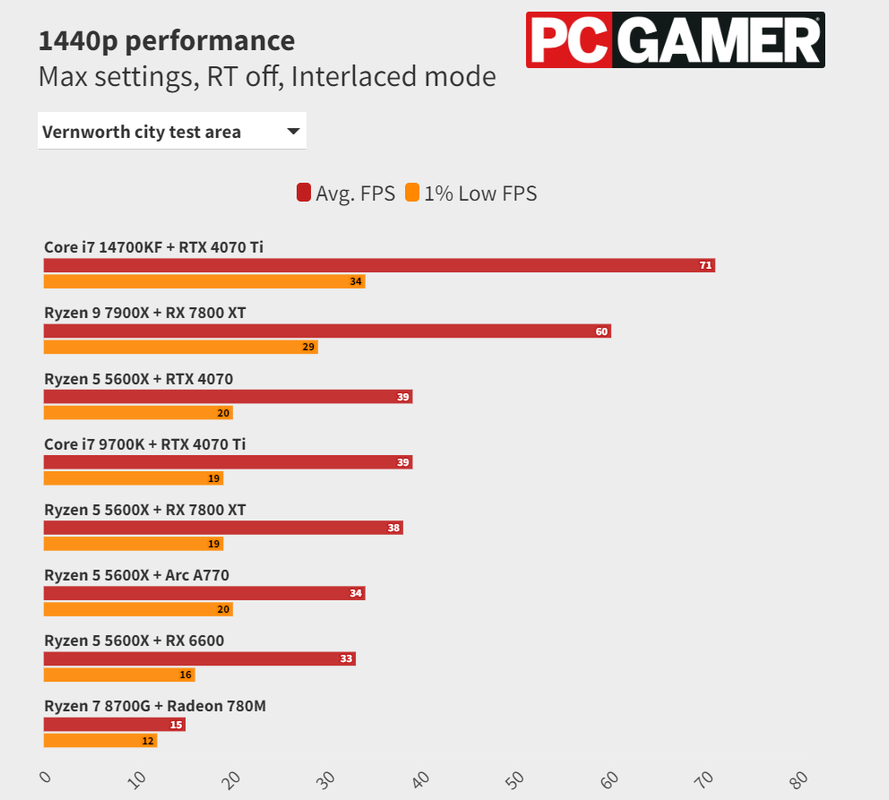
Unless the game doesn't care about cache. Then it would make more sense, but wouldn't be right.
Well, nvm. It appears to be just in the city. I can handle frame drops there. Game is very cpu intensive.
This post was edited on 3/20/24 at 11:44 am
Posted on 3/20/24 at 4:47 pm to hoojy
Japanese devs arent used to optimizing their games for PC... PC gaming is just now starting to become mainstream in Japan.
Posted on 3/20/24 at 5:44 pm to hoojy
With CPU bound numbers that low, it wouldn't surprise me if the game does a shite job using more than a couple of cores.
Actually, after I typed that, I noticed you had the overlay on. You can see that your overall CPU utilization is only 55% because half your threads are hardly being utilized. Definitely a game problem, not a hardware problem.
Actually, after I typed that, I noticed you had the overlay on. You can see that your overall CPU utilization is only 55% because half your threads are hardly being utilized. Definitely a game problem, not a hardware problem.
Posted on 3/20/24 at 6:14 pm to Joshjrn
That isn't mine. Those are benchmarks. 
I'll hold off on this for a couple of patches.
I'll hold off on this for a couple of patches.
Posted on 3/20/24 at 6:20 pm to hoojy
Ooo, well regardless, I would imagine yours would look quite similar. It’s actually the reason sometimes performance in older games is unexpectedly shitty. When I was playing Dragon Age: Origins again a few years ago, I had to artificially limit my CPU core affinity to… I think it was two cores? If I didn’t, I lost like 40fps.
Posted on 3/21/24 at 5:38 pm to Joshjrn
Horizon FW is apparently a great PC port, runs very well per reviews. Guess I will dive in soon.
Posted on 3/21/24 at 7:09 pm to UltimateHog
I’ve installed it and poked around the tutorial area a bit. For anyone curious, in that area, with maxed out setting at 3440x1440, I’m getting a solid 60fps with DLAA and no upscaling and 85fps with DLSS Quality. No noticeable graphical issues yet, but again, I’ve poked around for like five minutes. But I have high hopes.
3080 and 5800x.
3080 and 5800x.
Posted on 3/21/24 at 9:57 pm to Joshjrn
quote:
I’ve installed it and poked around the tutorial area a bit. For anyone curious, in that area, with maxed out setting at 3440x1440, I’m getting a solid 60fps with DLAA and no upscaling and 85fps with DLSS Quality. No noticeable graphical issues yet, but again, I’ve poked around for like five minutes. But I have high hopes.
3080 and 5800x.
I have 3 hours in, lol. I'm at 1440, max settings everything default. 95-100 fps in the busiest part of Chainscrape. Shoots north of 105 out in the open. I may need to mess with some settings.
It plays perfect. I haven't had a single hiccup yet.
ETA: 7800x3d, 4080 Super
ETA2: Should I be running DLSS? I don't expect it to make the game look much better. It looks pretty awesome right now.
This post was edited on 3/22/24 at 7:47 am
Posted on 3/22/24 at 8:10 am to SaintEB
quote:
ETA2: Should I be running DLSS? I don't expect it to make the game look much better. It looks pretty awesome right now.
Before we get into too much detail regarding things like upscaling, I would want you to take a look at something first: when I first fired up the game, it had "performance scaling" type options turned on by default. You need to make sure all of those are turned off before we start poking at settings. If you're not sure what you're looking at, feel free to post screenshots.
ETA: I just fired up the game, and it's in the "display" tab called "dynamic resolution scaling". It's just above the AA and upscaling options near the bottom of the page.
ETA2: If it's already off, great. If it's turned on, post what number it's set at, turn it to off, and then go run around your "high impact" areas and let us know what your frame rate looks like.
This post was edited on 3/22/24 at 8:20 am
Posted on 3/22/24 at 9:54 am to Joshjrn
quote:
ETA: I just fired up the game, and it's in the "display" tab called "dynamic resolution scaling". It's just above the AA and upscaling options near the bottom of the page.
ETA2: If it's already off, great. If it's turned on, post what number it's set at, turn it to off, and then go run around your "high impact" areas and let us know what your frame rate looks like.
I will check this when I get home. I feel like its on because the only thing I changed was "high" settings to "very high" settings.
Posted on 3/22/24 at 11:07 am to SaintEB
quote:
I will check this when I get home. I feel like its on because the only thing I changed was "high" settings to "very high" settings.
It likely is. What actually reminded me to ask about it was how tight your framerate range was from "easy" areas to "difficult" areas. You normally see more of a spread than that. Which then prompted me to remember that setting, and your having dynamic resolution scaling set to a target FPS of around 100fps would explain the results you're seeing.
And in case you're not familiar with the setting, it's how all modern console games work, and it's a setting you'll commonly see on console ports. Basically, you pick a target FPS. The game will then dynamically lower your resolution and settings to meet that target, as needed. If you can hit it at your max settings, great. If not, it quietly lowers them to keep performance the same.
That's actually why you'll see console players crowing about getting 4k 60fps on consoles that don't have near the hardware to actually drive that kind of performance.
ETA: If you're up for it, we should probably continue this on the HFW thread further down on the first page. That way people who find it later can follow along if needed.
This post was edited on 3/22/24 at 11:12 am
Posted on 3/22/24 at 12:56 pm to Joshjrn
quote:
ETA: If you're up for it, we should probably continue this on the HFW thread further down on the first page. That way people who find it later can follow along if needed.
Yeah. Good Idea.
Posted on 3/24/24 at 3:58 pm to SaintEB
DLSS is great at 1440p and 4k. Results may vary at 1080p, even on Quality.
Posted on 3/24/24 at 7:08 pm to GoGators1995
quote:
DLSS is great at 1440p and 4k. Results may vary at 1080p, even on Quality.
I would say DLSS is really good at 1440, but not great. Great at 4k.
1440p Quality renders at 720p. For a long time, I’ve been hoping Nvidia would add a DLSS Ultra Quality mode that rendered at 1080p for 1440p. You obviously wouldn’t see as much of a performance bump, but you would get a bump over native and as good or better visuals.
Posted on 3/24/24 at 7:48 pm to Joshjrn
quote:
I would say DLSS is really good at 1440, but not great. Great at 4k.
My panel resolution is 3840x1600 and that’s a really nice sweet spot for DLSS… quality mode looks great and can push higher frames than full 4k
Posted on 3/25/24 at 8:51 am to LSUGent
Have any of yall had luck selling a used tower before? What should I ask for this? All it needs is a GPU
quote:
CPU: Intel Core i9-9900K 3.6 GHz 8-Core Processor
CPU Cooler: Asus ROG Strix LC 240 80.95 CFM Liquid CPU Cooler
Motherboard: Asus ROG STRIX Z390-E GAMING ATX LGA1151 Motherboard
Memory: Corsair Vengeance LPX 32 GB (4 x 8 GB) DDR4-3200 CL16 Memory
Storage: Samsung 970 Evo 1 TB M.2-2280 PCIe 3.0 X4 NVME Solid State Drive
Case: MSI MPG GUNGNIR 100 ATX Mid Tower Case
Power Supply: EVGA SuperNOVA 1000 G3 1000 W 80+ Gold Certified Fully Modular ATX Power Supply
Posted on 3/25/24 at 9:37 am to Carson123987
quote:
Have any of yall had luck selling a used tower before? What should I ask for this? All it needs is a GPU
It needing a GPU is going to cause you problems. Even though we know that plugging in a GPU is the easiest damned thing, someone looking to "buy a computer" isn't going to want to do that. And anyone who is willing to do it would probably rather just pick their parts individually.
I would suggest either listing the parts as a group, but giving individual pricing as well, or buying a reasonable GPU on sale, plugging it in, and then listing the whole PC (though be prepared to get messages asking for components pricing, regardless).
As for pricing, I would plug it all into PCPP and assuming you don't have any components list really weird because it's not common anymore, knock 25% off because it's used, then see what kind of bites you get. If you do have wonky component price listing, compensate for that as well.
Posted on 3/25/24 at 11:13 am to Carson123987
I would have taken that power supply off your hands.
Facebook marketplace has all sorts of PC crap on it. From full customized builds to parts that make no sense to buy. Almost never are the prices reasonable.
I agree with Josh. Check what your parts are priced at today and knock it down. Keep in mind that there may be newer stuff that is cheaper than your part just due to supply. I also agree that having a GPU will help it sell. Also, you'll want to wipe that SSD if you haven't, but you may also want to get a cheap windows code and reinstall.
I would probably list as is and see what, reasonable, bites I get. Make it clear that if it doesn't have windows installed and only CPU graphics.
Facebook marketplace has all sorts of PC crap on it. From full customized builds to parts that make no sense to buy. Almost never are the prices reasonable.
I agree with Josh. Check what your parts are priced at today and knock it down. Keep in mind that there may be newer stuff that is cheaper than your part just due to supply. I also agree that having a GPU will help it sell. Also, you'll want to wipe that SSD if you haven't, but you may also want to get a cheap windows code and reinstall.
I would probably list as is and see what, reasonable, bites I get. Make it clear that if it doesn't have windows installed and only CPU graphics.

 Page 1884 of 1914



Popular

Back to top
 Follow TigerDroppings for LSU Football News