




- My Forums
- Tiger Rant
- LSU Recruiting
- SEC Rant
- Saints Talk
- Pelicans Talk
- More Sports Board
- Coaching Changes
- Fantasy Sports
- Golf Board
- Soccer Board
- O-T Lounge
- Tech Board
- Home/Garden Board
- Outdoor Board
- Health/Fitness Board
- Movie/TV Board
- Book Board
- Music Board
- Political Talk
- Money Talk
- Fark Board
- Gaming Board
- Travel Board
- Food/Drink Board
- Ticket Exchange
- TD Help Board
Customize My Forums- View All Forums
- Show Left Links
- Topic Sort Options
- Trending Topics
- Recent Topics
- Active Topics
Started By
Message
re: PC Discussion - Gaming, Performance and Enthusiasts
Posted on 12/21/20 at 12:11 pm to UltimateHog

Posted on 12/21/20 at 12:11 pm to UltimateHog
FYI - some more info on X570/B550 BIOS from the Gigabyte Tweaktown beta-BIOS thread.
Gigabyte supposedly is getting AMD Agesa 1.1.9.0 this week, with the formal PBO2 release incorporated. Expectation is the BETA bios will be available in hte next 2 weeks.
AMD AGESA 1.1.8.0 supposedly has the preliminary PBO2 release, but its buggy as hell, and has broken Bluetooth amungst other things.
All vendors except ASUS right now are using Agesa 1.1.0.0D. I believe Asus provided 1.1.8.0 in their latest BIOS, but its only for Ryzen 5000.
Gigabyte supposedly is getting AMD Agesa 1.1.9.0 this week, with the formal PBO2 release incorporated. Expectation is the BETA bios will be available in hte next 2 weeks.
AMD AGESA 1.1.8.0 supposedly has the preliminary PBO2 release, but its buggy as hell, and has broken Bluetooth amungst other things.
All vendors except ASUS right now are using Agesa 1.1.0.0D. I believe Asus provided 1.1.8.0 in their latest BIOS, but its only for Ryzen 5000.
 1
1


Posted on 12/21/20 at 1:13 pm to boXerrumble
quote:
All vendors except ASUS right now are using Agesa 1.1.0.0D. I believe Asus provided 1.1.8.0 in their latest BIOS, but its only for Ryzen 5000.
Well that works for me


Posted on 12/21/20 at 2:14 pm to Dam Guide
Just saw AMD is about to drop 2 more 5000 Series CPU's.
5800 and 5900 non X variants.
Oddly enough, OEM only.
5800 and 5900 non X variants.
Oddly enough, OEM only.
This post was edited on 12/21/20 at 2:15 pm
Posted on 12/21/20 at 2:35 pm to UltimateHog
Now that the government is printing funny money again, think I’m just going nuts and buying a 6900XT. I have never been so glad that my wife is underpaid than I am this year because she kept us under the income threshold on the govt cheese 

Posted on 12/21/20 at 2:52 pm to UltimateHog
Can non -X be OCd?
Posted on 12/21/20 at 3:24 pm to Hu_Flung_Pu
Yes, the 3600 I have right now I have a mild all-core OC at 4.0 GHz at Vcore set to 1.148V.
Posted on 12/22/20 at 4:48 pm to boXerrumble
What ram should I get, looking at Trident Z Neo either 3600 CL 16 or the newer CL14? The b die ones. Can’t decide if it is worth dealing with oos of the CL14 after finally defeating the 5900x beast.
Posted on 12/22/20 at 5:36 pm to Dam Guide
I have lower spec'd 3200 CL16 memory, but honestly if you look at bench marks... there isn't much difference between 3600 CL16 and 3200 CL14.
The fastest kits I've seen (very few and far in availability) are the 3600 CL14 kits you mentioned, but you're paying a shite ton for them.
The 3600 CL16 might be a bit cheaper, and you maybe lose 1-2 FPS at the most with a Ryzen 5000 CPU.
The fastest kits I've seen (very few and far in availability) are the 3600 CL14 kits you mentioned, but you're paying a shite ton for them.
The 3600 CL16 might be a bit cheaper, and you maybe lose 1-2 FPS at the most with a Ryzen 5000 CPU.
Posted on 12/22/20 at 5:48 pm to boXerrumble
3600 CL 16 is on sale for 230 at Newegg, normally 260
CL 14 is 300
CL 14 is 300
This post was edited on 12/22/20 at 5:49 pm


Posted on 12/23/20 at 9:43 am to Dam Guide
Just put a bunch of cards on to eBay finally. Once they sell, I think I'm going to finally upgrade to these:
- Z390 motherboard, my poor 8700k is having no fun in that B365
- swap my ram out for faster ram (likely downgrading from 32gb to 16gb). I think my current is 2666mhz
- Get a 3070 or 3080
- Get that LG monitor UH was recommending
- Z390 motherboard, my poor 8700k is having no fun in that B365
- swap my ram out for faster ram (likely downgrading from 32gb to 16gb). I think my current is 2666mhz
- Get a 3070 or 3080
- Get that LG monitor UH was recommending


Posted on 12/23/20 at 11:54 am to bluebarracuda
Does anybody in here have any experience with Multimonitor setups? I have a 5 monitor setup and 1,2,3,4 Monitors are all stable but once I hook up the 5th it basically causes the setup to go into a cycle where it can never regain its stability. Just using the basic Windows software to control them all because I cant seem to find anywhere in the AMD control panel to actually setup display like I can in the Nvidia
Posted on 12/23/20 at 2:38 pm to Greace
What video card are you using? I know some older cards only allowed 4 simultaneous output displays at one time, so I had to use the onboard graphics for the 5th display
Posted on 12/24/20 at 2:23 pm to bluebarracuda
Finally had a chance to do some light benching, haven't repasted it yet though so all stock still.
Rage Mode

2650MHz OC
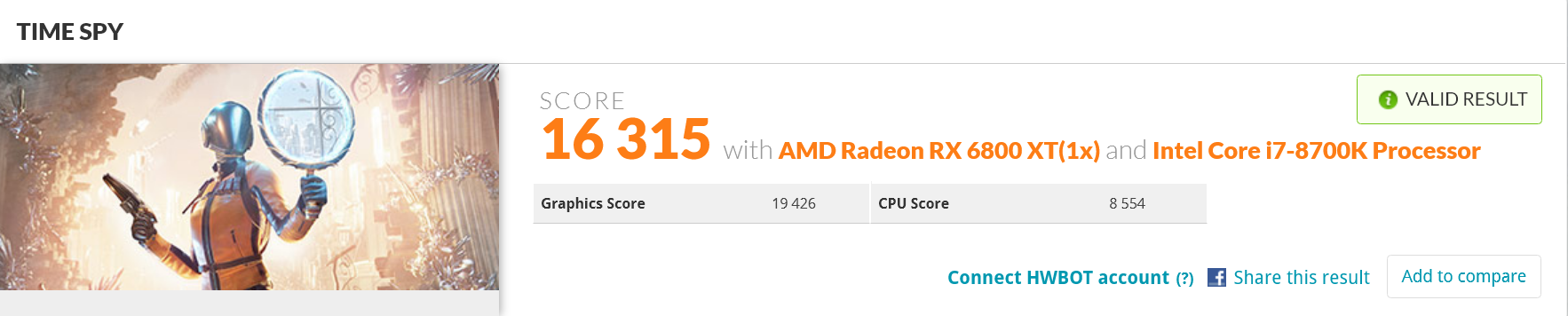
5700XT best bench comparison
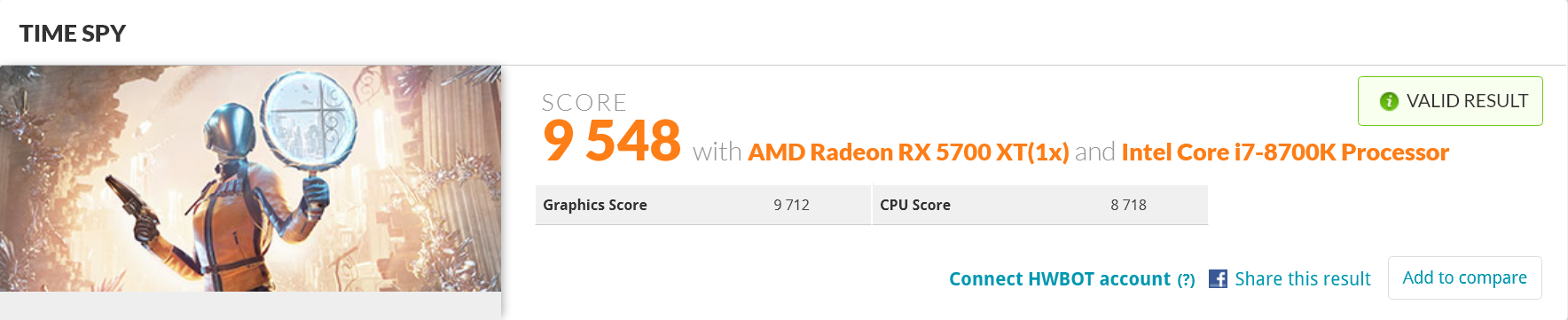
Rage Mode
2650MHz OC
5700XT best bench comparison
This post was edited on 12/24/20 at 2:25 pm
Posted on 12/24/20 at 5:24 pm to UltimateHog
Got my 5600x installed this morning. Cleaning the Noctua thermal paste is a royal PITA 
I gotta probably clean my 3600 again.
Just benched with the 5600x and the 2070 Super FE, with everything as stock.

I gotta probably clean my 3600 again.
Just benched with the 5600x and the 2070 Super FE, with everything as stock.
Posted on 12/24/20 at 8:46 pm to boXerrumble
Is timespy the go to benchmark these days over firestrike?
Posted on 12/24/20 at 8:55 pm to bluebarracuda
Ya firestrike is too old and dated now.

Posted on 12/25/20 at 2:58 pm to UltimateHog
So.......... on a scale of 1-10 how easy is it to swap out graphics cards and cpus?
I have no idea wtf I’m doing and wanna know if I should just say frick it and have geek squad do it or something
Escape from tarkov is making my pc it’s bitch
I have no idea wtf I’m doing and wanna know if I should just say frick it and have geek squad do it or something
Escape from tarkov is making my pc it’s bitch
This post was edited on 12/25/20 at 2:59 pm
Posted on 12/25/20 at 3:09 pm to beerJeep
quote:
So.......... on a scale of 1-10 how easy is it to swap out graphics cards and cpus?
I have no idea wtf I’m doing and wanna know if I should just say frick it and have geek squad do it or something
Escape from tarkov is making my pc it’s bitch
Not hard at all. Trickiest part is removing the CPU coolers.
If you're doing an Intel -> Intel or an AMD -> AMD CPU upgrade, you shouldn't have much trouble in Windows. I literally just replaced my 3600 with a 5600x yesterday, and have had zero problems in Windows (even no Windows 10 hardware change activation issues). Things to think about would be:
1) Does your current BIOS support your new CPU upgrade? If not, you'll need to upgrade the BIOS (or use flashback) before installing your new CPU.
2) If you're upgrading from AMD -> Intel, or Intel -> AMD, I would recommend just doing a complete Windows refresh, because odds are you'll run into a lot of driver issues.
As for GPU upgrades, they're mostly just drop in replacements. Similarly, I'd recommend just uninstalling your current drivers before replacing with the new GPU.
Posted on 12/25/20 at 3:14 pm to boXerrumble
quote:
1) Does your current BIOS support your new CPU upgrade? If not, you'll need to upgrade the BIOS (or use flashback) before installing your new CPU.
Idk what this means.
quote:
2) If you're upgrading from AMD -> Intel, or Intel -> AMD, I would recommend just doing a complete Windows refresh, because odds are you'll run into a lot of driver issues.
Have AMD, will probably stay with that.
quote:
As for GPU upgrades, they're mostly just drop in replacements. Similarly, I'd recommend just uninstalling your current drivers before replacing with the new GPU.
Cool cool. This is sounding more and more like a have someone else take care of it for me job
Posted on 12/25/20 at 3:33 pm to beerJeep
Bought myself some Plex server upgrades for Xmas. Once I get paid out for my eBay sales next week I'm gonna dump some money into my PC
Hopefully I can get my hands on a 3080 or 6800 xt
Hopefully I can get my hands on a 3080 or 6800 xt

 Page 1755 of 1911

Popular
Back to top
 Follow TigerDroppings for LSU Football News