




- My Forums
- Tiger Rant
- LSU Recruiting
- SEC Rant
- Saints Talk
- Pelicans Talk
- More Sports Board
- Fantasy Sports
- Golf Board
- Soccer Board
- O-T Lounge
- Tech Board
- Home/Garden Board
- Outdoor Board
- Health/Fitness Board
- Movie/TV Board
- Book Board
- Music Board
- Political Talk
- Money Talk
- Fark Board
- Gaming Board
- Travel Board
- Food/Drink Board
- Ticket Exchange
- TD Help Board
Customize My Forums- View All Forums
- Show Left Links
- Topic Sort Options
- Trending Topics
- Recent Topics
- Active Topics
Started By
Message
Tp-Link access points help.
Posted on 6/1/26 at 6:14 pm

Posted on 6/1/26 at 6:14 pm
I installed three indoor and one outdoor access points with a Armada controller. But my signal strength is not that great. I'm not sure if I have the points too close, which I turned down all the power and tried adjusting all the channels but that hasn't seemed to help.
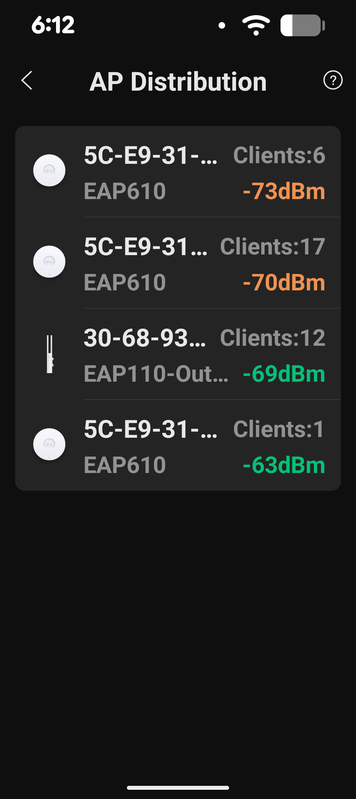
Does anybody have any suggestions for a total novice at the best way to set up the radios? The house is right at 3,000 ft.
Does anybody have any suggestions for a total novice at the best way to set up the radios? The house is right at 3,000 ft.
 1
1

Posted on 6/1/26 at 7:38 pm to Maillard
3 APs is a lot for that size house. Our house is 2200 and I have 1 tp-link ap. It covers the whole house and our yard. We live on 1/3 acre.
I would try disconnecting at least 1 ap and the outdoor one. See if that helps.
I would also try installing a network analyzer on your phone. You could see the power of your APs plus your neighbors and see if you have frequency issues.
I would try disconnecting at least 1 ap and the outdoor one. See if that helps.
I would also try installing a network analyzer on your phone. You could see the power of your APs plus your neighbors and see if you have frequency issues.
This post was edited on 6/1/26 at 7:40 pm

Posted on 6/1/26 at 8:19 pm to mchias1
quote:
3 APs is a lot for that size house.
Agreed. I covered 5300' with one router and an AP. That's an insane DB loss unless there are architectural issues like plaster and lathe.
Posted on 6/1/26 at 9:08 pm to LemmyLives
I will try turning one and then another off. And seeing if that helps. So I tried when I set this up to follow the two-wall rule as this is a single-story house that's brick. Thanks for the tips. I'll let y'all know what happens.
Posted on 6/3/26 at 7:57 pm to LemmyLives
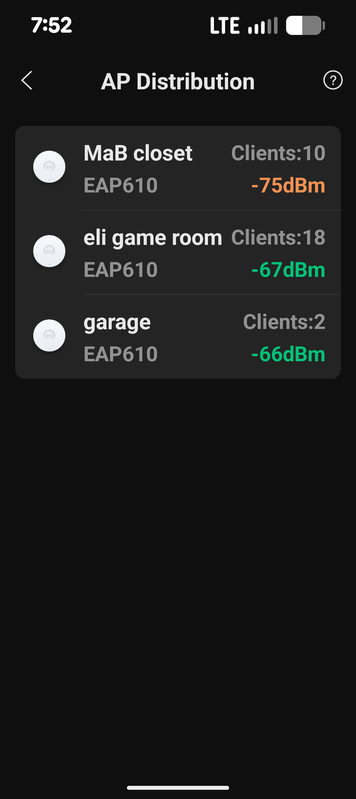
So I've downloaded the apps and looked for the heat maps and I don't know what I'm doing. I did turn off the outdoor 2.4 GHz one and then changed all the radio settings over and over again and got to a better point I thought.
This is out of my scope of understanding and would anyone in the baton rouge area know someone who knows how to fix this? Any recommendations would be super appreciated. I would even take a super smart high school or college kid to make a couple of bucks.
Thanks again!
This is out of my scope of understanding and would anyone in the baton rouge area know someone who knows how to fix this? Any recommendations would be super appreciated. I would even take a super smart high school or college kid to make a couple of bucks.
Thanks again!
This post was edited on 6/3/26 at 8:00 pm
Posted on 6/3/26 at 8:35 pm to Maillard
I'm not in Baton Rouge, but we used to call what you need a "wireless site survey" (that was 20+ years ago, and usually done in commercial settings.) Your neighbors may be interfering with your signal. An app to use is "WiFi Analyzer" which might make some sense to you given what you've posted (you can see the frequency, etc. of networks near you). The FCC licenses spectrum in a limited way, so you have limited bandwidth for everyone to "cooperate" about sharing channels and avoiding channels too close, spectrum wise, that may interfere with the transmission of other networks. Layman's version: If you're too close, you step on each other.
This is the way. You offer what they think is stupid money ($100 to solve my problem) and all they see is, wait, I'm going to sit on my computer for two hours and make $100? I will caveat that by saying that people without experience won't have the context to understand some of the basic physics I was taught (chain link fence, having a metal chimney flue next to the sole router in the house, etc.)
quote:
super smart high school or college kid to make a couple of bucks.
This is the way. You offer what they think is stupid money ($100 to solve my problem) and all they see is, wait, I'm going to sit on my computer for two hours and make $100? I will caveat that by saying that people without experience won't have the context to understand some of the basic physics I was taught (chain link fence, having a metal chimney flue next to the sole router in the house, etc.)



Posted on 6/3/26 at 9:01 pm to LemmyLives
quote:
having a metal chimney flue next to the sole router in the house, etc
Tell me more about this. My router is on an external wall about 5 feet from our fireplace. Is that why the signal is poor on the other side of the house or upstairs/in the basement?
Posted on 6/3/26 at 10:43 pm to LemmyLives
I can build you a house, I can build you a commercial building, and it will be flawless. I'm just looking for a little help on wireless access points. Just configuration. I ran all the cat6 and some 5e, made all the connections and got it up and running. Not as well as I'd like. Any help you can give would be greatly appreciated. As far as somebody else to figure this out good I will gladly pay.

Posted on 6/4/26 at 7:33 am to Maillard
Are those circular APs ceiling mounted in various places around the house?
Posted on 6/4/26 at 10:43 am to s14suspense
Yes. They're approximately 40 ft from each other in a straight line distance.
Posted on 6/4/26 at 11:26 am to Maillard
quote:
Yes. They're approximately 40 ft from each other in a straight line distance.
That should be good. Might be overkill.
I’ve got 1 UFO shaped AP sort of in the center of my house in the attic pointing down and have 3 other in-wall APs on the corners of my horseshoe shaped house to help on those outskirts.
The only thing that has bad reception is our Hayward pool tablet controller thing that’s on an exterior brick wall opposite of one of those in wall APs.
What’s saying you have bad signal? The Armada program?
Try running it through a chat bot for help.

 Page 1 of 1


Popular
Back to top
 Follow TigerDroppings for LSU Football News