




 5
5







- My Forums
- Tiger Rant
- LSU Recruiting
- SEC Rant
- Saints Talk
- Pelicans Talk
- More Sports Board
- Fantasy Sports
- Golf Board
- Soccer Board
- O-T Lounge
- Tech Board
- Home/Garden Board
- Outdoor Board
- Health/Fitness Board
- Movie/TV Board
- Book Board
- Music Board
- Political Talk
- Money Talk
- Fark Board
- Gaming Board
- Travel Board
- Food/Drink Board
- Ticket Exchange
- TD Help Board
Customize My Forums- View All Forums
- Show Left Links
- Topic Sort Options
- Trending Topics
- Recent Topics
- Active Topics
Started By
Message
HDMI/eARC Converter
Posted on 8/10/26 at 9:27 am
Posted on 8/10/26 at 9:27 am
A little assistance, if you please.
My tv has a standard HDMI output, but my receiver only has eARC input, no HDMI.
I've searched for converters and read all about them, but I'm still too tech-stupid to know exactly what I need to get the audio signal to my receiver (it has no optical input or I'd go that route).
Can someone explain to me like I'm a child?
The setup is simple: tv-->receiver-->speakers.
The only other input on the receiver is my turntable on the aux.
My tv has a standard HDMI output, but my receiver only has eARC input, no HDMI.
I've searched for converters and read all about them, but I'm still too tech-stupid to know exactly what I need to get the audio signal to my receiver (it has no optical input or I'd go that route).
Can someone explain to me like I'm a child?
The setup is simple: tv-->receiver-->speakers.
The only other input on the receiver is my turntable on the aux.
Posted on 8/10/26 at 9:35 am to wesfau
eARC is a part of HDMI. What do you mean it has eARC input?
Posted on 8/10/26 at 10:02 am to wesfau
It should be plug and play. eARC should look just like an HDMI. Are you saying that the input is the male connector sticking out of the receiver and not female? That would be weird, but if so, I guess you need to find an HDMI cable a male on one end and a female on the other.
Posted on 8/10/26 at 10:29 am to MyNameIsNobody
Told you I was dumb.
The eARC port on the receiver won't accept the HDMI cord.
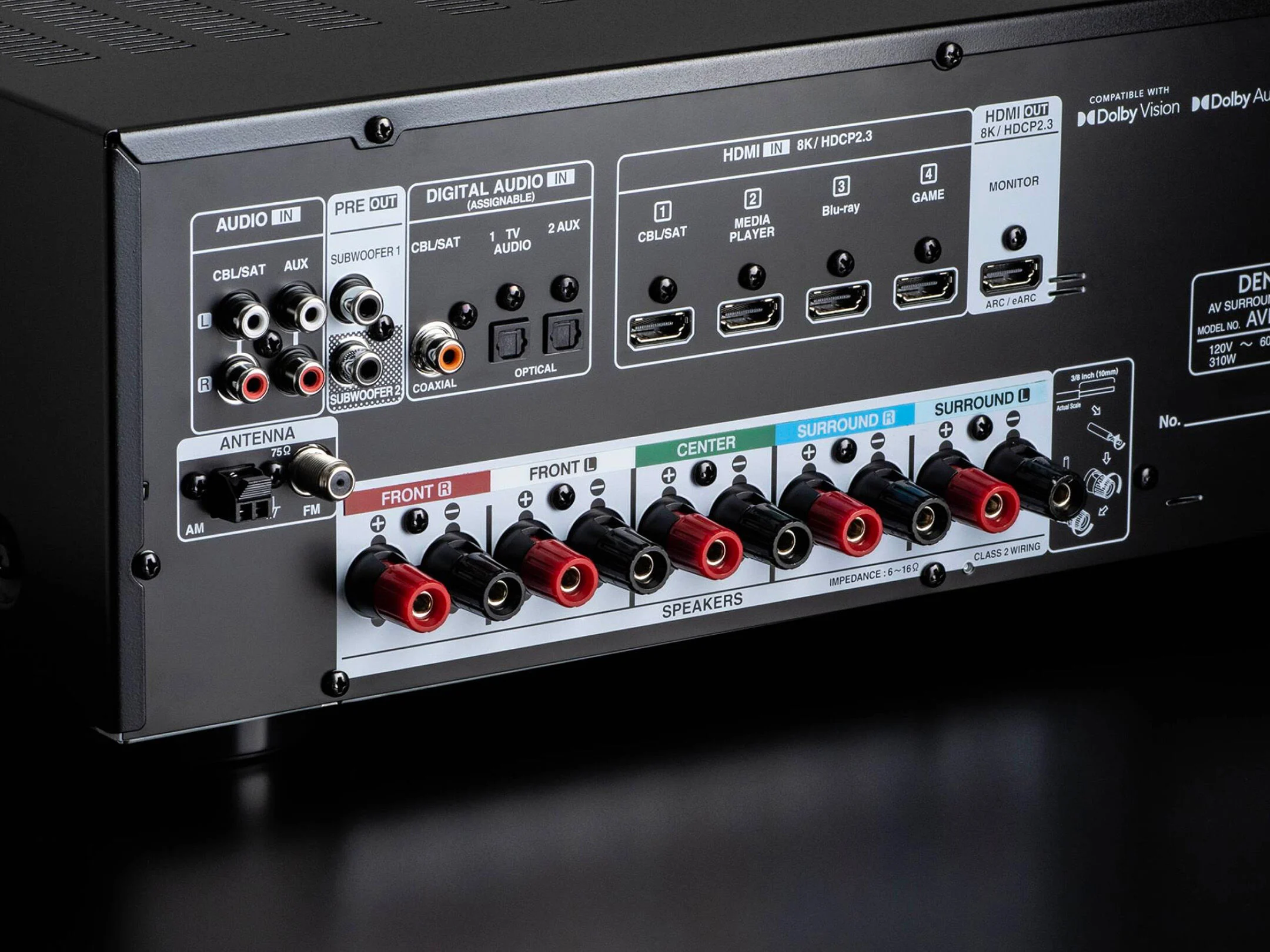
The eARC port on the receiver won't accept the HDMI cord.
Posted on 8/10/26 at 10:33 am to wesfau
quote:
The eARC port on the receiver won't accept the HDMI cord.
It should. There is no physical difference. Try a different cable.
Posted on 8/10/26 at 10:41 am to wesfau
bad cable? It should. That should go to your tv.
Posted on 8/10/26 at 10:52 am to j1897
I hadn't considered I had a bum cable.
Thank you both. I'll try a new one.
Thank you both. I'll try a new one.
Posted on 8/10/26 at 11:18 am to wesfau
If this is the actual picture of your receiver/amplifier, the one labeled "HDMI OUT...ARC/eARC" is output not input. Not sure you would hook a TV into it.
Your only real out puts are for passive speakers the black/red screwplugs in a row.
Are you sure you have an HDMI "output" on your TV? If you do, I would plug an HDMI into maybe HDMI In 1, 2, 3, or 4.
I am assuming you plugged your TV into the HDMI IN #1-4 and are trying to get sound out of HDMIout ARC/eARC. I am assuming your speaker is powered and has an HDMI input. If i were you, I would get a few passive speakers and use the left and right Front outputs.
You need a high speed HDMI cable to go into that ARC/eARC output from the receiver to the speaker.
Your only real out puts are for passive speakers the black/red screwplugs in a row.
Are you sure you have an HDMI "output" on your TV? If you do, I would plug an HDMI into maybe HDMI In 1, 2, 3, or 4.
I am assuming you plugged your TV into the HDMI IN #1-4 and are trying to get sound out of HDMIout ARC/eARC. I am assuming your speaker is powered and has an HDMI input. If i were you, I would get a few passive speakers and use the left and right Front outputs.
You need a high speed HDMI cable to go into that ARC/eARC output from the receiver to the speaker.
This post was edited on 8/10/26 at 11:23 am
Posted on 8/10/26 at 11:35 am to MyNameIsNobody
quote:
Are you sure you have an HDMI "output" on your TV? If you do, I would plug an HDMI into maybe HDMI In 1, 2, 3, or 4.
I don’t think that’s right.
This receiver is acting as a hub. You could plug all of your various inputs into 1-4 and then plug your TV into the output part.
The trouble he might have would be routing any TV based audio to the receiver if his TV is too old to have any ARC HDMI.
Posted on 8/10/26 at 12:52 pm to s14suspense
There are two modes of operation. One where the input is sent from a device (cable, Roku, Apple TV, DVD, etc.) to the receiver where the signal is processed by the receiver and passes the video on to the TV. The second mode is where the TV itself is the device (e.g. a smart TV with a native Netflix or other app) and the TV needs to send the signal to the receiver so it can decode the audio. If your TV is old then it may not have that capability.
I'm just spitting in the wind here, but I did sleep at a Holiday Inn last night.
I'm just spitting in the wind here, but I did sleep at a Holiday Inn last night.
Posted on 8/10/26 at 1:23 pm to s14suspense
eARC means enhanced audio return channel. It's just a way of sending audio back from the TV to the receiver. Amy HDMI cable should be capable of ARC.
OP, do have an HDMI cable with HDMI on both ends? Or do you happen to have a cable with display port connector.
The other question, does you tv support ARC? It should say on the TV input like the receiver does.
OP, do have an HDMI cable with HDMI on both ends? Or do you happen to have a cable with display port connector.
The other question, does you tv support ARC? It should say on the TV input like the receiver does.
This post was edited on 8/10/26 at 1:27 pm
Posted on 8/10/26 at 1:42 pm to wesfau
quote:
The setup is simple: tv-->receiver-->speakers.
If your TV doesn't have an eARC HDMI, this will not work since the HDMI ports on your TV are only input
Posted on 8/10/26 at 2:04 pm to bluebarracuda
quote:
If your TV doesn't have an eARC HDMI, this will not work since the HDMI ports on your TV are only inp
Could just be good old fashioned ARC
Even my 2012 Panasonic plasma has arc HDMI on port 1
Posted on 8/10/26 at 8:48 pm to wesfau
For that setup, I wouldn't care about audio from the TV because I would have all streaming devices connected to receiver and only use the TV for video.
Posted on 8/11/26 at 8:26 am to wesfau
okay, it looks like you have a Denon AVR-566H AV Receiver. LINK
I found the manual at cructhfiled for you LINK
go to page 27. Use that decision tree to see if you can use the unit on your tv.
If your answers are YES, then you need to use a
then it clarifies.
Good luck.
I found the manual at cructhfiled for you LINK
go to page 27. Use that decision tree to see if you can use the unit on your tv.
If your answers are YES, then you need to use a
quote:.
high quality HDMI cablez, connect one end to the HDMI port labeled “eARC” or “ARC” on your TV. Connect the other end to the HDMI OUT
MONITOR port on this unit.
When a TV with eARC support is connected, the eARC function of this unit is enabled automatically and the television audio is played back. When a TV with ARC support is connected, set “ARC” in the menu to “On”. (v p. 82)
then it clarifies.
quote:
z For 4K TVs we recommend using an HDMI cable labeled “High Speed”
and “with Ethernet” .
z For 8K TVs we recommend using an HDMI cable labeled “Ultra High
Speed”
Good luck.
Posted on 8/11/26 at 9:31 am to mchias1
quote:
OP, do have an HDMI cable with HDMI on both ends? Or do you happen to have a cable with display port connector.
This, the HDMI cable he is using is damaged on one end, or the port on the receiver is damaged are the only possible causes.
This post was edited on 8/11/26 at 9:41 am
Posted on 8/11/26 at 1:23 pm to wesfau
And not an update was given...
We all lose.
We all lose.

 Page 1 of 1




Popular

Back to top
 Follow TigerDroppings for LSU Football News