




- My Forums
- Tiger Rant
- LSU Recruiting
- SEC Rant
- Saints Talk
- Pelicans Talk
- More Sports Board
- Fantasy Sports
- Golf Board
- Soccer Board
- O-T Lounge
- Tech Board
- Home/Garden Board
- Outdoor Board
- Health/Fitness Board
- Movie/TV Board
- Book Board
- Music Board
- Political Talk
- Money Talk
- Fark Board
- Gaming Board
- Travel Board
- Food/Drink Board
- Ticket Exchange
- TD Help Board
Customize My Forums- View All Forums
- Show Left Links
- Topic Sort Options
- Trending Topics
- Recent Topics
- Active Topics
Started By
Message
Smart Thermostat for Home
Posted on 5/21/26 at 7:18 am


Posted on 5/21/26 at 7:18 am
How many here have smart thermostats in their homes?
What make/model do you have?
Do these things have a notification to tell you if the AC is off?
Do they have a notification to let you know when they air temp is above a certain temperature?
I'm looking to install one of these this weekend.
A few days ago, the drip pan filled up and the sensor turned the unit off and we didn't know until we got home. Would have been nice to know earlier so, we could have reacted quicker. Inside temp was in the mid 80s by the time we got home.
Also, what is a "C wire" and how do I know if I have/need this?
What make/model do you have?
Do these things have a notification to tell you if the AC is off?
Do they have a notification to let you know when they air temp is above a certain temperature?
I'm looking to install one of these this weekend.
A few days ago, the drip pan filled up and the sensor turned the unit off and we didn't know until we got home. Would have been nice to know earlier so, we could have reacted quicker. Inside temp was in the mid 80s by the time we got home.
Also, what is a "C wire" and how do I know if I have/need this?
 7
7


Posted on 5/21/26 at 7:50 am to MorbidTheClown
c wire is common back to the unit and allows for powered thermostats without batteries. i have ecobee with alexa. its ok and i like the ability to make changes in the truck hands free. im sure others are as useful.
Posted on 5/21/26 at 7:52 am to MorbidTheClown
I have the Ecobee Smart Premium in my current residence. I had the premium Nest in my last house but switch to Ecobee after Nest announced they were discontinuing and stopping support for all models except their newest model.
I do miss the UI and better feel of the Nest. I think the Ecobee is a little difficult to drill down and get used to.
A "C wire" (or common wire) is a dedicated electrical wire used in HVAC systems to provide a continuous, low-voltage (24V) power supply to your thermostat
I do miss the UI and better feel of the Nest. I think the Ecobee is a little difficult to drill down and get used to.
A "C wire" (or common wire) is a dedicated electrical wire used in HVAC systems to provide a continuous, low-voltage (24V) power supply to your thermostat


Posted on 5/21/26 at 8:06 am to MorbidTheClown
I have a Amazon Smart Thermostat.
In the Amazon Alexa app you can create routines, like if the temperature is above 80 send a notification. But those won't work if the device is offline. The device will show offline in the app, but it doesn't push a notification.
The c wire provides power for the thermostat. There are some smart thermostats that work off batteries. To know if you have it, you'd have to look for it on your air handler's control board.
In the Amazon Alexa app you can create routines, like if the temperature is above 80 send a notification. But those won't work if the device is offline. The device will show offline in the app, but it doesn't push a notification.
The c wire provides power for the thermostat. There are some smart thermostats that work off batteries. To know if you have it, you'd have to look for it on your air handler's control board.

Posted on 5/21/26 at 9:29 am to MorbidTheClown
I have an ecobee and it came with a power extender kit for units without the c-wire. It didn't take long to install. You can set alerts for high/low temp and humidity.
Posted on 5/21/26 at 12:50 pm to TAMU-93
quote:
you can create routines, like if the temperature is above 80 send a notification
I think this would work for what I am looking for. If the temp gets above a certain temp, I'll know something is wrong
Posted on 5/21/26 at 1:55 pm to Roy Curado
quote:
A "C wire" (or common wire) is a dedicated electrical wire used in HVAC systems to provide a continuous, low-voltage (24V) power supply to your thermostat
is there a quick way for me to know if my current thermostat has this?
Posted on 5/21/26 at 2:41 pm to MorbidTheClown
quote:
is there a quick way for me to know if my current thermostat has this?
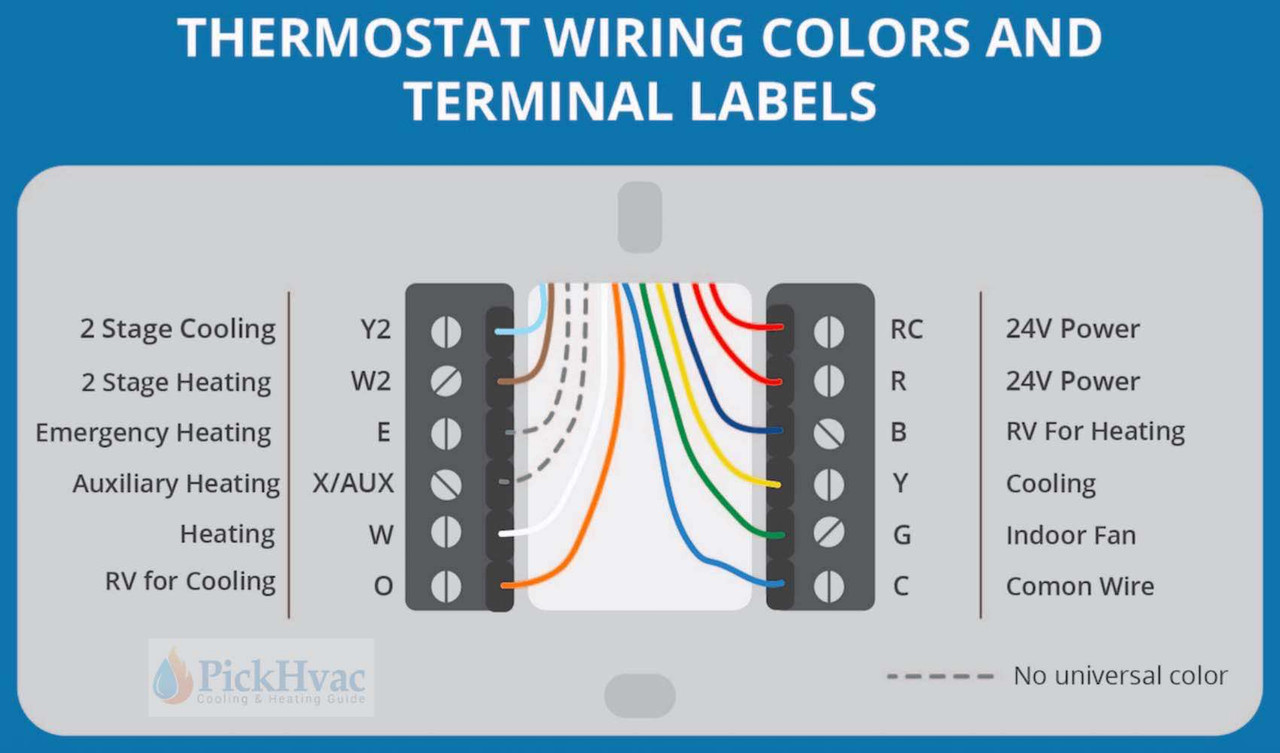
Remove the old thermostat cover (you might have pull the entire thermostat from the wall) and look for a blue wire (common). If you have an old analog style thermostat the blue wire would not be connected, but hopefully the blue C wire wire will be present in the thermostat wire bundle - often depends on the age of the house.
With a new smart thermostat, the common wire has to be connected to not only to the thermostat terminal, but also the other end of the common (blue) wire needs to be connected to the “C” terminal on the control board of the furnace, or air handler, in order for the thermostat to receive power.
I’d also recommend you choose an Ecobee or Honeywell thermostat that meets your needs, and avoid NEST.
This post was edited on 5/21/26 at 5:25 pm
Posted on 5/21/26 at 3:18 pm to CrawDude
Thanks for the info.
Thanks to the other responses as well. I'm pretty handy but, I've never messed with any thermostats.
Thanks to the other responses as well. I'm pretty handy but, I've never messed with any thermostats.


Posted on 5/21/26 at 3:56 pm to CrawDude
quote:
d also recommend you choise an Ecobee or Honeywell thermostat that meets your needs, and avoid NEST.
This.
I had a NEST for about a month. It's great for high tech and comfort, but it is brutal on your system. Way too many start and stops on the compressor.
I now have a Honeywell t6 and it has been great.


Posted on 5/21/26 at 6:10 pm to MorbidTheClown
quote:
What make/model do you have?
I have (2) Ecobee Smart Thermostat Premium with Smart Sensor and Air Quality Monitor - Programmable Wifi Thermostat - Works with Siri, Alexa, Google Assistant, Black

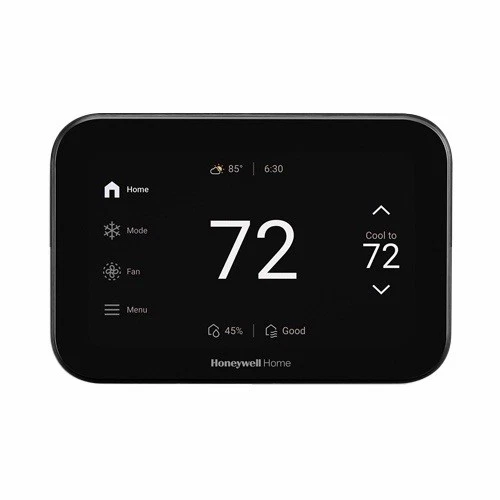
My new home will have (2) Honeywell Home THX1200B6 ElitePRO S1200 Smart Thermostats.
quote:. Yes
Do these things have a notification to tell you if the AC is off?
quote:Yes
Do they have a notification to let you know when they air temp is above a certain temperature?
quote:. The C-wire's primary job is to provide a continuous 24-volt power supply to the thermostat. The wiring should be labeled, if you have it, "C-Wire."
Also, what is a "C wire" and how do I know if I have/need this?

Posted on 5/23/26 at 8:52 am to CrawDude
Would Honeywell set up allow WiFi connection and ability to shut the system off remotely? My older Honeywell, very basic, (7 years old) doesn’t shut off if the pan fills with water. It shuts AC down but the blower keeps running. Not sure why. Would like ability to have it shut down completely or to turn it off if my pan water sensor goes off.

Posted on 5/23/26 at 11:35 am to MorbidTheClown
quote:
I've never messed with any thermostats.
If you have hot/cold spots or rooms, make sure you get one compatible with remote temp sensors. It will help the thermostat keep all areas more balanced.

Posted on 5/23/26 at 11:57 am to zippyputt
The installer broke your cooling (yellow) wire with float switch. Power (red) wire needs to be broke instead if you want entire system to shut down with water in safety pan.
Posted on 5/23/26 at 5:23 pm to zippyputt
quote:
Would Honeywell set up allow WiFi connection and ability to shut the system off remotely? My older Honeywell, very basic, (7 years old) doesn’t shut off if the pan fills with water. It shuts AC down but the blower keeps running. Not sure why. Would like ability to have it shut down completely or to turn it off if my pan water sensor goes off.
Yes it will. I have a very simple Honeywell Smart Thermostat, and I can control the HVAC functions from anywhere via WiFi connection.
But that said, as Koolazzkat states above, your secondary overflow pan float switch is apparently not wired in a manner to shut the entire system down - condensing unit, blower motor and thermostat. Rather it’s wired to just to break power to the condensing unit (breaking power to the yellow, Y, wire). Some HVAC techs do wire the float switch just to break power only to the condensor, but that’s not the norm, most wire it to shut power down to the entire system (breaking power to the red, R, wire). It’s a very simple wiring connection from the float switch to the control board inside the furnace or air handler.
Article you can read that describes the difference. Should The Float Switch Break R or Y?
This post was edited on 5/23/26 at 5:59 pm
Posted on 5/23/26 at 8:55 pm to CrawDude
Thanks to both for the info! Per the article referenced its kind of a decision based on the location. Thanks again!

Posted on 5/24/26 at 2:40 pm to MorbidTheClown
We had a Nest for a while. Loved it until we went out of town for four days and the Nest went in to some mode and we could not for the life of us, get it back functioning. We switched to an Ecobee and it works fine, but not as good as the Nest. But the Ecobee does work properly.
(I'd rather have kept the hardwired control panel than either of these wifi control units. Happy wife is a happy life so they say...)
(I'd rather have kept the hardwired control panel than either of these wifi control units. Happy wife is a happy life so they say...)
Posted on 5/27/26 at 2:45 pm to Fishwater
Follow-up on the smart thermostat thing.
Apparently the "C-wire" is not connected on our current thermostat.
There is an available blue wire but, honestly I have no idea where the other end of those wires is located. Seems like something I may need to leave to the pros.
Apparently the "C-wire" is not connected on our current thermostat.
There is an available blue wire but, honestly I have no idea where the other end of those wires is located. Seems like something I may need to leave to the pros.
Posted on 5/27/26 at 3:54 pm to MorbidTheClown
quote:
Follow-up on the smart thermostat thing. Apparently the "C-wire" is not connected on our current thermostat. There is an available blue wire but, honestly I have no idea where the other end of those wires is located. Seems like something I may need to leave to the pros.
Well that’s good. The other end of all those thermostat wires are going to be inside the furnace or air handler in the attic or a closet (whatever you might have) connected to thermostat terminals on the control (circuit) board and they’ll be labeled with the same letters as on the thermostat terminals. The blue (common) will likely be unattached and it would be attached to “C” terminal before or after you attach the other end of that same wire to the new smart thermostat.
But by all means if you not comfortable with this, let a pro do it. You don’t want to damage anything mis-wiring.
Posted on 5/27/26 at 7:07 pm to MorbidTheClown
I leave mine on 73 and have a dumb thermostat. Keep it simple.
This post was edited on 5/27/26 at 7:07 pm

 Page 1 of 2

Popular
Back to top
 Follow TigerDroppings for LSU Football News