





 1
1


- My Forums
- Tiger Rant
- LSU Recruiting
- SEC Rant
- Saints Talk
- Pelicans Talk
- More Sports Board
- Fantasy Sports
- Golf Board
- Soccer Board
- O-T Lounge
- Tech Board
- Home/Garden Board
- Outdoor Board
- Health/Fitness Board
- Movie/TV Board
- Book Board
- Music Board
- Political Talk
- Money Talk
- Fark Board
- Gaming Board
- Travel Board
- Food/Drink Board
- Ticket Exchange
- TD Help Board
Customize My Forums- View All Forums
- Show Left Links
- Topic Sort Options
- Trending Topics
- Recent Topics
- Active Topics
Started By
Message
re: PC Discussion - Gaming, Performance and Enthusiasts
Posted on 11/22/22 at 3:48 pm to SpeedyNacho
Posted on 11/22/22 at 3:48 pm to SpeedyNacho
That doesn't seem like a great deal. Feel like I've seen 6900xt under $700 new
Posted on 11/22/22 at 4:44 pm to bluebarracuda
Excuse me, it’s a 6950XT paired with the 5800x3D for 1028$
7900x and 6950Xt for 1173$
7900x and 6950Xt for 1173$
This post was edited on 11/22/22 at 4:46 pm
Posted on 11/22/22 at 6:18 pm to SpeedyNacho
quote:
Excuse me, it’s a 6950XT paired with the 5800x3D for 1028$
That's pretty spicy. Saves you about $100 off of the best prices of both these days. Would make a great core of a very sexy $1,750 or so build.
Posted on 11/26/22 at 12:18 am to Joshjrn
aight, josh. i must've done something wrong because i got no improvement with this 5800x3d processor. 
3600x

5800x3D

so yeah, the 5800x3D doesn't seem to be a viable upgrade from a 3600x.
and now i'm a little peeved that i spent $350 for this thing. 
3600x
5800x3D
so yeah, the 5800x3D doesn't seem to be a viable upgrade from a 3600x.
and now i'm a little peeved that i spent $350 for this thing.
This post was edited on 11/26/22 at 12:29 am
Posted on 11/26/22 at 1:34 am to finchmeister08
i did change my settings to these and now i'm getting 30-40 more frames. not sure if i would've gotten them with the 3600x.
LINK
LINK
Posted on 11/26/22 at 9:10 am to finchmeister08
Finch, look at the CPU segment of the benchmark.
You went from 123fps average to 264fps, a 114% increase. You went from 100fps as the average of the lowest quintile to 211fps, a 111% increase. You went from 83fps as a 1% low to 174fps, a 110% increase.
But your "problem" is that you went from being 34% CPU bound to 1% CPU bound, and your average GPU frames went from 107fps to 95fps (likely just run to run variance, or possibly a driver issue? I notice you updated your NVIDIA driver). So yeah, massive CPU upgrade, but if you have settings that make you primarily GPU bound, you're not going to see much of an uplift
ETA: I imagine I'm preaching to the choir, but in case there's someone reading who doesn't understand what they are looking at with those benchmarks: historically, benchmarks just spit out the frames per second of what your total system was able to display. However, more modern benchmarks can calculate the frames your CPU is processing and your GPU is processing as separate values. Your system will always only be able to display the lower of the two numbers, whichever component that might be. And whichever number it's using tells you whether the system is "GPU bound" (like Finch's), or "CPU bound". Knowing your bind tells you what's worth upgrading, or whether you need an upgrade at all.
You went from 123fps average to 264fps, a 114% increase. You went from 100fps as the average of the lowest quintile to 211fps, a 111% increase. You went from 83fps as a 1% low to 174fps, a 110% increase.
But your "problem" is that you went from being 34% CPU bound to 1% CPU bound, and your average GPU frames went from 107fps to 95fps (likely just run to run variance, or possibly a driver issue? I notice you updated your NVIDIA driver). So yeah, massive CPU upgrade, but if you have settings that make you primarily GPU bound, you're not going to see much of an uplift
ETA: I imagine I'm preaching to the choir, but in case there's someone reading who doesn't understand what they are looking at with those benchmarks: historically, benchmarks just spit out the frames per second of what your total system was able to display. However, more modern benchmarks can calculate the frames your CPU is processing and your GPU is processing as separate values. Your system will always only be able to display the lower of the two numbers, whichever component that might be. And whichever number it's using tells you whether the system is "GPU bound" (like Finch's), or "CPU bound". Knowing your bind tells you what's worth upgrading, or whether you need an upgrade at all.
This post was edited on 11/26/22 at 9:34 am
Posted on 11/26/22 at 10:36 pm to Joshjrn
quote:
Finch, look at the CPU segment of the benchmark.
yeah, i noticed that, but i was like "that doesn't do me any good. i'm still getting the same FPS on screen."
Posted on 11/27/22 at 7:39 am to finchmeister08
You might want to do a full DDU driver wipe and reinstall, though. Your GPU performance took a weird hit between those two benchmarks. Unless that’s a really shitty benchmark with high run to run variance.
Posted on 11/27/22 at 9:39 am to Joshjrn
I also just noticed that you were running that benchmark with no upscaling (which is what you should be doing). You're practically 100% GPU bound now, which means anything you can do to increase GPU frames will be a 1:1 increase in FPS. Turn on DLSS Quality mode and watch your frames jump. You can also usually turn off all of the AA settings, as DLSS basically does that job on its own. You'll likely get 25-30 fps boost just from that alone, and I'll be surprised if you notice any degradation in video quality at all.
This post was edited on 11/27/22 at 9:53 am
Posted on 11/27/22 at 7:24 pm to Joshjrn
Hopefully this is the right spot to ask. My son (9) is wanting a laptop for gaming. Right now he plays Fortnite on the Xbox and Roblox on his iPad. He has been playing Teardown on my brother's computer. Any recommendations for a budget-friendly laptop? Maybe 600-800 dollar range if possible. Don't want to go much over that since I am not sure how much he will actually use it. If nothing in that range what should I be looking at? Thanks
Posted on 11/27/22 at 7:52 pm to Joshjrn
quote:
I also just noticed that you were running that benchmark with no upscaling (which is what you should be doing).
why would i do that instead of just using the main resolution?
if i want 1440p and it scales to 1080p, why not just set the main resolution to 1080p?
This post was edited on 11/27/22 at 7:53 pm
Posted on 11/27/22 at 7:55 pm to BamaFan5833
quote:
Hopefully this is the right spot to ask. My son (9) is wanting a laptop for gaming. Right now he plays Fortnite on the Xbox and Roblox on his iPad. He has been playing Teardown on my brother's computer. Any recommendations for a budget-friendly laptop? Maybe 600-800 dollar range if possible. Don't want to go much over that since I am not sure how much he will actually use it. If nothing in that range what should I be looking at? Thanks
i'd make a thread on it so more people will see it.
but in my opinion:
Best Buy ASUS TUF with RTX 3070 for $999 (reg. $1499)
Posted on 11/27/22 at 8:12 pm to finchmeister08
quote:
why would i do that instead of just using the main resolution?
if i want 1440p and it scales to 1080p, why not just set the main resolution to 1080p?
My friend, where have you been for the last several years?
DLSS 1.0 was dogshit. DLSS 2.0+ is some truly impressive tech. (Jury is still out on DLSS 3.0, but your card can't even do 3.0, so we can leave that for another day)
I don't have it in me to do a full explanation this evening, but this is Nvidia's press release when they moved to 2.0: LINK
I'll say this: I'm not a framerate guy; I'm an eye candy snob. And even I almost never play a game at native if it offers DLSS 2.x, always opting for the Quality setting. Not only does it offer significantly better performance, but in certain situations, like with very thin geometry like power lines, it offers better visuals than native + AA. shite is legit. Trust me, give it a shot.
Posted on 12/1/22 at 1:22 am to Joshjrn
And now we start getting details on AMD's top card with 3D V Cache, apparently only the 7990XTX will feature the stacked 3D infinity cache, and it doubles to 192MB's with both stacks of 96MB.
3.3GHz-3.6GHz clocks is fricking insane like what?
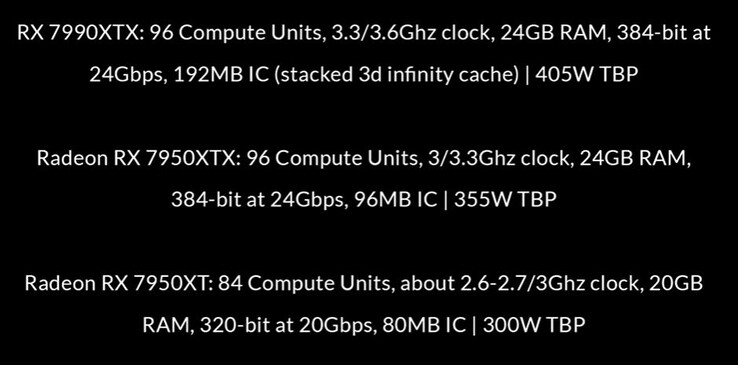
I'm also assuming these are the cards or at least the top card that was long rumored to be around $1500.
I wonder if we'll get a tease or anything at CES next month when they officially introduce the 3D CPUs. Would be a good time to hint at your 3D GPU.
3.3GHz-3.6GHz clocks is fricking insane like what?
quote:
RX 7990 XTX
First, the RX 7990 XTX will reportedly feature 96 RDNA 3 Compute Units (CUs) with boost clocks ranging from 3.3 GHz to 3.6 GHz. The card is expected to pack 24 GB of VRAM, a 384-bit bus, and a memory speed of 24 Gbps. The leaker thinks that, with 192 MB of Infinity Cache, the RX 7990 XTX will be the only RDNA 3 SKU to employ 3D V-Cache. Finally, the RX 7990 XTX will allegedly have a 405 W TBP.
For comparison's sake, the RX 7900 XTX has the same number of CUs and VRAM, but the card can only boost to 2.5 GHz and has 96 MB of Infinity Cache at 355 W TBP. So if the RX 7990 XTX materializes, we can expect a notable performance bump vs the RX 7900 XTX based on the clock speed improvements alone.
I'm also assuming these are the cards or at least the top card that was long rumored to be around $1500.
I wonder if we'll get a tease or anything at CES next month when they officially introduce the 3D CPUs. Would be a good time to hint at your 3D GPU.
This post was edited on 12/1/22 at 7:42 am
Posted on 12/1/22 at 7:24 am to UltimateHog
I cant wait to see some of these benchmarks. The 7990 XTX might be a shut up and take my money
Posted on 12/1/22 at 9:23 am to UltimateHog
I’m hoping AMD can meet these expectations. Nvidia needs to be punished for its pricing hubris.
Posted on 12/1/22 at 9:36 am to Joshjrn
How often are you guys upgrading hardware? I built my first computer in 2013. I've only upgraded the video card and RAM slightly.
Posted on 12/1/22 at 9:39 am to HailToTheChiz
quote:
How often are you guys upgrading hardware? I built my first computer in 2013. I've only upgraded the video card and RAM slightly.
I used to fly through hardware. About 4 years ago I pretty much cooled off and only do upgrades when I see a deal I cant pass up
Posted on 12/1/22 at 5:14 pm to HailToTheChiz
Used to yearly. Now I've still got my 8700K from 2017 but I still get a new gpu every gen or other gen at worst.
This post was edited on 12/1/22 at 5:15 pm
Posted on 12/1/22 at 5:31 pm to HailToTheChiz
quote:
How often are you guys upgrading hardware? I built my first computer in 2013. I've only upgraded the video card and RAM slightly.
How often someone should upgrade is answered by a simple question: is your computer still doing what you want it to do?
If you're gaming at 1080p 120fps, you can likely go a decade without upgrading with little to no issue.
On the other hand, if you're a high res, high setting gamer who is still trying to get the highest framerate possible, then you're basically upgrading GPU every generation and CPU probably ever second generation, if your financial situation can justify it.
Most people are going to somewhere in the middle.
This post was edited on 12/1/22 at 7:06 pm

 Page 1823 of 1914



Popular

Back to top
 Follow TigerDroppings for LSU Football News