




- My Forums
- Tiger Rant
- LSU Recruiting
- SEC Rant
- Saints Talk
- Pelicans Talk
- More Sports Board
- Fantasy Sports
- Golf Board
- Soccer Board
- O-T Lounge
- Tech Board
- Home/Garden Board
- Outdoor Board
- Health/Fitness Board
- Movie/TV Board
- Book Board
- Music Board
- Political Talk
- Money Talk
- Fark Board
- Gaming Board
- Travel Board
- Food/Drink Board
- Ticket Exchange
- TD Help Board
Customize My Forums- View All Forums
- Show Left Links
- Topic Sort Options
- Trending Topics
- Recent Topics
- Active Topics
Started By
Message
re: PC Discussion - Gaming, Performance and Enthusiasts
Posted on 9/29/15 at 5:35 pm to Ace Midnight


Posted on 9/29/15 at 5:35 pm to Ace Midnight
Cool. I've never seen one in person. Never had the opportunity, since I do custom water cooling in my own builds, and hyper 212s in customer builds unless they request something more (and 100% of the time I get a request for higher-end cooling, they insist on liquid cooling). If I ever get tired of the expense of liquid cooling, I'll be playing a lot of catch-up on air cooler knowledge.
This post was edited on 9/29/15 at 5:37 pm
 1
1


Posted on 10/1/15 at 11:03 am to ILikeLSUToo
quote:
If I ever get tired of the expense of liquid cooling, I'll be playing a lot of catch-up on air cooler knowledge.
The Noctuas generally perform at about the level of comparably priced (and even a little more expensive) AIO cooling solutions. When you consider you can actually go 3 fans (and most don't) directly on the Noctua, it is definitely a viable overclocking solution - although I'm still a few weeks away from testing exactly how much. May get the build done and O/S installed this weekend.
(And the Hyper 212 is probably a mild OC option as well - I cannot praise this extreme value at ~$30 more highly - virtually silent on an old AM3 motherboard - no special dampening measures and old tech fan controls.)
This post was edited on 10/1/15 at 12:14 pm
Posted on 10/1/15 at 11:37 am to Ace Midnight
quote:Yeah, it's been the value leader for the past 8-9 years. The hyper 212 has been my default selection for customer builds, even if it's not an OCing machine (in which case, I set a really passive fan profile, and you can't even tell the PC is on). But I routinely got a stable and relatively quiet OC of 4.3-4.5 GHz on a 3770K/3570K. And if you add one to an FX-8320, it's basically indistinguishable from an average 8350 in terms of max OC. For a 4770K, a hyper 212 is relatively quiet and sufficient for whatever OC you can get on stock voltage.
And the Hyper 212 is probably a mild OC option as well - I cannot praise this extreme value at ~$30 more highly
I've seen charts where the Noctua was basically on par with an H80i or even H100, and I'm assuming they were tested in the typical 2-fan arrangement.
Other than that, if someone asked me to pick out a good air cooler, I'd be hitting the Googles to see what's been tested lately.
EDIT: Yep, take a look at this:
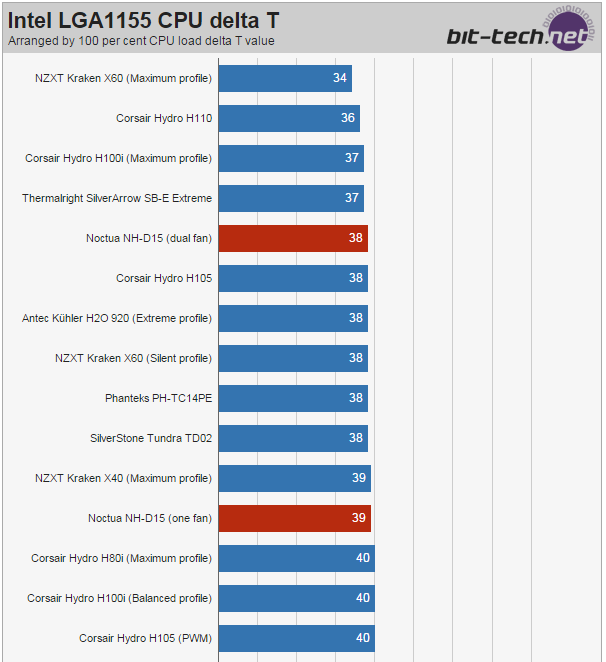
On par with an H100i with "maximum profile" (i.e. really friggin loud).
Let me know your thoughts on the installation process, particularly how well you think a novice could handle it, compared to a hyper 212.
This post was edited on 10/1/15 at 11:44 am
Posted on 10/1/15 at 5:43 pm to ILikeLSUToo
I started to work on the build today. Major glitches (self-inflicted) already. That motherboard tray side of the R5 just drops right off with no warning. Picked up a little dent when it hit the ground.
THEN, I open the processor and find a stock HSF. Since I know that's not right - I look much more closely. In my haste I apparently grabbed a locked i7-6700. I should have known on the price, but, I guess I wasn't thinking very clearly.
Processing the return with Tigerdirect now.
 at self. Hopefully, these will be the only glitches. The Fractal case fans are huge. The case is heavier empty than my CoolerMaster Centurions are with the PS installed.
THEN, I open the processor and find a stock HSF. Since I know that's not right - I look much more closely. In my haste I apparently grabbed a locked i7-6700. I should have known on the price, but, I guess I wasn't thinking very clearly.
Processing the return with Tigerdirect now.
at self. Hopefully, these will be the only glitches. The Fractal case fans are huge. The case is heavier empty than my CoolerMaster Centurions are with the PS installed.Posted on 10/2/15 at 1:48 pm to Ace Midnight
quote:
I look much more closely. In my haste I apparently grabbed a locked i7-6700.
That sucks. Glad you're returning it though. The 6700K seems to finally be in stock at the usual places (Amazon/Egg).
Posted on 10/2/15 at 1:57 pm to ILikeLSUToo
quote:
The 6700K seems to finally be in stock at the usual places
Yeah - I grabbed a 6700k from Newegg - already have a tracking number - so no problems. Have you used ASUS' 5-way optimization much on Z97 (or X99) builds to OC the processor and memory? I'm not planning on deviating from auto settings - and certainly I'm going to give the AS5 a few weeks to cure, but how easy is it? And it runs straight from the OS, and not a bios or UEFI type deal?
I mean, I consider myself a hardware guy and I have overclocked (the really old fashioned way, long, long ago) in the past - in fact, that's what brought me to ASUS in the first place - they were the first board maker that pushed OC as a legitimate, safe performance boosting option. But, I can't remember the last time I deviated from stock.
This post was edited on 10/2/15 at 1:58 pm
Posted on 10/2/15 at 4:38 pm to Ace Midnight
quote:
I'm not planning on deviating from auto settings
That would be a shame considering the caliber of cooling you have, and your pre-existing hardware knowledge. I haven't used ASUS 5-way optimization, and in fact I don't use the auto-overclock profiles at all. The auto button is for noobs, which seems to be pretty much what the ASUS 5-way software is (just selecting various profiles).
I tweak everything individually. It's still easier than the old fashioned way simply because you still don't have to worry about bus frequency and RAM/PCIe ratios. You'll get better thermals and potentially higher stable overclock by finding the right voltage(s) yourself and not letting the motherboard decide that for you (it'll always be way higher than necessary).
I also recommend you use the bios, not Windows software, to apply overclocks. You'll likely be able to make finer adjustments, and it's just safer. I don't trust third-party software to manage all of the power settings of a motherboard, in which breaking shite is a real possibility, and lament having to use it for GPU overclocks (I do enjoy the fact that it's easy to mod NVIDIA bioses to change voltage tables, min/max clocks, and power targets, though).
When you get everything running, I can clue you in on what each setting does, but I wouldn't be surprised if someone on overclock.net or elsewhere publishes (or has already published) a detailed overclocking guide for Skylake, maybe even on your particular board.
This post was edited on 10/2/15 at 4:39 pm
Posted on 10/2/15 at 5:00 pm to ILikeLSUToo
quote:
I tweak everything individually. It's still easier than the old fashioned way simply because you still don't have to worry about bus frequency and RAM/PCIe ratios.
I have to admit - I used to get a rush applying changes and getting OC results. And the OC community was not nearly as well-developed as now. I'll get it going and stable, report back on the Noctua (and maybe more generally on the build) and we'll go from there.


Posted on 10/4/15 at 4:46 pm to ILikeLSUToo
ilikelsu what do you think about the Raspberry Pi 2?
They have a starter kit on Amazon for $70, seems like a cool little toy to play around with.
They have a starter kit on Amazon for $70, seems like a cool little toy to play around with.
Posted on 10/4/15 at 7:42 pm to oR33Do
I don't have an opinion on them other than "neat." Never owned one, but I see no downside for a cheap computer with a variety of cool project ideas online.

Posted on 10/6/15 at 9:53 am to ILikeLSUToo
ILike - my 6700k is due to arrive today. The Noctua shipped with their excellent thermal paste - NT-H1 - I know you don't do air cooling, but should I go with their paste on their HSF, or should I stick with my AS5 and the curing period?
Also, I have looked at some Skylake OC guides and I guess I'll just have to look at the actual bios settings before I really get a vibe for the modern era of manual overclocking. I may get back to you before making any changes. I probably need a handful of programs to monitor temps and performance.
At this point, I do not see the value in hyperstressing with Prime95 or whatever, and probably just go with an x264 stress testing regimen for an initial stability check and than test the rig in combat after that. I'm not running a nuclear power plant, so I don't insist it be stable under any hypothetical load forever.
Do you have any preferred stability testing protocols?
Also, I have looked at some Skylake OC guides and I guess I'll just have to look at the actual bios settings before I really get a vibe for the modern era of manual overclocking. I may get back to you before making any changes. I probably need a handful of programs to monitor temps and performance.
At this point, I do not see the value in hyperstressing with Prime95 or whatever, and probably just go with an x264 stress testing regimen for an initial stability check and than test the rig in combat after that. I'm not running a nuclear power plant, so I don't insist it be stable under any hypothetical load forever.
Do you have any preferred stability testing protocols?
Posted on 10/6/15 at 10:20 am to Ace Midnight
quote:
I know you don't do air cooling, but should I go with their paste on their HSF, or should I stick with my AS5 and the curing period?
I used NT-H1 on my water blocks for years. I like it.
quote:
I probably need a handful of programs to monitor temps and performance.
I use realtemp for temperature and CPU-Z for voltage monitoring. Those aren't the only or necessarily best programs, though.
quote:
Do you have any preferred stability testing protocols?
AIDA64 is good. The Prime95 blend test is fine, too. I'm not one of those overclockers who feels the need to run small TFTs for 48 hours. I run a stress test for 15-20 minutes. If it doesn't crash in that time, 99% probability it's stable. Beyond the 20-minute stress test, my stability testing is just using the PC. Once I find an overclock I like that passes Prime95 or AIDA64, I consider it done unless it one day crashes in the middle of a game (it has happened before). Then I just bump the voltage a little or whatever I think needs to be done.


Posted on 10/6/15 at 7:16 pm to ILikeLSUToo
Since I've always run stock speeds, or very slight overclocking, can anyone explain the actual noticeable differences in performance after overclocking the CPU? Like say you take a 3.5/4.0 GHz CPU up to 4.6 or more, what do you actually notice as far as performance gains?
Also, anyone have a recommendation for a good set of 2.0/2.1 computer speakers for ~$150 or less?
Also, anyone have a recommendation for a good set of 2.0/2.1 computer speakers for ~$150 or less?
Posted on 10/6/15 at 7:59 pm to Tom288
Whether you "notice" it depends on what you're doing. Playing a game that's not already saturating your CPU at stock, you likely wouldn't see any frame rate boost by overclocking it. If encoding a video, it might shave a few seconds off your encoding time, or perform real-time rendering slightly faster if using a CPU-bound video editor or 3d modeling program. Mostly, we do it for fun.
Posted on 10/7/15 at 12:40 pm to Tom288
quote:
Also, anyone have a recommendation for a good set of 2.0/2.1 computer speakers for ~$150 or less?
I'm happy with my Edifier Exclaim e10 - 2.0 which are right about $100.
Harmon Kardon Soundsticks get great reviews at your budget, but if you want BT connectivity, you're at almost $200.
If I were buying a 2.1 set today, it would be the Soundsticks.

Posted on 10/7/15 at 2:01 pm to ILikeLSUToo
quote:
Mostly, we do it for fun.
And to heat the house in the winter.
Posted on 10/8/15 at 12:21 pm to ILikeLSUToo
Massdrop has a Raspberry Pi 2 B+ kit on sale for 59.99 now. Has everything you need to get it going. Seems like a good deal opposed to the Cana Kit on Amazon I saw for $70
LINK
I may purchase this, not sure yet though.
LINK
I may purchase this, not sure yet though.
Posted on 10/8/15 at 2:21 pm to Ace Midnight
quote:
Whether you "notice" it depends on what you're doing. Playing a game that's not already saturating your CPU at stock, you likely wouldn't see any frame rate boost by overclocking it. If encoding a video, it might shave a few seconds off your encoding time, or perform real-time rendering slightly faster if using a CPU-bound video editor or 3d modeling program. Mostly, we do it for fun.
That's what I've always thought and whenever I've looked into it it seems to always boil down to that point. That's why I've never really explored it; never really had the time or interest to learn and start fiddling with stuff without it providing a tangible difference in daily performance.
quote:
I'm happy with my Edifier Exclaim e10 - 2.0 which are right about $100.
Harmon Kardon Soundsticks get great reviews at your budget, but if you want BT connectivity, you're at almost $200.
If I were buying a 2.1 set today, it would be the Soundsticks.

I'll check those out. I've been debating between the Logitech Z623, Klipsch ProMedia, & BOSE Companion 2 speakers.
Just want something good enough for gaming & media; I'll game with headphones but I use my PC a lot for work each day so it's nice not having to rely on headphones for that many hours.

Posted on 10/11/15 at 10:31 am to Tom288
Is there a cheap device I can plug into my PC externally for decent wifi?

Posted on 10/11/15 at 10:56 am to Mr Gardoki

 Page 1109 of 1913

Popular
Back to top
 Follow TigerDroppings for LSU Football News