




- My Forums
- Tiger Rant
- LSU Recruiting
- SEC Rant
- Saints Talk
- Pelicans Talk
- More Sports Board
- Fantasy Sports
- Golf Board
- Soccer Board
- O-T Lounge
- Tech Board
- Home/Garden Board
- Outdoor Board
- Health/Fitness Board
- Movie/TV Board
- Book Board
- Music Board
- Political Talk
- Money Talk
- Fark Board
- Gaming Board
- Travel Board
- Food/Drink Board
- Ticket Exchange
- TD Help Board
Customize My Forums- View All Forums
- Show Left Links
- Topic Sort Options
- Trending Topics
- Recent Topics
- Active Topics
Started By
Message
New home Ethernet wiring help (update with pics)
Posted on 6/3/18 at 5:08 pm

Posted on 6/3/18 at 5:08 pm
Building a home with a home builder in Spanish fort and need some help. They wire all the bedrooms and the main living area for cat 5e but they run them to the outside panel for phone like it’s 1998.
I convinced them to run the Ethernet lines to a central closet where I have added a power outlet. So in total there will be only 5 lines running to this closet. Do I need anything fancy or can I just put an unmanaged Ethernet switch in there with the modem and the router? Any reason to install a structured wiring panel?
I was just going to get them to install a gang brush plate next to the power outlet.
I convinced them to run the Ethernet lines to a central closet where I have added a power outlet. So in total there will be only 5 lines running to this closet. Do I need anything fancy or can I just put an unmanaged Ethernet switch in there with the modem and the router? Any reason to install a structured wiring panel?
I was just going to get them to install a gang brush plate next to the power outlet.
This post was edited on 6/17/18 at 1:42 pm
 6
6


Posted on 6/3/18 at 5:31 pm to tilco
You said it, I would just slap a small switch in there and roll with it. 5 cables doesn't really call for a patch panel.
Posted on 6/3/18 at 6:19 pm to OSoBad
Thanks.....That’s what I thought.
Any recs for a switch and a router for a 2400 sq ft house? Thinking about A TP link AC1900 since the House ain’t that big and it’s one story.
Any recs for a switch and a router for a 2400 sq ft house? Thinking about A TP link AC1900 since the House ain’t that big and it’s one story.
This post was edited on 6/3/18 at 6:36 pm

Posted on 6/3/18 at 6:21 pm to OSoBad
Yes. I have it set up the same way...switch works like a charm with my Qnap and PLEX.

Posted on 6/4/18 at 12:13 am to tilco
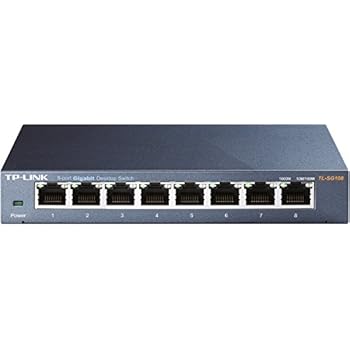
I use TP-Link unmanaged gigabit switches. I think the 8 port is about 25 or 30 dollars at Frys.

Posted on 6/4/18 at 7:50 am to tilco
Make sure they are terminating the jacks in the rooms with RJ45 and not RJ11. You will probably want to get them to terminate the lines with RJ45 in the closet too if you're not going to use a patch panel.
Posted on 6/4/18 at 8:09 am to gpburdell
Thank you for pointing that out. You would think that would be obvious given what we’ve talked about. However knowing my luck they would use rj11.

Posted on 6/4/18 at 11:00 am to tilco
You might want to upgrade to cat6 to future proof yourself.
Posted on 6/4/18 at 12:07 pm to Simon Gruber
I’m out of upgrade money. Wife spent it all on countertops and floors. I’ll run new wire in the future if it ever becomes necessary.


Posted on 6/6/18 at 9:01 am to tilco
The general recommendation is a centrally placed router for houses under 2000 sq ft. The TP-LINK AC1900 might work, but I wouldn't recommend it.
I'd install two Ubiquity APs. And use what ever router your ISPs provides. Just disable the router's WiFi.
I'd install two Ubiquity APs. And use what ever router your ISPs provides. Just disable the router's WiFi.

Posted on 6/6/18 at 2:06 pm to TAMU-93
For my new house, I'm going to be using the Ubiquity in wall APs. I don't want the UFO looking APs on the ceiling or walls. I just ordered a couple of them this week. I'm hoping each one can cover at least the two rooms that share a common wall.
https://inwall.ubnt.com/
https://inwall.ubnt.com/
Posted on 6/17/18 at 12:54 pm to tilco
Ok update.......... I need some help.
They ran all the Ethernet to the closet but they also ran all the coax there too. The bunch on the left feeds to all the rooms. The bunch on the right feeds to the outside.
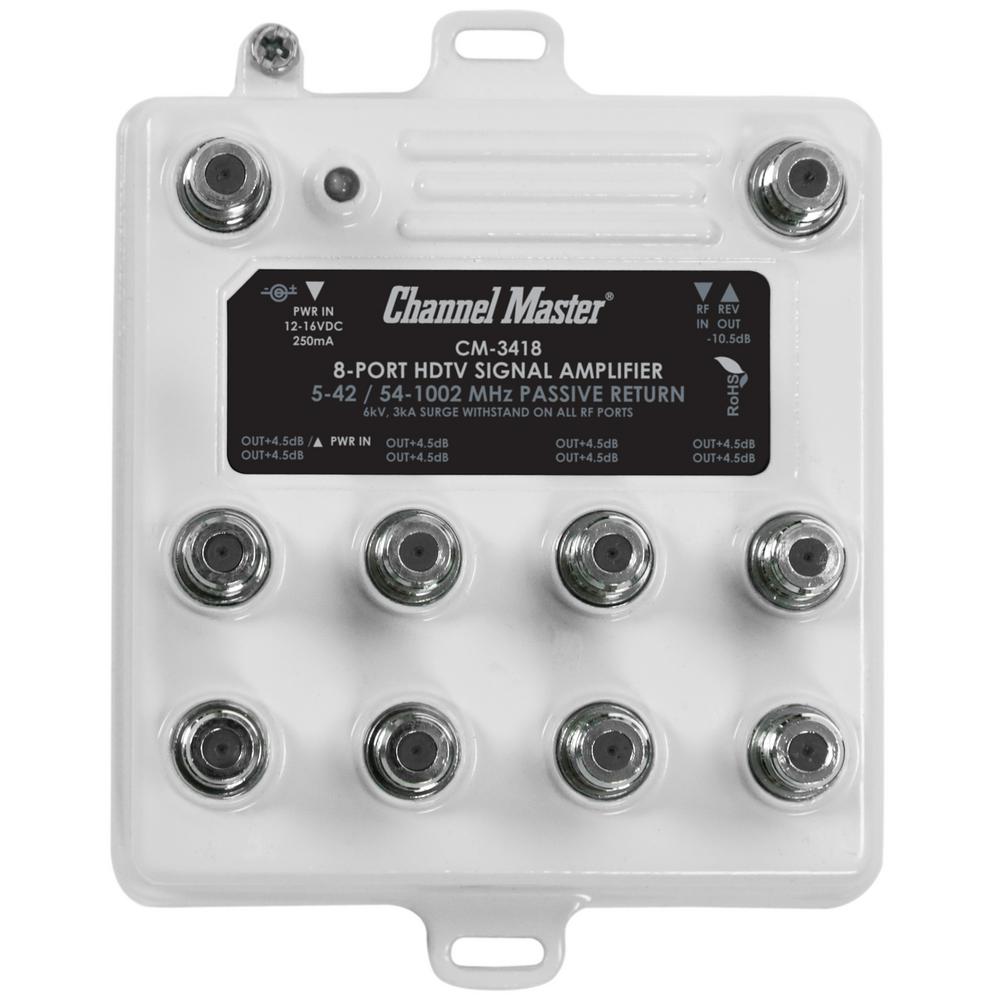
2 questions. Why do they have two sets running outside? What do I need to buy to hook all this up? I’m now thinking I need to put an 18 inch structured wiring panel in. Then mount my Ethernet switch and an amplified channel master splitter in it (I’m going to mount an antenna in the attic). Are there any problems with what I’m doing?

So I would have them install this

And then connect my Ethernet with this
And connect my cable with this
They ran all the Ethernet to the closet but they also ran all the coax there too. The bunch on the left feeds to all the rooms. The bunch on the right feeds to the outside.
2 questions. Why do they have two sets running outside? What do I need to buy to hook all this up? I’m now thinking I need to put an 18 inch structured wiring panel in. Then mount my Ethernet switch and an amplified channel master splitter in it (I’m going to mount an antenna in the attic). Are there any problems with what I’m doing?
So I would have them install this
And then connect my Ethernet with this
And connect my cable with this
This post was edited on 6/17/18 at 3:27 pm


Posted on 6/18/18 at 10:53 am to tilco
I don't recommend run-of-the-mill residential electricians to terminate cable directly to rj45 plugs. You are better off having them terminate onto rj45 jacks on each end (which are more idiot-proof to terminate), and use factory-terminated patch cords from the jack to the switch.
You don't have to buy a patch panel for 5 cables unless you want it to look neeat, they can just lay there somewhat loose in your box in a bundle.
You don't have to buy a patch panel for 5 cables unless you want it to look neeat, they can just lay there somewhat loose in your box in a bundle.

Posted on 6/18/18 at 10:56 am to tilco
I had Jeff Benton run all my wiring to my coat closet...in there I have my router and Google Fiber box as well as ADT boxes.
If you don't have Google Fiber or if you're running cable modem....make sure you have a coax cable running outside from that location so you don't have to wire it up later.
If you don't have Google Fiber or if you're running cable modem....make sure you have a coax cable running outside from that location so you don't have to wire it up later.


Posted on 6/18/18 at 11:03 am to tilco
quote:
Then mount my Ethernet switch and an amplified channel master splitter in it (I’m going to mount an antenna in the attic). Are there any problems with what I’m doing?
have you visited antennaweb.org yet to determine what type of antenna you are going to need? thats step one.
second: wtf do you need all that coax? you literally need a single hdhomerun box (get the one with 4 tuners) which accepts coax in and ethernet out and plug that into your switch then you can enjoy free live HDTV on virtually any tv in the house wirelessly using the plex app and dvr/pause, etc. it. in this scenario you only need a *SINGLE* coax drop to the server room or wherever you are sticking your hdhomerun box. doesn't have to be anywhere close to a TV. ..its 2018, there's no need for coax wall switches in every room of house. also if you go with a single tuner box (hdhomerun) then you don't have to deal with degraded signal since you're merely 'pushing' that signal to any tv via ethernet, not by putting in a giant coax splitter box.
third: if you are trying to plan ahead for broadband, i would check with comcast or google or whoever to determine if it makes more sense to run the wiring for that service while your walls are still open.
need more tuners? buy a cheap splitter and add a second hdhomerun and now you have 8 tuners.
plex running on a PC will act as your DVR/channel guide, etc.
This post was edited on 6/18/18 at 11:16 am
Posted on 6/18/18 at 11:52 am to CAD703X
Thanks everyone for the input. This isn’t a custom home builder so getting them to do what they are doing is a stretch.
CAD as for the coax they already do it for all the rooms and back patio and I like the idea plex and homerun but I’m not there yet. I did run an antenna search and I’m a clear shot to all the towers with the furthest being 15 miles away. I’m only hooking up three TVs so I’m hoping my signal doesn’t deteriorate too much.
ATT fiber is the provider. The builder already ran two coax and two Ethernet lines to the closet from the outside. I’m gonna go ahead and put in the panel. It will make it look nicer and have more room for future upgrades.
CAD as for the coax they already do it for all the rooms and back patio and I like the idea plex and homerun but I’m not there yet. I did run an antenna search and I’m a clear shot to all the towers with the furthest being 15 miles away. I’m only hooking up three TVs so I’m hoping my signal doesn’t deteriorate too much.
ATT fiber is the provider. The builder already ran two coax and two Ethernet lines to the closet from the outside. I’m gonna go ahead and put in the panel. It will make it look nicer and have more room for future upgrades.
This post was edited on 6/18/18 at 11:55 am
Posted on 6/18/18 at 12:10 pm to tilco
quote:
CAD as for the coax they already do it for all the rooms and back patio and I like the idea plex and homerun but I’m not there ye
its very easy to do. i would keep this in mind as you go forward because its extremely flexible and allows you to push live tv all over the place from a single coax input and you get full DVR capabilities independent of any cable/satellite company. see my thread on this forum about this. i took the plunge in one day and my total setup cost was under $200 but the PC with 8TB hd was already in place.
This post was edited on 6/18/18 at 12:11 pm

Posted on 6/18/18 at 8:05 pm to Helo
Thanks. I appreciate the help. What is the problem with the rj45 connectors? Are they more difficult for crackhead electricians to connect?
I guess in my head one connection is better than 3.
So just get that patch panel and install it to the wiring panel. Then run some 1 ft Ethernet cables to my switch?
Or my other option is to have them terminate with keystone jacks in the panel and leave them loose? Then connect those to a switch?
I guess in my head one connection is better than 3.
So just get that patch panel and install it to the wiring panel. Then run some 1 ft Ethernet cables to my switch?
Or my other option is to have them terminate with keystone jacks in the panel and leave them loose? Then connect those to a switch?
This post was edited on 6/18/18 at 8:49 pm
Posted on 6/18/18 at 9:14 pm to tilco
raw hanging terminated ends just looks trashy.
Terminating into a small block is much cleaner and easier to cross connect imo.
Just buy some short patch cords to connect over the switch.
Terminating into a small block is much cleaner and easier to cross connect imo.
Just buy some short patch cords to connect over the switch.

 Page 1 of 2

Popular
Back to top
 Follow TigerDroppings for LSU Football News