




 5
5








- My Forums
- Tiger Rant
- LSU Recruiting
- SEC Rant
- Saints Talk
- Pelicans Talk
- More Sports Board
- Fantasy Sports
- Golf Board
- Soccer Board
- O-T Lounge
- Tech Board
- Home/Garden Board
- Outdoor Board
- Health/Fitness Board
- Movie/TV Board
- Book Board
- Music Board
- Political Talk
- Money Talk
- Fark Board
- Gaming Board
- Travel Board
- Food/Drink Board
- Ticket Exchange
- TD Help Board
Customize My Forums- View All Forums
- Show Left Links
- Topic Sort Options
- Trending Topics
- Recent Topics
- Active Topics
Started By
Message
Samsung 57" Odyssey Neo G9... not connecting to computer - please help
Posted on 4/26/26 at 6:33 pm
Posted on 4/26/26 at 6:33 pm
Not very tech savvy. I purchased this monitor because I wanted the big space for work instead of two monitors.
Have a Mac mini station and the hdmi output runs thru the dongle attachment as past monitors could not reach proper resolution without the dongle.
Plugged this new monitor in and it is not pulling any video signal. How do I get it pull? I can plug into a display port with an hdmi adapter or I can plug an additional monitor in to see if the big monitor has wrong refresh or resolution
Any help would be much appreciated
Have a Mac mini station and the hdmi output runs thru the dongle attachment as past monitors could not reach proper resolution without the dongle.
Plugged this new monitor in and it is not pulling any video signal. How do I get it pull? I can plug into a display port with an hdmi adapter or I can plug an additional monitor in to see if the big monitor has wrong refresh or resolution
Any help would be much appreciated
Posted on 4/26/26 at 8:12 pm to bamatiger90
Try a new cable. Then the dongle. I don't know shite about Macs, but it probably doesn't matter.
There's something called the OSI model, and it's a stack of technology layers. It teaches us that none of the shiny tech stuff matters until basic stuff (physical connectivity, etc.) is taken care of first.
There's something called the OSI model, and it's a stack of technology layers. It teaches us that none of the shiny tech stuff matters until basic stuff (physical connectivity, etc.) is taken care of first.
Posted on 4/26/26 at 10:27 pm to bamatiger90
I'm not familiar with Macs either, but is that dangle powered or passive?
Posted on 4/27/26 at 5:19 am to bamatiger90
quote:
Have a Mac mini station and the hdmi output runs thru the dongle attachment as past monitors could not reach proper resolution without the dongle.
What dongle? And what year and Chip Mac mini? Be specific.
Did you try it without the dongle?
This post was edited on 4/27/26 at 5:52 am
Posted on 4/27/26 at 6:33 am to bamatiger90
Check the input on the monitor. You might want to try running it straight to a display port.
Posted on 4/27/26 at 7:23 am to OliverTwist225
had an older HDMI that ran through the wall =- when I plug direct with new it works - will replace the older HDMI cord - Thanks!!
Posted on 4/27/26 at 9:30 am to bamatiger90
I’m not saying that’s wrong but what’s the story with the dongles and all between the In-wall HDMI and the new screen?
Posted on 4/27/26 at 10:29 am to s14suspense
When I built the house, i put the terminal in a closet and ran the wires behind the wall to hide them in my at-home office. My old screen died and had to replace it. The dongle was added to increase wired internet speed to override the limitations on the built in modem and the other screen performed better when the hub dongle ran the monitor -
Posted on 4/27/26 at 10:58 am to bamatiger90
I got you. I would troubleshoot the dongle potentially before replacing in wall cable, but maybe something is going on there too.
Posted on 4/27/26 at 4:03 pm to bamatiger90
I have nothing to add, other than you made a good choice for the monitor. I absolutely love mine. I need all the monitor space I can get lol
Posted on 4/29/26 at 10:21 am to CP3
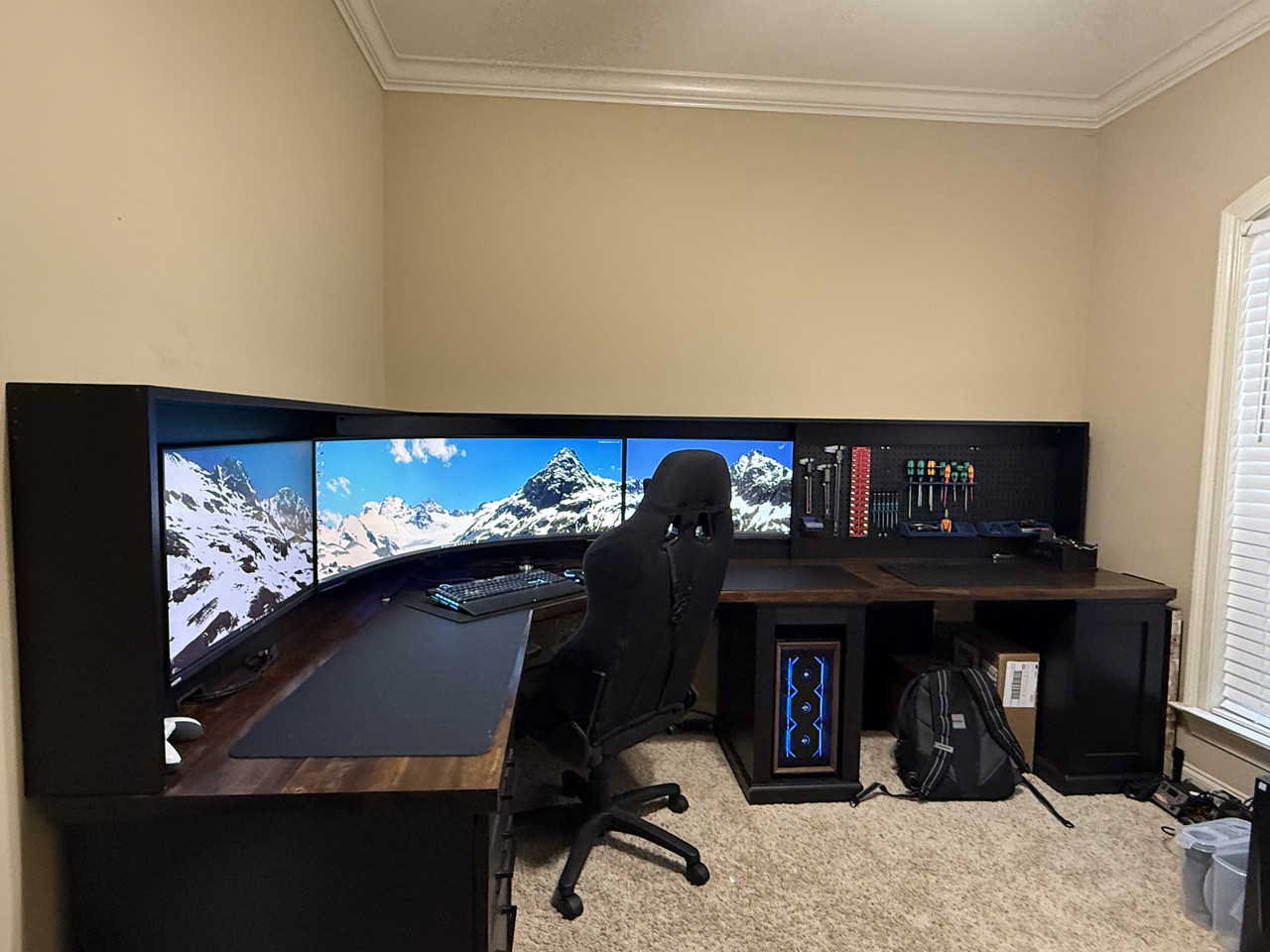
How did you get one background to stretch across all three screens?
Posted on 4/29/26 at 9:35 pm to TigerFanatic99
I had to find an image with a 15360x2160 resolution  . Which there aren’t many of apparently.
I just googled “15360x2160 wallpaper” the set it as background with stretch or whatever the option is that puts it across every screen.
I think the website was quadmonitorbackrounds
. Which there aren’t many of apparently. I just googled “15360x2160 wallpaper” the set it as background with stretch or whatever the option is that puts it across every screen.
I think the website was quadmonitorbackrounds
This post was edited on 4/29/26 at 9:36 pm

 Page 1 of 1




Popular

Back to top
 Follow TigerDroppings for LSU Football News