




 2










- My Forums
- Tiger Rant
- LSU Recruiting
- SEC Rant
- Saints Talk
- Pelicans Talk
- More Sports Board
- Coaching Changes
- Fantasy Sports
- Golf Board
- Soccer Board
- O-T Lounge
- Tech Board
- Home/Garden Board
- Outdoor Board
- Health/Fitness Board
- Movie/TV Board
- Book Board
- Music Board
- Political Talk
- Money Talk
- Fark Board
- Gaming Board
- Travel Board
- Food/Drink Board
- Ticket Exchange
- TD Help Board
Customize My Forums- View All Forums
- Show Left Links
- Topic Sort Options
- Trending Topics
- Recent Topics
- Active Topics
Started By
Message
Postimages suck lately
Posted on 9/22/26 at 8:32 pm
Posted on 9/22/26 at 8:32 pm
Not loading. Asking if Admin knows what the issue is?
This post was edited on 9/22/26 at 9:17 pm
Posted on 9/23/26 at 8:51 am to KingOrange
Can you show me an example of it not loading?
Posted on 9/23/26 at 10:47 am to Chicken
quote:
Can you show me an example of it not loading?
I think it does work (eventually), but lately it's been really slow, which gives the appearance that it's not.
After a random upload, the provided link will sometimes take 30 seconds to a minute to actually display an image.
I've had to take my award-winning content to imgur a handful of times this month.
Posted on 9/23/26 at 1:31 pm to Chicken
quote:
Can you show me an example of it not loading?
I’ll try to take a snapshot next time. The post says it’s complete but the picture is empty. I’m doing this from an iPhone if that helps. All my settings are good. It may be a postimage issue. Thanks Chicken.
Posted on 9/23/26 at 8:02 pm to Chicken
It was messed up for me (not working or working very slow, even the upload from their website) but it worked fine a few mins ago. 
Posted on 9/26/26 at 10:05 am to Chicken
for me its postimage and imgur. It takes about 2 minutes for the picture to upload once submitted into the post messsage
Posted on 9/26/26 at 5:01 pm to Chicken
quote:
Can you show me an example of it not loading?
Posted on 9/26/26 at 5:12 pm to Chicken
I believe this issue is specific to Chrome and not Safari, for example.
Looks like I was wrong.
Looks like I was wrong.
This post was edited on 9/28/26 at 9:55 pm
Posted on 10/5/26 at 2:02 pm to Chicken
quote:
Can you show me an example of it not loading?
Here's one example in this thread.
quote:

Both are essentially the same image (bottom is the original from twitter), but the postimages URL is not rendering it at full resolution – sometimes you get served the "small" or icon version instead, like there's not enough bandwidth.
After a refresh or two, it will correctly display the full-sized image.
Posted on 10/5/26 at 2:07 pm to paperwasp
Here's the LINK to the full 1099 x 587 image on postimages.
It's the same image that's erroneously displaying as something like 185 x 100 in the post linked above.
One of my posts is also doing the same thing. Sometimes it will display fully, sometimes it won't, with the exact same URL link.
It's the same image that's erroneously displaying as something like 185 x 100 in the post linked above.
One of my posts is also doing the same thing. Sometimes it will display fully, sometimes it won't, with the exact same URL link.
Posted on 10/5/26 at 2:11 pm to paperwasp


Posted on 10/6/26 at 2:17 pm to KingOrange
I’ve noticed images link from postimages shrink now. They might look fine at first, but eventually they shrink.
Posted on 10/9/26 at 6:55 am to Chicken
How can I resize a posted image to make it smaller?
Posted on 10/12/26 at 1:18 pm to KingOrange
quote:
The post says it’s complete but the picture is empty.
I've been having the exact same issue. It seems to be on the Postimages side of things.
Posted on 10/14/26 at 8:51 am to themunch
quote:
How can I resize a posted image to make it smaller?
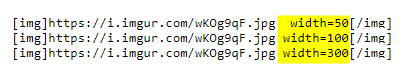
Use the width attribute at the end of the img markup link. The numerical unit is in pixels.
Here's a visual example I made a while back, regarding sizing team logos appropriately for the body of a post:
quote:
quote:


 Page 1 of 1




Popular
Back to top
 Follow TigerDroppings for LSU Football News