




 1
1






- My Forums
- Tiger Rant
- LSU Recruiting
- SEC Rant
- Saints Talk
- Pelicans Talk
- More Sports Board
- Fantasy Sports
- Golf Board
- Soccer Board
- O-T Lounge
- Tech Board
- Home/Garden Board
- Outdoor Board
- Health/Fitness Board
- Movie/TV Board
- Book Board
- Music Board
- Political Talk
- Money Talk
- Fark Board
- Gaming Board
- Travel Board
- Food/Drink Board
- Ticket Exchange
- TD Help Board
Customize My Forums- View All Forums
- Show Left Links
- Topic Sort Options
- Trending Topics
- Recent Topics
- Active Topics
Started By
Message
re: PC Discussion - Gaming, Performance and Enthusiasts
Posted on 6/23/22 at 1:38 pm to UltimateHog
Posted on 6/23/22 at 1:38 pm to UltimateHog
Honestly, if I were buying into DDR5, I would get 32gb. Which should be obvious that I bought 32gb of DDR4 a few months ago, but still 
I’ve had a few games already flirt you to about 14gb, so if I’m buying a new kit, I would rather have the headroom for the next few years.
I’ve had a few games already flirt you to about 14gb, so if I’m buying a new kit, I would rather have the headroom for the next few years.
Posted on 6/23/22 at 1:40 pm to Joshjrn
Yeah like I said above they don't really make DDR5 in 8GB sticks for 16GB.
You really only have a choice for 32GB.
400 kits of 16GB sticks x2 for 32GB, 9 total kits and two are ECC for 8GB sticks x2.
You really only have a choice for 32GB.
400 kits of 16GB sticks x2 for 32GB, 9 total kits and two are ECC for 8GB sticks x2.
Posted on 6/23/22 at 1:41 pm to UltimateHog
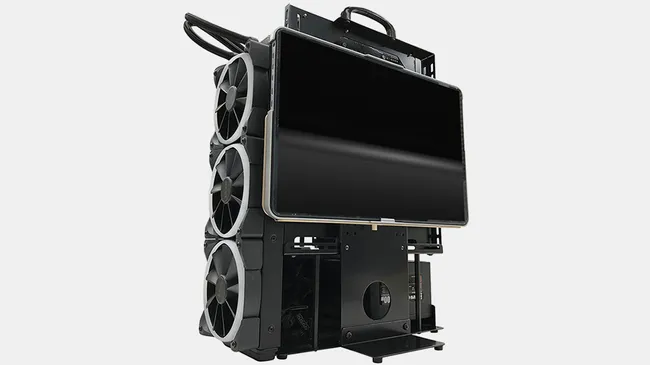
Ever wanted a case with a monitor mount?
Posted on 6/23/22 at 3:07 pm to UltimateHog

Posted on 6/23/22 at 3:09 pm to UltimateHog
I've actually been looking at doing something like that DIY
Posted on 6/23/22 at 3:18 pm to bluebarracuda
quote:
I've actually been looking at doing something like that DIY
I want to hear what I imagine is a staggeringly specific use case to even make you consider that
Posted on 6/23/22 at 3:45 pm to Joshjrn
I have absolutely no reasoning behind it, I just wanted to do it
The only reason I didn't was because there weren't any halfway decent cases with a handle that didn't have a glass side panel. I was going to use a 1440p/144hz laptop display as a monitor mounted in the side panel
The only reason I didn't was because there weren't any halfway decent cases with a handle that didn't have a glass side panel. I was going to use a 1440p/144hz laptop display as a monitor mounted in the side panel
Posted on 6/23/22 at 5:42 pm to bluebarracuda
I'm currently eyeing a larger desk to get my tower further away from my head. I would have no interest in getting my tower closer to my head
Posted on 6/23/22 at 8:10 pm to Joshjrn
I think stating needing a case with a handle clearly meant it was going to be a mobile PC
Posted on 6/23/22 at 9:53 pm to bluebarracuda
Fair enough
Posted on 6/25/22 at 11:13 am to Joshjrn
Just built my first pc. Still setting things up. Intel i7 with a 3070. Breathed a sigh of relief when I had a successful boot.
Any tips getting started? Haven’t had a gaming capable pc in ages. Mostly been using my phone and random laptops for computing so I feel like I’ve got some catching up to do.
Any tips getting started? Haven’t had a gaming capable pc in ages. Mostly been using my phone and random laptops for computing so I feel like I’ve got some catching up to do.
Posted on 6/25/22 at 11:16 am to CornDogCologne
quote:
Any tips getting started?
Download and install chipset drivers for your particular cpu from your motherboard manufacturer. Use DDU to do a clean install of your gpu driver downloaded directly from Nvidia. Don't forget to set XMP

Posted on 7/2/22 at 6:32 pm to Joshjrn
Anyone got recommendations/tips on what to look for for a pre-built? My pc is getting pretty old now and it's overdue for a complete overhaul, not just a few parts. I'd like something water cooled and capable of 4k and with SSDs instead of HDDs. I'll of course need a new monitor as well. Also, needs to be wireless capable as the router is on the opposite side of my apartment unfortunately. I was looking at some of the ones on ibuypower but I'm not sure if another retailer would be better. Also, I know I've heard that some pre-builts will go cheap on certain parts that most people would overlook, so any advice is appreciated.
This post was edited on 7/2/22 at 6:35 pm
Posted on 7/3/22 at 5:19 pm to tehchampion140
quote:
Anyone got recommendations/tips on what to look for for a pre-built?
There is no system integrator or custom builder that has flawless reviews. There's always risk involved with buying a prebuilt.
quote:
I'd like something water cooled and capable of 4k
Unless you want to spend all the money on a hybrid gpu (and even then, that's going to be very rare in a prebuilt), you're probably simply looking at an AIO as a CPU cooler. Not much of an issue. If you're looking to game at 4k, you're going to want a minimum of a 3080 or a 6800x.
quote:
Also, needs to be wireless capable as the router is on the opposite side of my apartment unfortunately.
Not a big deal. You can buy a wifi/blutooth USB dongle on Amazon for like $20.
quote:
Also, I know I've heard that some pre-builts will go cheap on certain parts that most people would overlook, so any advice is appreciated.
This is going to be your biggest concern. If the listing doesn't give the exact sku (make/model, basically) of *every single part*, run away. Specs aren't enough. I don't want to read that it comes with an "850w Gold" power supply. I want to read that it comes with a Corsair RM850x (just as an example). That includes PSU, RAM, motherboard, and storage. I wouldn't be that strict for a random home computer, but if you want to do big dick gaming, each component matters.
With all of that said, you can currently get great deals on components if you're willing to build it yourself. Several people on here would be happy to put together a parts list for you so you don't have to worry about doing all of that research.
Posted on 7/4/22 at 4:34 pm to Joshjrn
Upgrading the monitor finally. Looking for 27" 1440p 144+hz. I'm out of the loop. What's the best bang for my buck?
Posted on 7/4/22 at 4:44 pm to Devious
Gigabyte 27” 1440p 144hz @$240
Check this out on @Newegg: GIGABYTE G27Q 27" 144Hz 1440P Gaming Monitor, 2560 x 1440 IPS Display, 1ms (MPRT) Response Time, 92% DCI-P3, VESA Display HDR400, FreeSync Premium, 1x DisplayPort 1.2, 2x HDMI 2.0, 2x USB 3.0, Height Adjustable
I’ve been using it and it’s done just fine.
Check this out on @Newegg: GIGABYTE G27Q 27" 144Hz 1440P Gaming Monitor, 2560 x 1440 IPS Display, 1ms (MPRT) Response Time, 92% DCI-P3, VESA Display HDR400, FreeSync Premium, 1x DisplayPort 1.2, 2x HDMI 2.0, 2x USB 3.0, Height Adjustable
I’ve been using it and it’s done just fine.
Posted on 7/4/22 at 4:50 pm to Devious
I have the LG 27GL83A-B and it’s fantastic. I think Best Buy has a similar version of it that often goes on sale for $299
Posted on 7/5/22 at 9:30 am to Devious
Appreciate the feedback. Probably going to roll with the LG.
Posted on 7/5/22 at 11:42 am to Devious
quote:
Upgrading the monitor finally. Looking for 27" 1440p 144+hz. I'm out of the loop. What's the best bang for my buck?
Just was in your spot a few weeks ago, and bought the Dell S2721DGF.
Have no regrets - first monitor they shipped me had physical damage, but Dell immediately sent me a paid-for shipping label to ship it back, and sent me a brand new replacement by air which came the next day.
It routinely goes on sale for $299 at both Dell and Best Buy.
Posted on 7/5/22 at 12:50 pm to boXerrumble
I looked at that one, too. Spent about an hour on rtings before making a decision lol

 Page 1809 of 1914



Popular

Back to top
 Follow TigerDroppings for LSU Football News