




- My Forums
- Tiger Rant
- LSU Recruiting
- SEC Rant
- Saints Talk
- Pelicans Talk
- More Sports Board
- Fantasy Sports
- Golf Board
- Soccer Board
- O-T Lounge
- Tech Board
- Home/Garden Board
- Outdoor Board
- Health/Fitness Board
- Movie/TV Board
- Book Board
- Music Board
- Political Talk
- Money Talk
- Fark Board
- Gaming Board
- Travel Board
- Food/Drink Board
- Ticket Exchange
- TD Help Board
Customize My Forums- View All Forums
- Show Left Links
- Topic Sort Options
- Trending Topics
- Recent Topics
- Active Topics
Started By
Message
Terminated my first Cat 6 cables
Posted on 7/13/26 at 9:03 am
Posted on 7/13/26 at 9:03 am
Built a metal shop with a guest house. I have starlink internet inside the house and didn't want to pay for an additional starlink satellite for the guest house and was worried about reception of a P2P device through the metal. So I have 80' of Cat 6 run through my attic to a weatherproof box outside. Then ran another 100' of direct burial in 1" electrical PVC to the shop, then it's another 100' to the guest house. I ran 3 circuits. 1 primary and 2 backups. So had roughly 18 connectors to put on.
I work in IT and realized I had never done it before, but it really wasn't too bad. Getting all the twisted pairs untwisted and getting them all to seat the way they needed to took a little time to figure out. Direct burial ethernet cable is a larger gauge than the normal Cat 6 cable. . . they make connectors that accept the larger gauge wire. . . I tried stripping the direct burial wires individually and getting them into a normal connector and only had a few wires connect properly. So if you're trying to use direct burial cable, just know you can't use normal connectors.
This is my home network for those interested:
Starlink internet
TP Link switch connected to the starlink router
~200' run from the switch in the house to the shop where it terminates into another TP Link switch
TP Link router plugged into the same switch in the shop to broadcast signal to the shop.
Finally got all the streaming services set up on the shop TV now. The wife may never see me again.
My home network isn't anything too crazy. But it was kinda fun to do a little more networking type of work. Curious if any of you guys have home networks and what you got.
A neighbor has a crestron system which the amount he spent on that was absurd.
I work in IT and realized I had never done it before, but it really wasn't too bad. Getting all the twisted pairs untwisted and getting them all to seat the way they needed to took a little time to figure out. Direct burial ethernet cable is a larger gauge than the normal Cat 6 cable. . . they make connectors that accept the larger gauge wire. . . I tried stripping the direct burial wires individually and getting them into a normal connector and only had a few wires connect properly. So if you're trying to use direct burial cable, just know you can't use normal connectors.
This is my home network for those interested:
Starlink internet
TP Link switch connected to the starlink router
~200' run from the switch in the house to the shop where it terminates into another TP Link switch
TP Link router plugged into the same switch in the shop to broadcast signal to the shop.
Finally got all the streaming services set up on the shop TV now. The wife may never see me again.
My home network isn't anything too crazy. But it was kinda fun to do a little more networking type of work. Curious if any of you guys have home networks and what you got.
A neighbor has a crestron system which the amount he spent on that was absurd.
 6
6



Posted on 7/13/26 at 9:47 am to WhiskeyThrottle
If the house and shop have separate electrical services or there's a chance of lightning-induced surges, for example, running fiber between buildings instead of copper. Fiber eliminates electrical continuity between structures, which can reduce the risk of equipment damage from ground potential differences or nearby lightning strikes. If you stick with copper, using proper surge protection designed for Ethernet links between buildings is worth considering.


Posted on 7/13/26 at 9:56 am to WhiskeyThrottle
quote:
TP Link router plugged into the same switch in the shop to broadcast signal to the shop.
I assume you have this "router" set to only broadcast wifi, and not doing any actual routing?
Posted on 7/13/26 at 1:12 pm to Breauxsif
The direct burial cable does have a ground wire in it. And I did terminate the ground to the connector as you're supposed to. But now I need to tether it to the grounding structure on both ends I suppose. And I need to look up how to properly ground everything. Not a bad idea. I did see that when I was researching how to get everything working together but hadn't thought about it further.
Do I essentially just need to ground the wires to a proper ground on both ends?
Do I essentially just need to ground the wires to a proper ground on both ends?
Posted on 7/13/26 at 1:14 pm to bluebarracuda
quote:
I assume you have this "router" set to only broadcast wifi, and not doing any actual routing?
That is the intent with this router. There's no OSPF or BGP customization going on. I just needed a wi-fi signal broadcasting from within the structure.
Posted on 7/13/26 at 2:16 pm to WhiskeyThrottle
speaking of I was enjoying your shop updates, do you have any recent progress updates? I can't seem to find the thread
Posted on 7/13/26 at 2:24 pm to WhiskeyThrottle
If your direct-burial cable has a drain wire, it's almost certainly a shielded cable. The drain wire is there to bond the cable's shield it is not a safety ground conductor. The caveat being, is that you generally don't run a separate wire from the RJ45 connector to a building ground at both ends. The shield is normally bonded through the shielded connector/jack to shielded network equipment or a properly grounded patch panel. Simply attaching the drain wire to a random ground point at both ends isn't the standard installation method.
Use shielded connectors/jacks that maintain continuity with the cable shield.. Then Install Ethernet surge protectors designed for outdoor/inter-building Ethernet where the cable enters each building, and bond those protectors to the building's electrical grounding system. Moreover, make sure each building has a code-compliant grounding electrode system. For Ethernet between buildings, the manufacturer's instructions for the cable and surge protection equipment matter, because improper bonding can actually increase the chance of ground-loop or surge-related issues.
Additionally, since you've already pulled three copper cables, I'd focus first on adding proper Ethernet surge protection at each building entrance rather than trying to improvise a ground connection from the drain wire.
Use shielded connectors/jacks that maintain continuity with the cable shield.. Then Install Ethernet surge protectors designed for outdoor/inter-building Ethernet where the cable enters each building, and bond those protectors to the building's electrical grounding system. Moreover, make sure each building has a code-compliant grounding electrode system. For Ethernet between buildings, the manufacturer's instructions for the cable and surge protection equipment matter, because improper bonding can actually increase the chance of ground-loop or surge-related issues.
Additionally, since you've already pulled three copper cables, I'd focus first on adding proper Ethernet surge protection at each building entrance rather than trying to improvise a ground connection from the drain wire.
Posted on 7/13/26 at 8:59 pm to WhiskeyThrottle
I did the same in my shop. Was totally worth it.
Dont let the squirrels eat the wire
I like the connectors that you just shove the wires in the correct holes all the way through, jacket and all, and it cuts and crimps them in one shot. So much easier.
Dont let the squirrels eat the wire
I like the connectors that you just shove the wires in the correct holes all the way through, jacket and all, and it cuts and crimps them in one shot. So much easier.

Posted on 7/14/26 at 8:08 am to PistolPete45
Kinda went on a few week hiatus working out there as much and got back after it about 2 weeks ago. I just added some updates.
Shop Build Thread
Shop Build Thread
Posted on 7/14/26 at 7:46 pm to DownshiftAndFloorIt
quote:
Dont let the squirrels eat the wire
Fortunately all the wires are in conduit from the house to the shop and if squirrels are getting in my shop I have bigger problems.
quote:
I like the connectors that you just shove the wires in the correct holes all the way through, jacket and all, and it cuts and crimps them in one shot. So much easier.
This is exactly what I used. Really wasnt too bad once you understood how it all worked. The direct burial cable was slightly more uncooperative but I was also working in a cramped area next to my pool equipment and barely had enough room to squeeze my arse into the hole I was working in.

Posted on 7/15/26 at 9:43 pm to WhiskeyThrottle
Cool skill to have.
Not sure exactly which connectors you’re talking about but props for picking it up and doing it yourself too on top of everything else you have going on.
Not sure exactly which connectors you’re talking about but props for picking it up and doing it yourself too on top of everything else you have going on.

Posted on 7/15/26 at 10:14 pm to WhiskeyThrottle
quote:
Curious if any of you guys have home networks and what you got.
I have a single strand fiber from my home to my shed as the backbone.
ATT 5GB Ethernet gateway to switch with 10 GB BIDI SFP+ fiber out to same model switch in shed with 10GB BIDI SFP+ matching transceiver. The Ethernet ports on the far end are 2.5GB. It's a little overkill, but it was fun to build and the equipment prices have come way down in the past year.
Posted on 7/16/26 at 7:56 am to s14suspense
This is a shielded cat 6 connector.
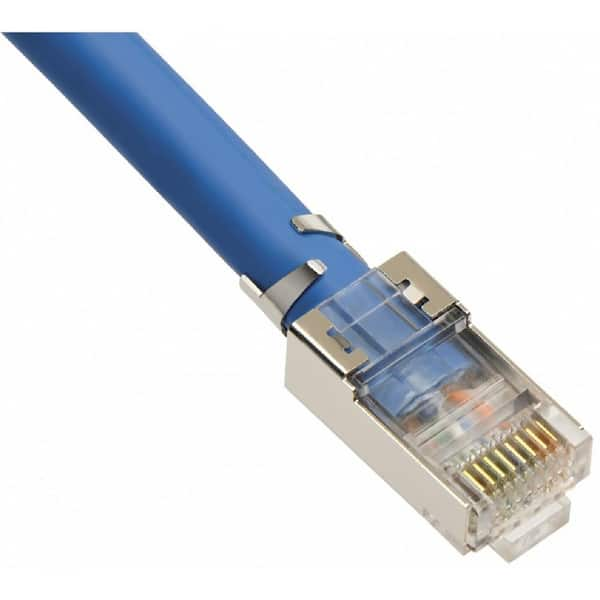
Normal cat 6 connector.

And thanks man. My brain doesn't comprehend paying someone to do something I can pretty easily figure out how to do. More and more i hear people complaining about project times, price and work quality. If I'm going to have to wait a long time to pay a lot of money for a crappy job, I can at least knock out one or two of those problems.
Normal cat 6 connector.
And thanks man. My brain doesn't comprehend paying someone to do something I can pretty easily figure out how to do. More and more i hear people complaining about project times, price and work quality. If I'm going to have to wait a long time to pay a lot of money for a crappy job, I can at least knock out one or two of those problems.
Posted on 7/16/26 at 8:42 am to WhiskeyThrottle
quote:
This is a shielded cat 6 connector.
Oh cool yeah I just watched a video from True Cable about that pull through process and flush cutting them with their crimper tool. How about that?

Posted on 7/17/26 at 9:03 am to WhiskeyThrottle
Cat 6 is too much of a pain to terminate by hand. Cat5e is more than enough for a home environment and easy to cap RJ-45 modules with. Just ran a line the other day. My cabling tool kit has been well used over the years.

 Page 1 of 1


Popular
Back to top
 Follow TigerDroppings for LSU Football News