




- My Forums
- Tiger Rant
- LSU Recruiting
- SEC Rant
- Saints Talk
- Pelicans Talk
- More Sports Board
- Fantasy Sports
- Golf Board
- Soccer Board
- O-T Lounge
- Tech Board
- Home/Garden Board
- Outdoor Board
- Health/Fitness Board
- Movie/TV Board
- Book Board
- Music Board
- Political Talk
- Money Talk
- Fark Board
- Gaming Board
- Travel Board
- Food/Drink Board
- Ticket Exchange
- TD Help Board
Customize My Forums- View All Forums
- Show Left Links
- Topic Sort Options
- Trending Topics
- Recent Topics
- Active Topics
Started By
Message
re: New House Audio
Posted on 3/31/17 at 12:47 pm to LSU_postman

Posted on 3/31/17 at 12:47 pm to LSU_postman
Put devices behind the TV on the back...plug all into HDMI switch that has a optical out. Plug HDMI from switch to TV and optical out to sonos sound bar. Most TVs dont put out 5.1 via there optical unless its a native app. Thats how I do it...
 0
0

Posted on 3/31/17 at 12:49 pm to LSU_postman
quote:
Assuming g I get the sound bar sub and a set of play 1s...could I detach a single play one and use outside if we are entertaining that day and have audio in house and a different audio on the single play one I took outside ?
Yes but you will have to change a setting or two. The "rear" play 1s are linked as "rears" I think you have to unlink then you have 2 reg play 1s to play what ever you want on 1 or both or all.


Posted on 3/31/17 at 1:02 pm to NOLAGT
THanks for answering both questions. If money was not a concern, it sounds like if I were to purchase a 3rd Play 1, I could just leave it out of the 5.1 system and let it be a "free agent"
Is that doable ?
Is that doable ?
Posted on 3/31/17 at 1:19 pm to LSU_postman
Yep each Play"whatever" and connect"whatever" acts as its own zone. You can link them together in any ratio you want and play anything on each one...control vol all in one or pause.
Now I will say this...the only thing I dont like. If I am jamming at home and someone calls me I can not pause the music....or run and turn a volume knob down. I could run to the sonos box and hit the pause button on the front of them...usually I just call the person back. What I have done is kept a old iphone and put the sonos app on it and use it as a remote. You can put the app on ipads or whatever so you have a "remote".
Its usually not a problem but some people dont like hearing Bust Down in the background
Now I will say this...the only thing I dont like. If I am jamming at home and someone calls me I can not pause the music....or run and turn a volume knob down. I could run to the sonos box and hit the pause button on the front of them...usually I just call the person back. What I have done is kept a old iphone and put the sonos app on it and use it as a remote. You can put the app on ipads or whatever so you have a "remote".
Its usually not a problem but some people dont like hearing Bust Down in the background

Posted on 3/31/17 at 1:32 pm to Gaston
Sonos integrates with Apple Music now and I can access my music (my content and Apple Music downloads) seamlessly through the app.
However, I don't know the exact quality played (it sounds good to me) and I pay for Apple Music each month. I'm not sure on the integration for just a regular iTunes library. I did used to have a Apple Apirport Express hooked up to my Connect Amp to play music from my phone or computer through Sonos (not needed now because of the integration).
However, I don't know the exact quality played (it sounds good to me) and I pay for Apple Music each month. I'm not sure on the integration for just a regular iTunes library. I did used to have a Apple Apirport Express hooked up to my Connect Amp to play music from my phone or computer through Sonos (not needed now because of the integration).


Posted on 3/31/17 at 2:08 pm to NOLAGT
quote:
only thing I dont like. If I am jamming at home and someone calls me I can not pause the music....or run and turn a volume knob down. I could run to the sonos box and hit the pause button on the front of them...usually I just call the person back. What I have done is kept a old iphone and put the sonos app on it and use it as a remote. You can put the app on ipads or whatever so you have a "remote"
I hate using my phone as a source or a control device. I like hard buttons.
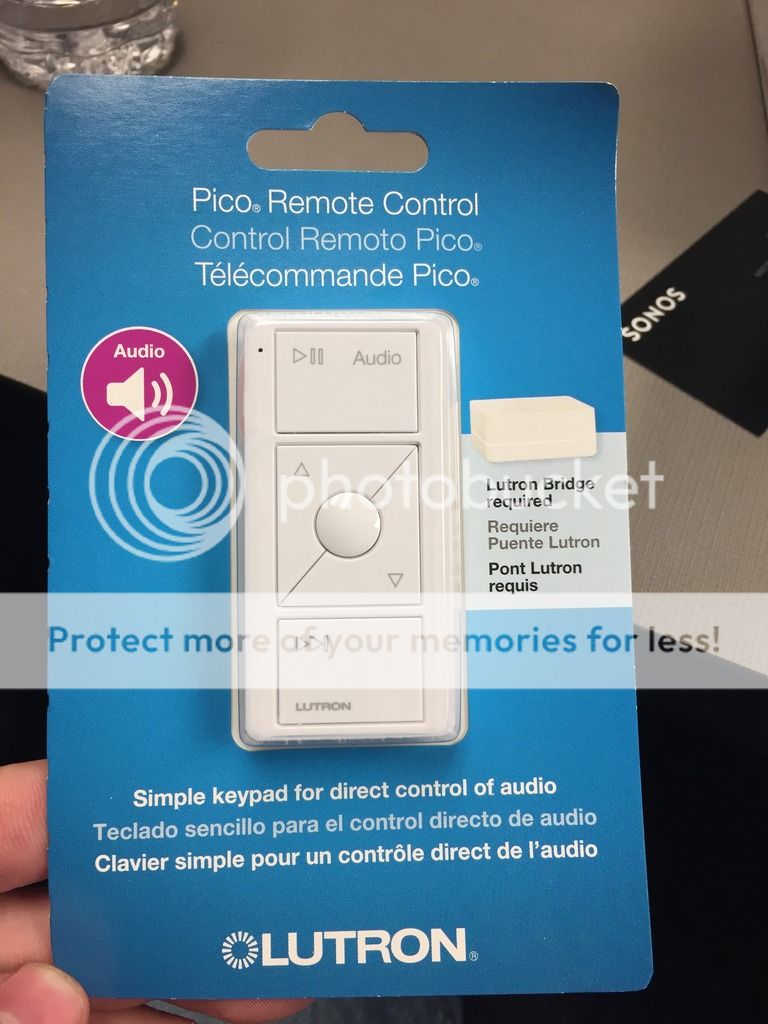
Get you a Lutron Smart Bridge pro and an audio pico.

Posted on 3/31/17 at 2:24 pm to TigerWise
hmmm intadesting. That runs on batteries right? I had looked at something they have to control one set of outside lights that are on a 3 way switch. They had something that looked like that with a app for the phone. The one for the 3rd switch was just a battery operated pad like that.
This post was edited on 3/31/17 at 2:25 pm
Posted on 3/31/17 at 2:31 pm to NOLAGT
Yes, it runs on batteries. Its just like the lighting pico remote but for SONOS. Just need a Smart Bridge pro.
Posted on 3/31/17 at 2:33 pm to NOLAGT
(no message)
This post was edited on 12/21/21 at 11:01 am
Posted on 3/31/17 at 3:08 pm to TigerWise
Nice ill have to keep that in mind. I have some USB wall outlets in a cabinet that I leave the old iphone plugged in and ready to go. I have the other house apps on it too like the AC and the few lights and things like that.
Posted on 3/31/17 at 3:08 pm to XanderCrews
quote:
XanderCrews
Was wondering if someone would catch that one


 Page 3 of 3


Popular
Back to top
 Follow TigerDroppings for LSU Football News