




- My Forums
- Tiger Rant
- LSU Recruiting
- SEC Rant
- Saints Talk
- Pelicans Talk
- More Sports Board
- Fantasy Sports
- Golf Board
- Soccer Board
- O-T Lounge
- Tech Board
- Home/Garden Board
- Outdoor Board
- Health/Fitness Board
- Movie/TV Board
- Book Board
- Music Board
- Political Talk
- Money Talk
- Fark Board
- Gaming Board
- Travel Board
- Food/Drink Board
- Ticket Exchange
- TD Help Board
Customize My Forums- View All Forums
- Show Left Links
- Topic Sort Options
- Trending Topics
- Recent Topics
- Active Topics
Started By
Message

Need some Excel Spreadsheet help
Posted on 4/5/17 at 11:01 pm


Posted on 4/5/17 at 11:01 pm
I figure I could dick around with this for a little bit and figure it out or just ask here for hopefully a quick response.
Column A has 35K values.
Of those 35K, 189 of them are different numbers. Lets say 1-189. (So the numbers 1-189 make up all 35K values)
How can I make it tell me how many of each value there is?
The tricky part is that I don't know all 189 values because they are 12 digit item numbers.
So essentially can I make it tell me how many of each value I have without me telling it what those values are?
Column A has 35K values.
Of those 35K, 189 of them are different numbers. Lets say 1-189. (So the numbers 1-189 make up all 35K values)
How can I make it tell me how many of each value there is?
The tricky part is that I don't know all 189 values because they are 12 digit item numbers.
So essentially can I make it tell me how many of each value I have without me telling it what those values are?
 13
13

Posted on 4/5/17 at 11:02 pm to GatorReb
Pivot table
Count on column A
Count on column A


Posted on 4/5/17 at 11:02 pm to GatorReb
Google it

Posted on 4/5/17 at 11:04 pm to GatorReb
I would do pivot. Insert on the ribbon, select all the numbers in column a as your data
Row value will be the number (1-189)
The data value will be count of values
Someone beat me to it. Do a subtotal with a count would be another way
Row value will be the number (1-189)
The data value will be count of values
Someone beat me to it. Do a subtotal with a count would be another way
This post was edited on 4/5/17 at 11:06 pm

Posted on 4/5/17 at 11:06 pm to GatorReb
Send it to the help desk. You shouldnt be doing menial labor.
You need to be concentrating on growth strategy.
You need to be concentrating on growth strategy.
Posted on 4/5/17 at 11:06 pm to GatorReb
as the others say, a pivot table is what you want. not sure you will be able to figure it out at this time of night, without any real help though.

Posted on 4/5/17 at 11:08 pm to iAmBatman
/thread. First two responses are perfect. I frequently use google for compound excel functions I haven't used in awhile
Posted on 4/5/17 at 11:08 pm to iAmBatman
thanks guys. Exactly what I needed

Posted on 4/5/17 at 11:09 pm to GatorReb
Uhhhh.....
Tree fiddy?
Tree fiddy?
Posted on 4/5/17 at 11:10 pm to GatorReb
Pivot table is answer
If you can figure that out but the number 1 next to all numbers in column b and subtotal
If you can figure that out but the number 1 next to all numbers in column b and subtotal

Posted on 4/5/17 at 11:13 pm to GatorReb
To insert a pivot table

It will bring up this to select data set:
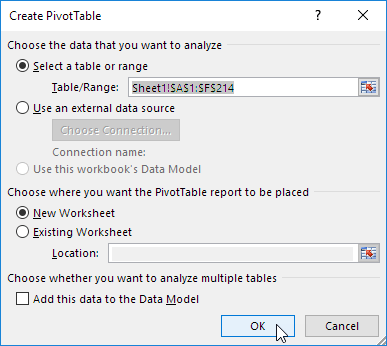
Select all of your data (click in a1, then hold ctrl+shift+down to highlight all cells)
OK

You can give column a a title or it will say data or something. Click in the right section on it and drag into bottom left and bottom right. It will make bottom right sum. Left click on it and select pivot table options, make it a count formula.
If moving to another sheet/workbook copy and paste values, not the table. You can use format painter to make it look nice
It will bring up this to select data set:
Select all of your data (click in a1, then hold ctrl+shift+down to highlight all cells)
OK
You can give column a a title or it will say data or something. Click in the right section on it and drag into bottom left and bottom right. It will make bottom right sum. Left click on it and select pivot table options, make it a count formula.
If moving to another sheet/workbook copy and paste values, not the table. You can use format painter to make it look nice
Posted on 4/5/17 at 11:14 pm to GatorReb
That'll be $75
PayPal it to TDexcelguru@gmail.com
PayPal it to TDexcelguru@gmail.com

Posted on 4/5/17 at 11:33 pm to GatorReb
I recommend counting it manually.
Posted on 4/5/17 at 11:35 pm to GatorReb
Custom sort.

Posted on 4/5/17 at 11:36 pm to Winston Cup
Or... just dump it into a sql server and select distinct with count.
SELECT DISTINCT (column), COUNT (column) AS Total
FROM yourexcelfile
GROUP BY (column), COUNT (column)
Upload that shite to the cloud and hammer out a uSQL statement

SELECT DISTINCT (column), COUNT (column) AS Total
FROM yourexcelfile
GROUP BY (column), COUNT (column)
Upload that shite to the cloud and hammer out a uSQL statement
This post was edited on 4/6/17 at 1:20 am
Posted on 4/5/17 at 11:53 pm to jefforize
Ouch.
Well that's just your opinion, man!!!
Well that's just your opinion, man!!!
Posted on 4/6/17 at 12:00 am to Winston Cup
Just joking. Nice tutorial. I hate excel.
The boring shite we do for money. What a time to be alive.
The boring shite we do for money. What a time to be alive.
This post was edited on 4/6/17 at 12:04 am

Posted on 4/6/17 at 1:04 am to GatorReb
Copy the column and paste then remove duplicates. This gets the 189 values.
Then use COUNTIF formula that references the 189 values and locks the array of 35K rows as the reference to count.
This is a very easy task TBH.
Then use COUNTIF formula that references the 189 values and locks the array of 35K rows as the reference to count.
This is a very easy task TBH.

Posted on 4/6/17 at 1:22 am to lynxcat
quote:
this is a very easy task tbh
My baw is a baller now. Lynx laughs at these simple tasks now


This post was edited on 4/6/17 at 1:23 am

Posted on 4/6/17 at 1:54 am to jefforize
quote:
Or... just dump it into a sql server and select distinct with count.
SELECT DISTINCT (column), COUNT (column) AS Total
FROM yourexcelfile
GROUP BY (column), COUNT (column)
Upload that shite to the cloud and hammer out a uSQL statement
Yeesh.
Save it as a csv, use either cut or awk to pick out the column and pipe it through sort | uniq -c | sort -n
About 20 seconds of work, and you're done.

 Page 1 of 2

Popular
Back to top
 Follow TigerDroppings for LSU Football News