




- My Forums
- Tiger Rant
- LSU Recruiting
- SEC Rant
- Saints Talk
- Pelicans Talk
- More Sports Board
- Fantasy Sports
- Golf Board
- Soccer Board
- O-T Lounge
- Tech Board
- Home/Garden Board
- Outdoor Board
- Health/Fitness Board
- Movie/TV Board
- Book Board
- Music Board
- Political Talk
- Money Talk
- Fark Board
- Gaming Board
- Travel Board
- Food/Drink Board
- Ticket Exchange
- TD Help Board
Customize My Forums- View All Forums
- Show Left Links
- Topic Sort Options
- Trending Topics
- Recent Topics
- Active Topics
Started By
Message
re: PC Discussion - Gaming, Performance and Enthusiasts
Posted on 3/30/16 at 6:52 pm to ILikeLSUToo


Posted on 3/30/16 at 6:52 pm to ILikeLSUToo
I'm on way to 3rd eye blind concert I'll have to do that in morning. I knew this was a possibility but it's very frustrating and stressful regardless.
I also tried to clear the cmos, that didn't do anything.
I never plugged in sata or power cables I was gonna do that after I made sure the bios came up. Does that matter?
I also tried to clear the cmos, that didn't do anything.
I never plugged in sata or power cables I was gonna do that after I made sure the bios came up. Does that matter?
This post was edited on 3/30/16 at 6:55 pm
 1
1


Posted on 3/30/16 at 6:59 pm to fouldeliverer
quote:
I never plugged in sata or power cables I was gonna do that after I made sure the bios came up. Does that matter?
No, that doesn't matter.
I'd also check for bent pins in the CPU socket.
This post was edited on 3/30/16 at 7:23 pm
Posted on 3/30/16 at 7:11 pm to ILikeLSUToo
Me and friend didn't see anything noticeable.
This post was edited on 3/30/16 at 7:21 pm
Posted on 3/30/16 at 7:24 pm to fouldeliverer
Looking at your video, the first code I see is 08 I think, power-on initialization, followed by code 19, which is CPU initialization. It appears to hit code 55 before it starts over. Code 55 is early memory initialization.
Once you get to the point of needing to swap out hardware for diagnostics, might be worth trying new RAM. (And I'm going to assume you tested each stick INDIVIDUALLY IN EVERY SLOT ONE AT A TIME).
Once you get to the point of needing to swap out hardware for diagnostics, might be worth trying new RAM. (And I'm going to assume you tested each stick INDIVIDUALLY IN EVERY SLOT ONE AT A TIME).
Posted on 3/30/16 at 7:31 pm to ILikeLSUToo
Yeah after I had both in I tried each stick alone in the second slot which is the one the manual says.
I don't have other ram to try. It seems to stick on the number 32 the longest.
When people have problems does it normal show all those numbers? The threads I see people just wrote that they have one particular code that's the issue.
I don't have other ram to try. It seems to stick on the number 32 the longest.
When people have problems does it normal show all those numbers? The threads I see people just wrote that they have one particular code that's the issue.
Posted on 3/30/16 at 7:44 pm to fouldeliverer
quote:
Yeah after I had both in I tried each stick alone in the second slot which is the one the manual says.
Try each in ALL slots.
quote:
It seems to stick on the number 32 the longest.
Length of time isn't relevant unless it hangs for a really long time. 32 is just one of the early CPU initialization codes.
quote:
When people have problems does it normal show all those numbers? The threads I see people just wrote that they have one particular code that's the issue.
Nothing is normal or abnormal when a motherboard shits the bed for no apparent reason. Having it actually stop on a code is ideal for diagnostics. Yours is looping, based on the short video you posted. Do you have an internal speaker? Couldn't tell from the video. Beep codes can be helpful.
If all connections are fine, no beep codes, and you get the same symptoms no matter what you try, you'll have to RMA something or buy new hardware to test.
Another thing to try is powering on with no CPU installed. If it even powers on. Some do, some don't.
This post was edited on 3/30/16 at 7:46 pm
Posted on 3/30/16 at 7:49 pm to ILikeLSUToo
Nothing is beeping. Is new egg just like Amazon, free shipping for replacement of mobo? I see the mobo I got on newegg is out of stock.
Thanks so much btw for the help.
Thanks so much btw for the help.
This post was edited on 3/30/16 at 7:53 pm
Posted on 3/30/16 at 8:36 pm to fouldeliverer
quote:
Nothing is beeping.
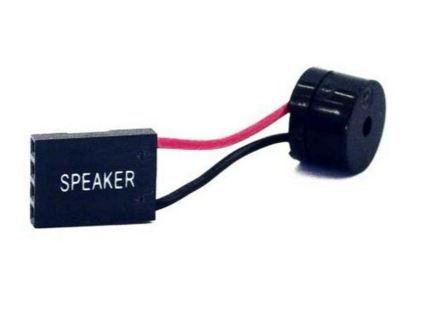
That doesn't answer my question, though. You'd have to install the internal speaker, and they aren't as common anymore. Usually, cases come with them. They look like this.
quote:
Is new egg just like Amazon, free shipping for replacement of mobo?
I don't know. I haven't ordered from NewEgg in years, but I imagine they will be a bigger pain in the arse than Amazon about returns. Just about any other retailer is.
Maybe get a different motherboard from Amazon and return that one to NewEgg. Or order from RAM from Amazon and see if that's the problem, return it if not.

Posted on 3/30/16 at 10:08 pm to ILikeLSUToo
quote:
Once you get to the point of needing to swap out hardware for diagnostics, might be worth trying new RAM. (And I'm going to assume you tested each stick INDIVIDUALLY IN EVERY SLOT ONE AT A TIME).
I would try this.
Also, try re-seating your CPU if you haven't already.
Posted on 3/31/16 at 12:21 am to boXerrumble
If he's checked for bent pins, that'll cover the reseating. And I only suggest this based on an article I skimmed about certain coolers putting too much pressure on Skylake CPUs and damaging them due to Skylake's thinner substrate.

Posted on 3/31/16 at 7:32 am to ILikeLSUToo
Has to be either the motherboard or the memory then right?
How often is memory just bad? Haven't read too many cases of that happening.
How often is memory just bad? Haven't read too many cases of that happening.
Posted on 3/31/16 at 7:51 am to boXerrumble
I'm gonna hook everything up and take pictures or another video for you guys in a bit. I just can't imagine it's the RAM. But hell if I know, I don't have other RAM to use to check.
I leave tomorrow for a vacation and won't be back till Monday night. If I can't get it working gonna submit an RMA this afternoon for the mobo.
I leave tomorrow for a vacation and won't be back till Monday night. If I can't get it working gonna submit an RMA this afternoon for the mobo.

Posted on 3/31/16 at 8:32 am to fouldeliverer
My Naga Hex bit the dust last night (with a little help) I was on the final fight in an hour long mission playing The Division and it just stopped working  , needless to say it is in more than one piece right now. I ordered another Hex but also ordered one of these to check it out.

LINK
, needless to say it is in more than one piece right now. I ordered another Hex but also ordered one of these to check it out. LINK
Posted on 3/31/16 at 9:31 am to DoUrden
Okay I got it, sort of. Idk know if I didn't do all the combinations or wires right last night or what but I redid everything. I can reach bios with one stick in the dimm 2 slot but not when I have two sticks one in 2 slot and other in 4 slot.
So know I guess I need to see if it's bad ram or bad dimm slot
So know I guess I need to see if it's bad ram or bad dimm slot
Posted on 3/31/16 at 9:59 am to fouldeliverer
Well I was wrong ILike and box y'all are awesome. It is one bad stick of RAM. I tried all the combinations in the different slots and with one or both sticks. It only works with one of the sticks in dimm 2 (where it supposed to be) if I put the other stick there it won't work.
So since I got package of two sticks of 8 are they gonna make me send back both or just one? Any one have experience with that?
So since I got package of two sticks of 8 are they gonna make me send back both or just one? Any one have experience with that?
Posted on 3/31/16 at 12:07 pm to fouldeliverer
quote:
if I put the other stick there it won't work.
Just to confirm, you are saying that you tried each individually, and only one works? And the other stick, even by itself, does not work in any slot?
quote:
So since I got package of two sticks of 8 are they gonna make me send back both or just one? Any one have experience with that?
If you're returning it to the retailer, you'll definitely need to return the whole kit in the original packaging. If RMAing with the manufacturer, I don't know... I honestly don't remember the last time I've had to RMA RAM. You'll want to replace the whole kit anyway if one of the sticks is genuinely defective. The modules in kits are tested together before they're sold. They often come from the same production batch. It's not unheard of for two seemingly identical sticks of RAM from different kits to not work together across channels.
quote:
How often is memory just bad? Haven't read too many cases of that happening.
It's rare. It used to be more common with higher voltage sticks like old DDR. But the video he posted was pretty telling that there was something going on with memory -- even if it were the DIMM slots causing the problem and not the RAM itself. But RAM is the easiest thing to swap out and test to at least try to rule it out. That's why it is so important to not only test them individually, but also in each DIMM slot, regardless of what the manual says. It could just as easily be motherboard compatibility issues. Maybe it's trying to force some default voltage, speed, and latency settings that one of the sticks can't handle.
I would also advise flashing the most current bios for that motherboard since you're able to POST now. BIOS updates generally improve memory compatibility. Worth trying just in case.
Posted on 3/31/16 at 12:40 pm to ILikeLSUToo
quote:
Just to confirm, you are saying that you tried each individually, and only one works? And the other stick, even by itself, does not work in any slot?
Correct, the only time bios comes up is one of the sticks (the good one) in the dimm 2 slot. If I put that stick in another slot it won't work. And if I put the other stick in any slot it won't work. If I put two sticks in any combination it won't work.
I requested a refund from new egg and will ship both sticks (gskill) back as they came in a package.
I ordered corsair sticks from Amazon and will get them tomorrow. I leave for vacation at 4 so hopefully it comes in before then so I can test.
For now I'm just gonna use one stick in dimm2 and install Windows and and all that.
How do I flash bios? You mean like when install Windows and set up Internet get the latest bios version?
Posted on 3/31/16 at 12:47 pm to fouldeliverer
quote:
How do I flash bios? You mean like when install Windows and set up Internet get the latest bios version?
First check your bios version. The latest appears to be 1.8. Here's the changelog:
- Optimized Hynix A-die Memory
- Improved memory compatibility.
- Patched Ghost problem.
- Updated CPU microcode(0x7C).
- Improved PCIe SSD compatibility.
LINK
You don't need Windows to flash (but there's no reason not to install Windows now). You can put the bios file on a flash drive and then boot to your bios to use the M-Flash utility. The instructions are in your motherboard manual.
Posted on 3/31/16 at 1:02 pm to ILikeLSUToo
I could buy you some bourbon.
Did the m-flash and it boots and recognizes both ram sticks now.
Did the m-flash and it boots and recognizes both ram sticks now.
Posted on 3/31/16 at 1:04 pm to fouldeliverer
Ha!
It's always the fricking motherboard.
Go into the bios and set the RAM to its rated speed, timings and voltage.
It's always the fricking motherboard.
Go into the bios and set the RAM to its rated speed, timings and voltage.

 Page 1166 of 1913

Popular
Back to top
 Follow TigerDroppings for LSU Football News