




- My Forums
- Tiger Rant
- LSU Recruiting
- SEC Rant
- Saints Talk
- Pelicans Talk
- More Sports Board
- Fantasy Sports
- Golf Board
- Soccer Board
- O-T Lounge
- Tech Board
- Home/Garden Board
- Outdoor Board
- Health/Fitness Board
- Movie/TV Board
- Book Board
- Music Board
- Political Talk
- Money Talk
- Fark Board
- Gaming Board
- Travel Board
- Food/Drink Board
- Ticket Exchange
- TD Help Board
Customize My Forums- View All Forums
- Show Left Links
- Topic Sort Options
- Trending Topics
- Recent Topics
- Active Topics
Started By
Message


 1
1


Posted on 9/7/23 at 1:07 pm to pmacattack
quote:
I just built my first rig with the dynamic evo case and it is great. I used 3 Lian Li SL120 fans on the bottom panel as the intake and no complaints.


Posted on 9/7/23 at 1:33 pm to Tom288
quote:
I actually love that case, think I'm going to go with that. So far the parts list only has the AIO for cooling, would I not need any extra fans for the side/bottom/rear?
First case I gave comes with two fans. Combined with the three on the AIO, it was sufficient. Now that we've switched to a case that's built a bit differently and doesn't come with fans, they are more relevant. Plus, you care about aesthetics. So, we'll not only need more fans, but we're probably going to replace the fans that come with the AIO, because matchy matchy.
With that said, fans are crazy personal preference items. For ease of cable management, I would go with one of the Lian Li Uni fans: LINK (there's like four different types, just pick one that says UNI) or one of the new Corsair LINKs: LINK
Pick and come back. Feel free to ask any questions.

Posted on 9/7/23 at 2:13 pm to Joshjrn
quote:
As an alternative, I would suggest the O11 Dynamic Evo.
I have this case and it's great. Fyi, Lian Li announced two new O11D Evo variants this year. The Evo XL and the Evo RGB. I believe the XL is already available for preorder on Newegg.
Posted on 9/7/23 at 3:07 pm to gpburdell
quote:
The Evo XL
This actually hadn’t made my radar yet. Just looked at it, and I’ve now seen the first case that I would want over my O11XL. Well, with one caveat: I have the less common silver variant, which they aren’t offering for their new releases. But that aside, damn, that’s a nice case. And I’m glad they finally went with an empty bottom. Would have saved me a lot of effort of cutting a hole in mine

Posted on 9/7/23 at 3:37 pm to Joshjrn
Damn, it's difficult to pick between the fans. What would you go with? As for aesthetics, I'm trying to decide between a white case with all white RGB fans and white cables, roughly like this:
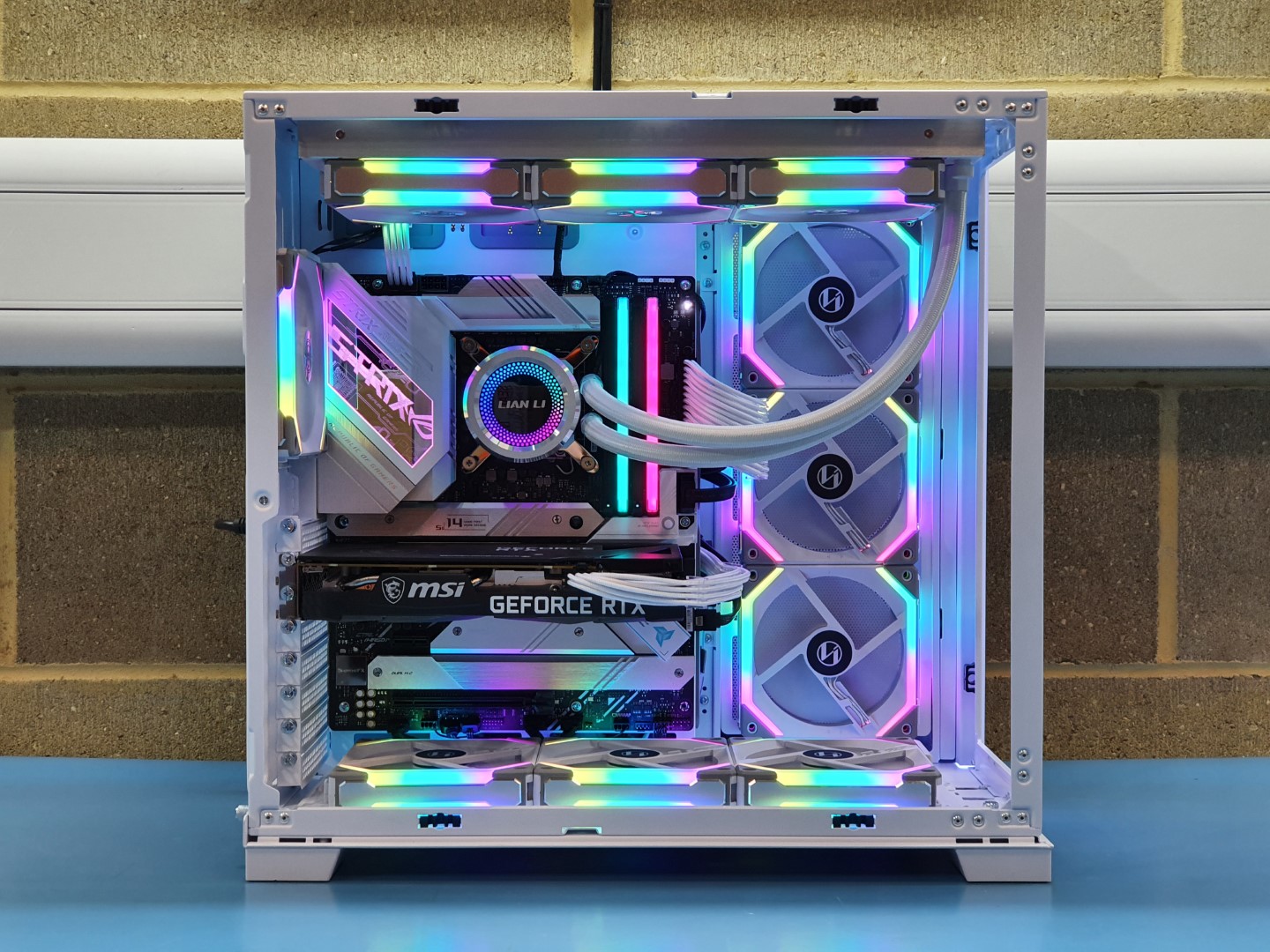
Or a black alternative:
What do you think, aesthetically speaking?
ETA: I do think I like the Corsair fans a little more than the Lian, but I'm still debating. At first I was thinking of getting these:
Corsair LL Fans
Or a black alternative:
What do you think, aesthetically speaking?
ETA: I do think I like the Corsair fans a little more than the Lian, but I'm still debating. At first I was thinking of getting these:
Corsair LL Fans
This post was edited on 9/7/23 at 3:50 pm
Posted on 9/7/23 at 3:54 pm to Tom288
I really like my white build. Also feel like it will incentivize me to keep it clean and dust it regularly.
Also check out the Phanteks d30 fans. They are really sleek and they have reverse fans so you don’t have to see the frames on the back for in take fans.
Also check out the Phanteks d30 fans. They are really sleek and they have reverse fans so you don’t have to see the frames on the back for in take fans.
This post was edited on 9/7/23 at 3:58 pm
Posted on 9/7/23 at 3:59 pm to LSUGent
quote:
I really like my white build.
You don't have any pics do you?
quote:
Also check out the Phanteks d30 fans.
Will do.
I have like $6k worth of parts in my Amazon cart now, just trying to figure out what I'm getting.
Posted on 9/7/23 at 4:01 pm to Tom288
quote:
You don't have any pics do you?
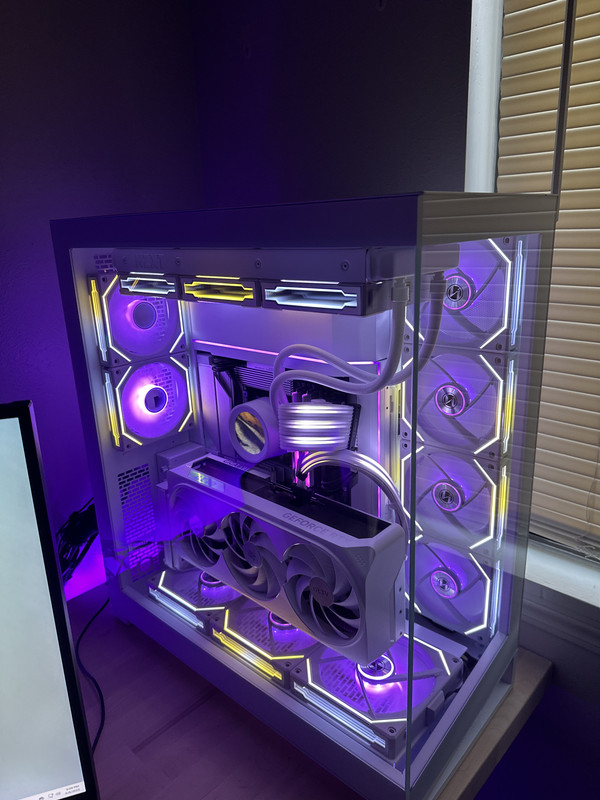
Mid build
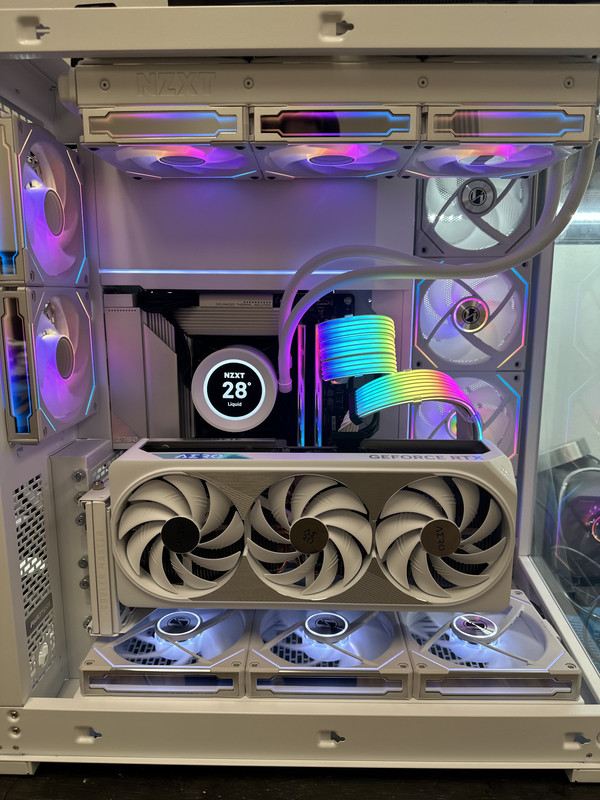
This post was edited on 9/7/23 at 4:04 pm
Posted on 9/7/23 at 4:10 pm to LSUGent
That looks badass, man. What kind of cables did you use? I'm also considering the Kraken Elite 360 for an AIO.

Posted on 9/7/23 at 4:15 pm to Tom288
Also, I do have two SSDs (2.5" SATA) from my current PC that I'm planning on transferring over to my new PC. Not sure if that affects how many fans I can use.
I'd also like to consider basic, no frills fans as I may just go with that, standard cables, etc., for now and then upgrade to RGB later on.
And how do you control the RGB on that many fans? I know they have like control centers, but those are limited to like 3 or 6 fans right? So do you have to have multiples and do you use a remote or software, etc?
Thanks for all of the help guys.
I'd also like to consider basic, no frills fans as I may just go with that, standard cables, etc., for now and then upgrade to RGB later on.
And how do you control the RGB on that many fans? I know they have like control centers, but those are limited to like 3 or 6 fans right? So do you have to have multiples and do you use a remote or software, etc?
Thanks for all of the help guys.
This post was edited on 9/7/23 at 4:16 pm
Posted on 9/7/23 at 4:22 pm to Tom288
quote:
What kind of cables did you use?
If you are asking about the lighted power cables going to the motherboard and GPU, those are rgb strimmer cable extensions from Lian Li.
quote:
Also, I do have two SSDs (2.5" SATA) from my current PC that I'm planning on transferring over to my new PC. Not sure if that affects how many fans I can use.
No that wouldn’t effect how many fans you can use.
quote:
And how do you control the RGB on that many fans? I know they have like control centers, but those are limited to like 3 or 6 fans right? So do you have to have multiples and do you use a remote or software, etc?
The Lian Li SL Infinity fans I’m using are daisy chain connected and only require one cable to the control box, which is capable of controlling many daisy chained units. Lian Li also has software to configure rgb for the fans and the strimmer power cable extensions.
Posted on 9/7/23 at 7:07 pm to Tom288
quote:
Damn, it's difficult to pick between the fans. What would you go with?
In my opinion, it's a function of aesthetics in a vacuum versus applied aesthetics in your space. As an example, I love looking at all of the super bright white builds, but I don't, at all, want one near my face. Which is why my build looks like this:

The colors capture oddly on camera, but it's all essentially a matching blue with a touch of green. Anywho, point being, I wanted a "stealth build, but pretty". It just comes down to personal preference as to how "loud" you want your build to be. Just take into consideration how close to your monitor it will be, your tolerance for distractions, etc.
Posted on 9/7/23 at 7:13 pm to Joshjrn
How do you like the curved screen? I love the real estate they give but other than gaming they seem to be kind of a novelty. Do you find it useful for everyday computer tasks besides gaming?
Posted on 9/7/23 at 7:14 pm to TomSpanks
quote:
How do you like the curved screen? I love the real estate they give but other than gaming they seem to be kind of a novelty. Do you find it useful for everyday computer tasks besides gaming?
As a point of clarification, are you asking about the screen's curve, the fact that it's a 21:9 ultrawide, or both?
Posted on 9/7/23 at 7:54 pm to Joshjrn
What fans are you using for your build? And that's actually pretty close to what I'd be running. I want the options of more colors, but with my current rig I generally run all blue. I see your point about a distraction, but my desk is only big enough for the two monitors I'm using, so my PC is on the ground for now. May get a new desk eventually. But my current case is white and I like it. That said, I'm still debating between white and black.
Posted on 9/7/23 at 8:03 pm to Tom288
quote:
What fans are you using for your build?
The original Lian Li Uni fans. This build is about three years old.
quote:
I want the options of more colors, but with my current rig I generally run all blue.
Everything in the build can go full unicorn vomit if I want
quote:
I see your point about a distraction, but my desk is only big enough for the two monitors I'm using, so my PC is on the ground for now.
No, sir. This is not acceptable

Posted on 9/7/23 at 9:17 pm to Joshjrn
quote:
No, sir. This is not acceptable
Well, do you wanna broaden the recommendations to desks as well? I'd need something large enough for dual monitors and the PC, speakers, etc.
Posted on 9/7/23 at 9:20 pm to Tom288
quote:
Well, do you wanna broaden the recommendations to desks as well? I'd need something large enough for dual monitors and the PC, speakers, etc.
Just get a Husky workbench
way cheaper and is completely adjustable.Posted on 9/7/23 at 9:21 pm to Tom288
What kind of desk aesthetic are you going for?

 Page 2 of 3

Popular
Back to top
 Follow TigerDroppings for LSU Football News