




- My Forums
- Tiger Rant
- LSU Recruiting
- SEC Rant
- Saints Talk
- Pelicans Talk
- More Sports Board
- Fantasy Sports
- Golf Board
- Soccer Board
- O-T Lounge
- Tech Board
- Home/Garden Board
- Outdoor Board
- Health/Fitness Board
- Movie/TV Board
- Book Board
- Music Board
- Political Talk
- Money Talk
- Fark Board
- Gaming Board
- Travel Board
- Food/Drink Board
- Ticket Exchange
- TD Help Board
Customize My Forums- View All Forums
- Show Left Links
- Topic Sort Options
- Trending Topics
- Recent Topics
- Active Topics
Started By
Message
re: Excel Help Please - ASAP
Posted on 12/14/15 at 4:32 pm to TFS4E


Posted on 12/14/15 at 4:32 pm to TFS4E
THis is what the problem is... I need each of these values into their own column.... I need to be able to make a pivot for just "Regular Pay" and "JCC Pay" and "JMAA Hrs" etc...
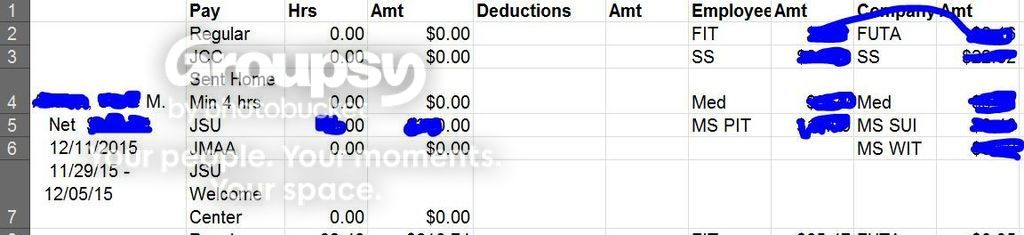
If anyone might be able to help beyond through a message board...
<--- @gmail.com
If anyone might be able to help beyond through a message board...
<--- @gmail.com
This post was edited on 12/14/15 at 4:36 pm
 4
4


Posted on 12/14/15 at 4:35 pm to lynxcat
Also, what is the format of the Date fields?
Is it...
MM/DD/YY?
Does January 5th, 2016 show up as...
1/5/16 or 01/05/16?
If the latter, then you can easily cut off the date values since they are all the same length (can be done in text-to-columns). This would get you partially there...
Is it...
MM/DD/YY?
Does January 5th, 2016 show up as...
1/5/16 or 01/05/16?
If the latter, then you can easily cut off the date values since they are all the same length (can be done in text-to-columns). This would get you partially there...

Posted on 12/14/15 at 4:36 pm to lynxcat
quote:
If the latter, then you can easily cut off the date values since they are all the same length (can be done in text-to-columns). This would get you partially there...
He could just copy and past that entire column.
Then on the original, take away all the dates. On the new one, take away all but the dates.
Posted on 12/14/15 at 4:40 pm to yankeeundercover
If you want to make that "pivotable" then you need to unmerge the first column. Once you do that, all of the data should flow into Column A, Row 2.
I have an add-in that I use to copy down into the blanks until the a cell has new data and then it copies that down...it is called ASAP utilities.
LINK
I only use it for this one function. It is under the "Fill" menu and is the "Copy down..." option.
This would make it pivotable and you could skip the text to columns work.
I have an add-in that I use to copy down into the blanks until the a cell has new data and then it copies that down...it is called ASAP utilities.
LINK
I only use it for this one function. It is under the "Fill" menu and is the "Copy down..." option.
This would make it pivotable and you could skip the text to columns work.
Posted on 12/14/15 at 4:42 pm to yankeeundercover
Do you need to pivot on a person's name or are you looking to total JCC for the entire data set?

Posted on 12/14/15 at 4:48 pm to yankeeundercover
Not to hijack, but I'm always amazed at how many OTers are adept at Excel.


Posted on 12/14/15 at 4:49 pm to yankeeundercover
How many records are you dealing with?

Posted on 12/14/15 at 4:54 pm to yankeeundercover
quote:
If anyone might be able to help beyond through a message board...
There are several websites dedicated to this type of stuff...You are doing yourself a disservice trying to find answers here. Save yourself some time and use google to find the answer to your question. It's almost always worked for me.
Posted on 12/14/15 at 4:56 pm to SUB
MrExcel is terrific but he won't get an answer as quickly as he will on this site.
Posted on 12/14/15 at 5:20 pm to Bullfrog
~530k
Posted on 12/14/15 at 5:26 pm to lynxcat
Please feel free to email me if you have a second... 

 Page 3 of 3


Popular
Back to top
 Follow TigerDroppings for LSU Football News