





 5



- My Forums
- Tiger Rant
- LSU Score Board
- LSU Recruiting
- SEC Rant
- SEC Score Board
- Saints Talk
- Pelicans Talk
- More Sports Board
- Coaching Changes
- Fantasy Sports
- Golf Board
- Soccer Board
- O-T Lounge
- Tech Board
- Home/Garden Board
- Outdoor Board
- Health/Fitness Board
- Movie/TV Board
- Book Board
- Music Board
- Political Talk
- Money Talk
- Fark Board
- Gaming Board
- Travel Board
- Food/Drink Board
- Ticket Exchange
- TD Help Board
Customize My Forums- View All Forums
- Show Left Links
- Topic Sort Options
- Trending Topics
- Recent Topics
- Active Topics
Started By
Message
Whole House HD Antenna
Posted on 5/13/20 at 10:30 am
Posted on 5/13/20 at 10:30 am
I have decided to cut the cord to my cable provider. I've read a few things on this board but have a simple question.
Can I purchase an attic HD antenna and run all of my cable outlets in the house with it?
Will I need anything besides the antenna and would appreciate and recommendations to accomplish this.
Can I purchase an attic HD antenna and run all of my cable outlets in the house with it?
Will I need anything besides the antenna and would appreciate and recommendations to accomplish this.
Posted on 5/13/20 at 10:50 am to Tiger 79
How many TVs are you trying to get the signal to?
Posted on 5/13/20 at 11:20 am to Tiger 79
Yes, just connect the antenna to the main coax line before it hits the splitters. Depending on number of runs you might need an amplifier but you might need you just to get certain channels with weak signals.
Posted on 5/13/20 at 11:37 am to BallsEleven
4
Posted on 5/13/20 at 11:47 am to Tiger 79
I have a similar setup. Just bought a massive RCA antenna, the HD thing is all marketing. It is just an antenna. Mine is 4 feet long, and I have an amplifier coming off of it, and down to a splitter in the basement and back up through the floors to a pair of TVs. I used to have the splitter in the attic and connected to a TV right across the wall, but no one ever watched it and I decided splitting two ways was better than three. Not sure if coincidence, but when I did that, NBC and CBS came in stronger on the other two TVs.
Posted on 5/13/20 at 11:51 am to BallsEleven
quote:
How many TVs are you trying to get the signal to?
I will have 6
Posted on 5/13/20 at 11:52 am to TU Rob
quote:
I have a similar setup. Just bought a massive RCA antenna, the HD thing is all marketing. It is just an antenna. Mine is 4 feet long, and I have an amplifier coming off of it, and down to a splitter in the basement and back up through the floors to a pair of TVs. I used to have the splitter in the attic and connected to a TV right across the wall, but no one ever watched it and I decided splitting two ways was better than three. Not sure if coincidence, but when I did that, NBC and CBS came in stronger on the other two TVs.
So you just put the antenna in the attic or is it outside?
Posted on 5/13/20 at 11:55 am to Tiger 79
quote:
Can I purchase an attic HD antenna and run all of my cable outlets in the house with it?
Will I need anything besides the antenna and would appreciate and recommendations to accomplish this.
i wrote up a whole long thing about this several years ago.
here's what you need:
- antennaweb.org <-- go there & put in your address and get the antenna type they recommend. this is key. if they say an attic antenna is ok, then do it. if they say you need an external one..DO IT. nothing more frustrating than a local HD signal that cuts in and out because you didnt get a powerful enough antenna. my outside mounted antenna project only ran me $75 or so including mounting kit for the gable and a metal fence rail to use for the mast.
- stuff to mount it. if its in the attic probably just some zip ties or something to attach it.
- coax to reach from antenna into *one* room in your house. you want to drop the coax into the room with your router or switch.
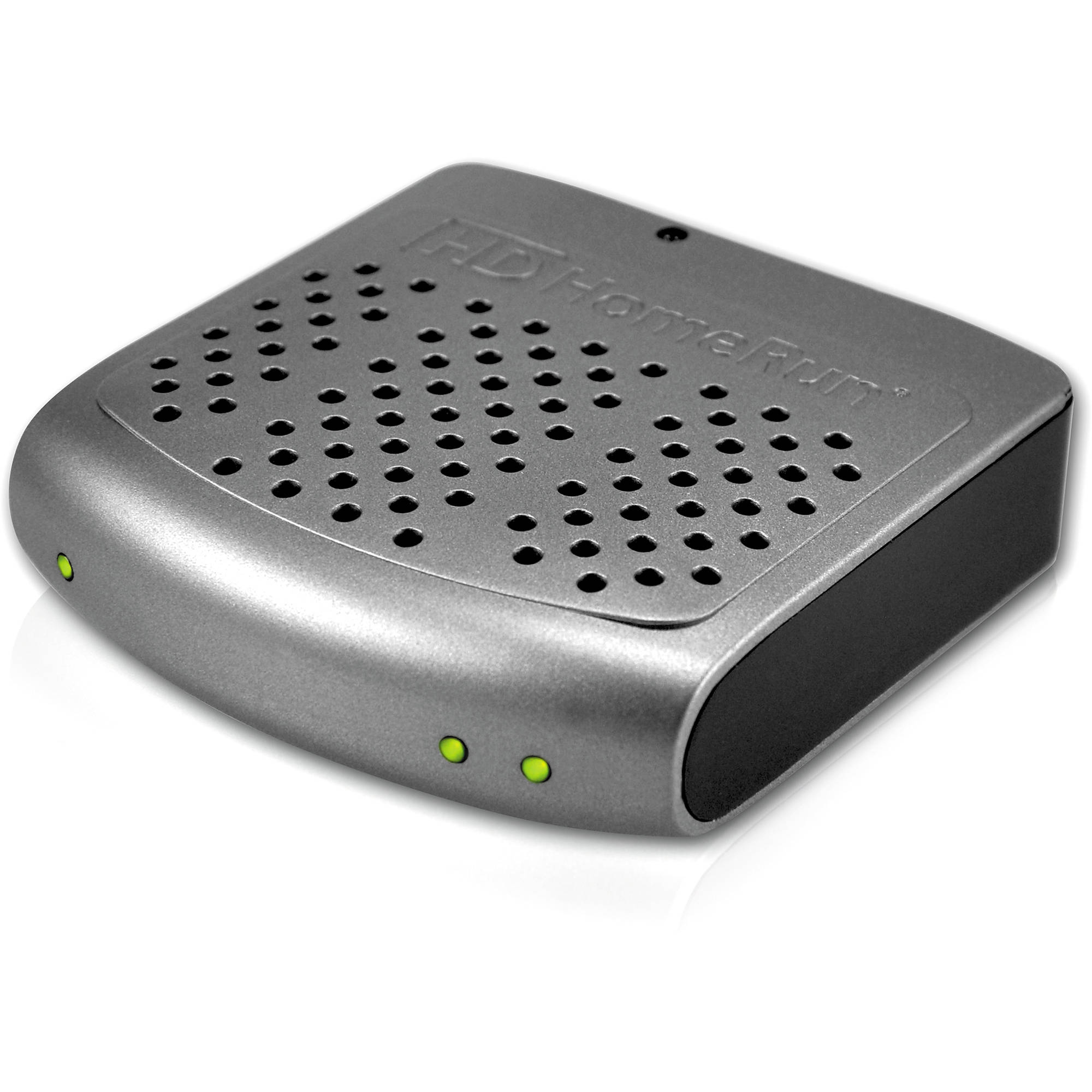
- hd homerun. <-- don't scrimp on this and try to use your TV's built in OTA tuner. just dont. these devices run from $35 (refurb) up to a couple hundred dollars. the cheap ones LACK a DVR and maybe only have 2 tuners instead of 4 so you'll need something else if you plan to record live TV like plex.
- ethernet cable
option a: no DVR. simply screw the coax into the hd-homerun and connect it to power and run the etherent to your router/switch. done. you can then access tv (2-4 tuners depending on the HD homerun you bought) via the HD homerun app on any TV that has some type of smart tv app connected (fire tv, roku, built-in, etc.) nothing else required. hd homerun will get the TV guide from the internet and allow anyone to access it. very slick and easy.
option b: dvr. i picked plex as my dvr. if you're already running a plex server it requires nothing more than option (a) except to purchase 'plex pass' and then you'll see the hd homerun inside plex and plex uses your PC's hard drive for DVR storage.
thats the easiest way i know of. 100% off the grid/cable dependency. plex runs local so you don't even need internet. you can watch 2 or 4 different channels at the same time depending on which hd homerun you bought.
my antenna and hd homerun pick up OVER SEVENTY local channels
 including an ever increasing number of HD..i think im up to 20 HD channels now.
This post was edited on 5/13/20 at 12:04 pm
Posted on 5/13/20 at 12:21 pm to CAD703X
quote:
CAD703X
I put it in but it I didn't see what type (out or in) Just that I can use Yellow or Red or Blue or Violet.

Mostly yellow
I found it, I live less than 30 miles from all so indoor will do!

This post was edited on 5/13/20 at 12:25 pm
Posted on 5/13/20 at 12:32 pm to Tiger 79
You can put the antenna either in the attic or outside. I have mine in the attic and it works just fine. I recommend always having an amplifier to boost the signal. They are pretty cheap. You will need a plug for it though.
If you are trying to get to 6 TVs, you will probably have significant signal loss but it doesn't hurt to try and connect the antenna to the main line just to test it. Have all the TVs connected and on and see what it looks like. Best case scenario you return any unopened extra equipment you bought.
For antenna, it would depend on how close you are to the stations. AntennaWeb.org is a great website that you can enter your address and see how far you are and what directions the station are in. It has a color coded key to tell you which type of antenna you should buy based on your distance.
A lot of people have been happy with the clearstream antennas. I have a Mohu Sail and it has been adequate for me, I pick up stations about 50 miles away.
If you do end up having a lot of signal loss to the TVs, the only solution I know of is to stream it over wifi (although I'd imagine you could get a juiced up amplifier and push signal over cox to the TVs). I use the HD Homerun Duo and also purchased a Plex Pass. It works almost flawlessly. If you have 6 Tvs, I'd go at least with the quatro (duo for 2 simultaneous viewings, quatro for 4).
My set up goes:
Antenna in attic, amplifier right off it, then cable runs down to the hd homerun in my entertainment center. That is hardwired to my modem which sends the signal out on the network to the computer running my plex server. Plex then organizes it and sends the signal out to the firesticks and apple tvs throughout my house with the plex app on them. (My main smart tv can pick up the signal without any device since it is connected to the same network so the plex isn't necessary if they are all smart tvs) I like Plex because it acts as a dvr also so I can record any shows or football games onto my computer and watch them from anywhere in the house.
Sorry for the flood of info
Edit: Looks like someone beat me to it while I was typing my novel.
If you are trying to get to 6 TVs, you will probably have significant signal loss but it doesn't hurt to try and connect the antenna to the main line just to test it. Have all the TVs connected and on and see what it looks like. Best case scenario you return any unopened extra equipment you bought.
For antenna, it would depend on how close you are to the stations. AntennaWeb.org is a great website that you can enter your address and see how far you are and what directions the station are in. It has a color coded key to tell you which type of antenna you should buy based on your distance.
A lot of people have been happy with the clearstream antennas. I have a Mohu Sail and it has been adequate for me, I pick up stations about 50 miles away.
If you do end up having a lot of signal loss to the TVs, the only solution I know of is to stream it over wifi (although I'd imagine you could get a juiced up amplifier and push signal over cox to the TVs). I use the HD Homerun Duo and also purchased a Plex Pass. It works almost flawlessly. If you have 6 Tvs, I'd go at least with the quatro (duo for 2 simultaneous viewings, quatro for 4).
My set up goes:
Antenna in attic, amplifier right off it, then cable runs down to the hd homerun in my entertainment center. That is hardwired to my modem which sends the signal out on the network to the computer running my plex server. Plex then organizes it and sends the signal out to the firesticks and apple tvs throughout my house with the plex app on them. (My main smart tv can pick up the signal without any device since it is connected to the same network so the plex isn't necessary if they are all smart tvs) I like Plex because it acts as a dvr also so I can record any shows or football games onto my computer and watch them from anywhere in the house.
Sorry for the flood of info
Edit: Looks like someone beat me to it while I was typing my novel.
This post was edited on 5/13/20 at 12:34 pm
Posted on 5/13/20 at 2:06 pm to Tiger 79
quote:
I found it, I live less than 30 miles from all so indoor will do!

soooo much easier if you can do this.
Posted on 5/13/20 at 2:09 pm to BallsEleven
quote:
I use the HD Homerun Duo and also purchased a Plex Pass. It works almost flawlessly. If you have 6 Tvs, I'd go at least with the quatro (duo for 2 simultaneous viewings, quatro for 4).
easiest way by far. you have *ONE* doodad connected to the coax coming from the antenna and it 'channels' (pardon the pun) the tv out to everyone in the house...hell you even can watch tv coming off of your home antenna in antarctica if you have a phone and data.
6 tvs..12 tvs..24 tvs..you just need one coax line to the hd homerun and it takes care of the rest. no running coax throughout your house.
eta with 6 tvs you may want to get a hd-homerun with 4 tuners but the coolest thing about hd-homerun is if you had a 2-tuner model..you can simply add another 2-tuner model and you'll automagically be able to watch 4 different channels at the same time.
This post was edited on 5/13/20 at 2:11 pm
Posted on 5/13/20 at 2:22 pm to Tiger 79
quote:
I live less than 30 miles from all
If that is the case, run to your nearest Walmart and try an antenna like this one. Already has the amplifier and cheap. Worst case scenario is you return it for a different one.
I had one similar to this when I lived in Florida suction cupped to my window. I was picking up channels 55 miles away in Mobile, AL. It would probably work for you assuming you don't have a ton of trees.
Posted on 5/13/20 at 4:19 pm to BallsEleven
I have 2 similar to that now, got em stuck in the window in the bathroom and bedroom (yes I added a tv in the bathroom) .
Will those work in the attic?
Will those work in the attic?
Posted on 5/13/20 at 8:00 pm to Tiger 79
Yeah it should work. For shits and giggles I tried my Mohu leaf up in my attic when I moved. It worked fine for the closer channels but I needed to get a little further out because I was missing fox which was 48 miles away. That’s the only reason I upgraded.
Posted on 5/14/20 at 7:11 am to Tiger 79
I have a huge antenna in my attic and it’s split to all the rooms. I’m glad I did it but it’s definitely not the best setup.
I’m going to get a homerun soon. My local fox affiliate is a difficult station to pull in and it comes in and out on my porch.
CAD can you point t me in the right direction for a two or four tuner homerun without dvr? Refurb is fine with me. I just don’t know which models to buy / worry about older ones not receiving support.
I’m going to get a homerun soon. My local fox affiliate is a difficult station to pull in and it comes in and out on my porch.
CAD can you point t me in the right direction for a two or four tuner homerun without dvr? Refurb is fine with me. I just don’t know which models to buy / worry about older ones not receiving support.
This post was edited on 5/14/20 at 7:14 am
Posted on 5/14/20 at 7:27 am to Tiger 79
Get an amazon fire tv recast. It’s a simple one device solution that has a DVR and allows you to watch live tv or recordings via a fire stick or mobile device
Posted on 5/14/20 at 8:02 am to tilco
quote:imma check now.
CAD can you point t me in the right direction for a two or four tuner homerun without dvr? Refurb is fine with me. I just don’t know which models to buy / worry about older ones not receiving support.
Just FYI this is a plug it in and forget about it type box. I have a really old one and it's the one device in my whole house that never seems to have any problems. It's been as reliable as a light switch.
LINK
That was in $109 but if you hurry, amazon warehouse has a scratch-and-dent model for $69 at that same link.
the hd homerun devices get confusing, so i'll try to explain them as I understand them and why some are several hundred dollars:
From 'cheapest' to most expensive
- 2 tuner no compression (if you use some type of dvr either by subscribing to hd homerun for $35/year or just getting a plex pass you'll find an hour of video takes up 5-10GB or more. you can set your software to compress it after the fact, but having this base model means your signal gets stored at native resolution only initially.
- 4 tuners no compression
- 2 tuners, compression
- 4 tuners, compression
i think aside from other minor 'bells and whistles' w/ the various bundles, thats essentially their lineup.
oh and some of the models include some storage in them as well so it can store video like a dishTV or xfinity DVR all-in-one.
personally i have a very old simple model with 2 tuners and plex running on my pc does all the hard work and i've never had any trouble from the tuner.
This post was edited on 5/14/20 at 8:58 am
Posted on 5/14/20 at 9:30 am to Tiger 79
Elevation matters as well. Are you on high ground or low?
Posted on 5/14/20 at 2:13 pm to CAD703X
Thanks for the info. I’ll keep an eye out for one. I don’t need it until August or September. We really don’t watch tv anymore outside of a few Netflix shows and kids shite.
I assume it will work with both fire sticks and roku? If I get a 2 tuner and decide to add another do I run a splitter?
I assume it will work with both fire sticks and roku? If I get a 2 tuner and decide to add another do I run a splitter?

 Page 1 of 2




Popular

Back to top
 Follow TigerDroppings for LSU Football News