




 1
1




- My Forums
- Tiger Rant
- LSU Recruiting
- SEC Rant
- Saints Talk
- Pelicans Talk
- More Sports Board
- Fantasy Sports
- Golf Board
- Soccer Board
- O-T Lounge
- Tech Board
- Home/Garden Board
- Outdoor Board
- Health/Fitness Board
- Movie/TV Board
- Book Board
- Music Board
- Political Talk
- Money Talk
- Fark Board
- Gaming Board
- Travel Board
- Food/Drink Board
- Ticket Exchange
- TD Help Board
Customize My Forums- View All Forums
- Show Left Links
- Topic Sort Options
- Trending Topics
- Recent Topics
- Active Topics
Started By
Message
Font size
Posted on 6/6/26 at 1:38 pm
Posted on 6/6/26 at 1:38 pm
Can font size be changed? Everything is too small
Posted on 6/6/26 at 1:57 pm to Sloughdog
quote:
Everything is too small
First, try setting your browser's zoom to 100%.
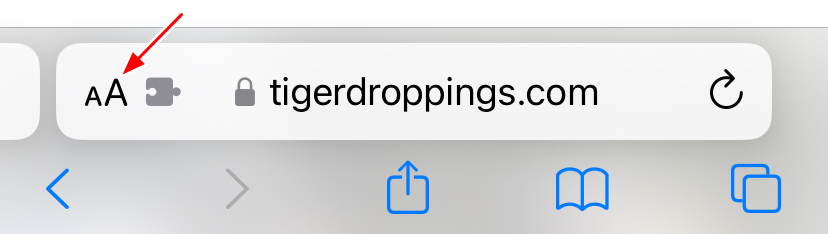
This process varies a bit, but if you're using Safari for example, click on the "aA" symbol to the left of your address bar:
quote:
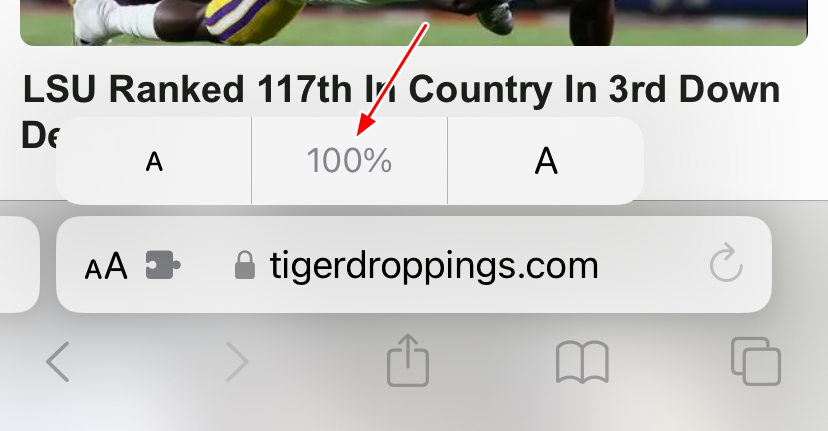
And then click directly on the number in the middle to set the zoom back to 100% (or you can click "a" and "A" on either side to zoom in/out incrementally):
quote:
Then look again at the very bottom of the page, see if you can find this link, and click on it:
quote:
Does that change anything?
Posted on 6/6/26 at 2:22 pm to paperwasp
I have safari. Don’t see aA and don’t see the mobile
Link. Went into settings on my phone and increase aA but doesn’t affect thisnlink
Link. Went into settings on my phone and increase aA but doesn’t affect thisnlink
Posted on 6/6/26 at 8:25 pm to Sloughdog
Finally figured it out. Thanks
Posted on 6/7/26 at 12:38 pm to Sloughdog

This post was edited on 6/8/26 at 1:11 pm

 Page 1 of 1




Popular

Back to top
 Follow TigerDroppings for LSU Football News