




- My Forums
- Tiger Rant
- LSU Recruiting
- SEC Rant
- Saints Talk
- Pelicans Talk
- More Sports Board
- Fantasy Sports
- Golf Board
- Soccer Board
- O-T Lounge
- Tech Board
- Home/Garden Board
- Outdoor Board
- Health/Fitness Board
- Movie/TV Board
- Book Board
- Music Board
- Political Talk
- Money Talk
- Fark Board
- Gaming Board
- Travel Board
- Food/Drink Board
- Ticket Exchange
- TD Help Board
Customize My Forums- View All Forums
- Show Left Links
- Topic Sort Options
- Trending Topics
- Recent Topics
- Active Topics
Started By
Message
re: Just got a raspberry pie
Posted on 1/30/17 at 7:13 pm to dallastiger55

Posted on 1/30/17 at 7:13 pm to dallastiger55
Extremely simple. Building it isn't the time consuming part. Downloading all of the roms is the long part as Geaux mentioned.
Here is a longer thread about how to build one:
LINK
Here is a longer thread about how to build one:
LINK
 1
1


Posted on 1/30/17 at 7:44 pm to TTownTiger
Wonder how much space each ROM takes?
How's the gameplay? Can you tell the difference?
How's the gameplay? Can you tell the difference?
Posted on 1/30/17 at 8:03 pm to dallastiger55
You can fit the entire Atari, NES, Genesis, SNES library on under 2 GB. PlayStation games and any system whose games are CDs take up a lot more space. PSOne game Fear Effect, which is a 4 disc game, takes up around 2 GB by itself. I'm sure the final fantasy games on PSOne are just as big.
Rule of thumb is if you aren't going to include a ton of CD games (PSOne, Neo Geo, Sega Cd, etc...) then you can get away with a 32 GB micro sd. If you want more cd games, then go with a larger card. I have maybe 1200 games on my 32 sd card, but not too many cd games. Still have 7-10 GB available too, which is a ton of space.
Games run pretty flawlessly for the most part. Graphics out the box aren't as sharp as you remember, but there are ways to enhance them.
Rule of thumb is if you aren't going to include a ton of CD games (PSOne, Neo Geo, Sega Cd, etc...) then you can get away with a 32 GB micro sd. If you want more cd games, then go with a larger card. I have maybe 1200 games on my 32 sd card, but not too many cd games. Still have 7-10 GB available too, which is a ton of space.
Games run pretty flawlessly for the most part. Graphics out the box aren't as sharp as you remember, but there are ways to enhance them.
Posted on 1/30/17 at 8:13 pm to TTownTiger
All I want is sega, Nes, snes and genesis
As long as they look similar I'm down
Question- do you use the original raspberry pi or the new one that came out?
As long as they look similar I'm down
Question- do you use the original raspberry pi or the new one that came out?
This post was edited on 1/30/17 at 8:14 pm
Posted on 1/30/17 at 8:21 pm to dallastiger55
Latest one is raspberry pi 3 model B: link to amazon
It runs emulations a lot better than the previous versions. Plus I think it's only $10 more.
It runs emulations a lot better than the previous versions. Plus I think it's only $10 more.
Posted on 1/30/17 at 8:35 pm to dallastiger55
Posted on 1/30/17 at 8:36 pm to TTownTiger
Thanks. I'm all over this
Lastly, does it matter if I go bigger on a sd card? Will that speed things up?
Lastly, does it matter if I go bigger on a sd card? Will that speed things up?
Posted on 1/30/17 at 8:57 pm to dallastiger55
No, larger size of the sd card doesn't increase RP3's speed. Now some cards run better than sub par cards, but the GB size of the card doesn't determine that. You'd actually be good with an 8 gb card if you are only adding the systems you mentioned, but I'd suggest a 16 or 32gb at minimum just in case you want to add more later on. Remember you can add arcade games too, not just consoles. Adding Roms becomes addicting 
This is the card I use as it was suggested in multiple articles that I read while researching best sd cards to use and it's only $12: 32 GB micro sd
This is the card I use as it was suggested in multiple articles that I read while researching best sd cards to use and it's only $12: 32 GB micro sd
Posted on 1/30/17 at 9:02 pm to dallastiger55
Just seeing Geaux's post about the CanaKit. Those are popular as they come with everything you need. Some even come with the SD card, but I suggest if you're going with a CanaKit to get your on SD card regardless just so you can get a higher quality card than whatever comes with the kit.
Posted on 1/30/17 at 9:10 pm to TTownTiger
This is awesome. Thanks guys
So the kit has everything I need except for SD correct? Is this easy enough to use where I can teach my 8 year old to use it when I'm not there?
So the kit has everything I need except for SD correct? Is this easy enough to use where I can teach my 8 year old to use it when I'm not there?

Posted on 1/30/17 at 9:26 pm to dallastiger55
Your computer will have to read the micro SD card. If it doesn't have a micro sd card slot, you'll need to buy a micro sd card reader to plug it into your computer. About $5 on amazon.
You'll also need a USB controller if you don't have one available (PS3 & 360 controllers work well). There are also dozens of 3rd party controllers available. Free if you already have a controller obviously, about $15 per controller if you need to buy them. The RP3 has 4 USB ports, so you can plug in up to four controllers. And they don't have to be all the same kind. You can have a PS3 controller in one slot, 360 in another, 3rd party in another...doesnt matter as long as it is a USB controller.
And you may need a USB keyboard to plug into your RP3 for setup and customization later on. $10 on amazon.
The RP3 doesn't have an on/off button, so most people just keep it on as it doesn't use much energy (someone mentioned in a previous thread it uses about as much power as a roku player or fire stick, so no need to turn off). So it's as easy to get to as using your tv remote to select the correct hdmi slot you connected it to. So yes, an 8 year old can play it himself if he knows how to get to a DVD player or any other device you have connected to the tv via hdmi.
You'll also need a USB controller if you don't have one available (PS3 & 360 controllers work well). There are also dozens of 3rd party controllers available. Free if you already have a controller obviously, about $15 per controller if you need to buy them. The RP3 has 4 USB ports, so you can plug in up to four controllers. And they don't have to be all the same kind. You can have a PS3 controller in one slot, 360 in another, 3rd party in another...doesnt matter as long as it is a USB controller.
And you may need a USB keyboard to plug into your RP3 for setup and customization later on. $10 on amazon.
The RP3 doesn't have an on/off button, so most people just keep it on as it doesn't use much energy (someone mentioned in a previous thread it uses about as much power as a roku player or fire stick, so no need to turn off). So it's as easy to get to as using your tv remote to select the correct hdmi slot you connected it to. So yes, an 8 year old can play it himself if he knows how to get to a DVD player or any other device you have connected to the tv via hdmi.
This post was edited on 1/30/17 at 9:33 pm
Posted on 1/30/17 at 9:37 pm to TTownTiger
Awesome stuff
That makes sense. So when I download the ROMs, do I go one by one or can I just download the whole catalog?
Also is it able to be customized on how you view the titles in the menu? Can you view logos instead of just the titles in a line?
That makes sense. So when I download the ROMs, do I go one by one or can I just download the whole catalog?
Also is it able to be customized on how you view the titles in the menu? Can you view logos instead of just the titles in a line?

Posted on 1/30/17 at 10:10 pm to CBandits82
quote:
Rygar. Is. fricking. Awesome.
Yes!
Makes me want to get a Pi just for that game.
And Super Tecmo Bowl.
Posted on 1/30/17 at 10:13 pm to TTownTiger
Is the USB port on a tv enough to power it?
Posted on 1/30/17 at 10:24 pm to dallastiger55
quote:
So when I download the ROMs, do I go one by one or can I just download the whole catalog?
You can DL an entire catalog at once. Some catalogs have multiple versions of the same game though, so you might have to go through and delete versions of the same game if you do it that way. Or when you copy/paste the games to your emulators, you'll need to make sure you only have one version of the game chosen so that you aren't adding 3-4 versions of one game. So library maintenance will still be needed to some degree. And by different versions of the same game I mean one catalog might have the USA version, Europe version, Japan version, etc ... of the same game, so you'll have to make sure to choose only the one you want to add to your system.
quote:
Also is it able to be customized on how you view the titles in the menu? Can you view logos instead of just the titles in a line?
Yes, there are different themes you can choose from to change how everything looks. Don't think you can customize it to where the games just show logos or box art but you can customize it to where every time you scroll through your games, the original box art appears on screen with a description of the game. You can also change how the system loads after being shut down, the image that shows on screen when a game loads, how the graphics look (different graphics overlays can make the game look exactly like your playing on an 80s TV set of you wanted to get that nostalgic)...
So there are a ton of customizable options if you wanted to dig into that.
This post was edited on 1/30/17 at 10:30 pm
Posted on 1/30/17 at 10:30 pm to TTownTiger
This is like Christmas morning
That's man. Appreciate the feedback
That's man. Appreciate the feedback
Posted on 1/31/17 at 6:43 am to dallastiger55
Is there somewhere I can buy one of these with everything downloaded to it? I have no idea how to do all that. If so how much would they be?
Posted on 1/31/17 at 7:21 am to tigertown80
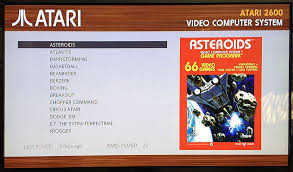
Hey guys, in short, this is what i want my interface to look like. easy so me and my kids can identify which system and games. you're saying this is doable with that kit from amazon?

Posted on 1/31/17 at 7:50 am to dallastiger55
Yes, you'll be able to do that. The main program you'll have to download and copy to your micro sd is called retropie. That one program has all of the emulators already included in it plus all of the customizable options like the picture you're showing.
Posted on 1/31/17 at 7:54 am to tigertown80
quote:
Is there somewhere I can buy one of these with everything downloaded to it? I have no idea how to do all that. If so how much would they be?
Never looked for a preloaded raspberry pi, so cant say for sure. I know people sell modded consoles on ebay though. Think you can get a modded xbox with thousands of games already preloaded on it for $150 or so there.
edit: seriously, you should read the link I added in the first post of the 2nd page of this thread. It is another raspberry pi thread we recently had that goes over the steps of how to build one. I am pretty computer illiterate and I can tell you it isn't difficult. Literally three free downloads and a file transfer. The file transfer is just being able to copy and paste something, so it isn't anything technical.
This post was edited on 1/31/17 at 8:02 am

 Page 2 of 6

Popular
Back to top
 Follow TigerDroppings for LSU Football News