


- My Forums
- Tiger Rant
- LSU Recruiting
- SEC Rant
- Saints Talk
- Pelicans Talk
- More Sports Board
- Coaching Changes
- Fantasy Sports
- Golf Board
- Soccer Board
- O-T Lounge
- Tech Board
- Home/Garden Board
- Outdoor Board
- Health/Fitness Board
- Movie/TV Board
- Book Board
- Music Board
- Political Talk
- Money Talk
- Fark Board
- Gaming Board
- Travel Board
- Food/Drink Board
- Ticket Exchange
- TD Help Board
Customize My Forums- View All Forums
- Show Left Links
- Topic Sort Options
- Trending Topics
- Recent Topics
- Active Topics
Started By
Message
Need help selecting a cloud drive to set up Plex
Posted on 12/17/17 at 10:28 am

Posted on 12/17/17 at 10:28 am
I want to place all of my videos and pics on a cloud server so I can access them through Plex via cloud no matter where I am. I was looking at the WD My Cloud Home and the Seagate Personal Cloud. Any advice or other recommendations would be great. I am looking for something that is user friendly and has decent speed.
My Cloud Home
Seagate
My Cloud Home
Seagate
 2
2


Posted on 12/17/17 at 10:54 am to MSTiger33
Have a 5+ year old my cloud which was over due updating. Just last weekend I set up a QNAP 453 NAS with 4 x 8TB WD external drives which I "shucked" for only $140. They have the red drives in them. I then set up PLEX on it with all my movies/music. Installed plex on the smart tv's and now can access all my media...working flawless! 
Posted on 12/17/17 at 11:04 am to bengalman
Can you access your files away from
Home?
Home?


Posted on 12/17/17 at 1:08 pm to MSTiger33
Why would you set up a cloud instead of simply opening a port on your router to your server?

Posted on 12/17/17 at 1:57 pm to HubbaBubba
quote:
Why would you set up a cloud instead of simply opening a port on your router to your server?
OP is considering a personal "cloud" for storage.
Posted on 12/17/17 at 2:33 pm to Korkstand
But why? Everything is accessible from my Plex server (computer) anywhere in the world by simply opening a port on my router.
Posted on 12/17/17 at 5:33 pm to HubbaBubba
Because OP doesn't have a Plex server currently and wants to use one of the "personal cloud" NAS drives as storage for a new Plex build. At least that's how I understand it.
Posted on 12/17/17 at 7:26 pm to Korkstand
Maybe I need to clarify. I have Plex running through my smart TV. Currently, it syncs up to my laptop and, depending on the movie, my external hard drive connected to my laptop. I have about 1.5 TB worth of movies/tv shows. I want to move away from streaming from my laptop and have a standalone server for my TV to access. I want to be able to access said server if I am in a different location so I am thinking a cloud server.
Posted on 12/17/17 at 7:30 pm to MSTiger33
Get an nVidia Shield. It has a built-in Plex Server.
Posted on 12/17/17 at 7:37 pm to HubbaBubba
But would I be able to access it from another location?

Posted on 12/17/17 at 10:59 pm to MSTiger33
Posted on 12/17/17 at 11:10 pm to MSTiger33
quote:Yes, you can do that running Plex server on your laptop right now if you want to.
But would I be able to access it from another location?
I see now that you're getting confused on what "cloud" means in the context of storage devices and how Plex works. I'm not knocking you, all these companies are throwing the word around for everything these days. For example, the devices you linked are just NAS (network attached storage) boxes, but obviously they are marketing them as "cloud" devices. This is confusing.
Plex doesn't need any sort of cloud device or service in order to allow you to view your content from anywhere. It uses a client-server setup, plain and simple. You can run your Plex server in the cloud now, but let's ignore that since you have been running your server locally. Since you're getting rid of the laptop, though, you're going to need a machine to run the server on, and Hubba's suggestion of a Shield would be great. You would also need one of the NAS boxes you've been looking at for storage, and you would just point the Plex server running on the Shield to where to find the files on your NAS.
I'm probably forgetting some of the details of setting this stuff up, but that's the gist of it. You will have a very nice media box (Shield) running Plex server, and it will pull media from your NAS box. The Shield can also be used as a Plex client (like your smart TV does currently). The Shield's main use is actually for Android TV (think FireTV or Roku), it's just that it's also powerful enough to run the Plex server as well.
And that's it. You should be able to log in to a Plex client from anywhere and access your server. I'm pretty sure I didn't even have to set up any port forwarding on my router, though it may be necessary in some cases I guess.
Posted on 12/18/17 at 7:15 am to MSTiger33
Yes I can access video files through plex along with a file manager app that Qnap has on the app store.
Posted on 12/18/17 at 7:44 am to Korkstand
quote:Great post.
Korkstand

Posted on 12/18/17 at 9:49 am to Korkstand
Thanks Kork! I want to make sure I understand. The Shield is the server and then I can connect an external drive to it with all of my media. I didn’t see a Shield with a large internal hard drive. I would like a server and a HD with 4 TB minimum contained all in one if possible.


Posted on 12/18/17 at 10:20 am to MSTiger33
quote:
I would like a server and a HD with 4 TB minimum contained all in one if possible.
you would then need to purchase a NAS device that can serve as your Plex Media Server, as well as hard drives for the NAS. The problem with a lot of NAS devices though is that they are limited by processing power when it comes to transcoding multiple streams, or so i've been told.
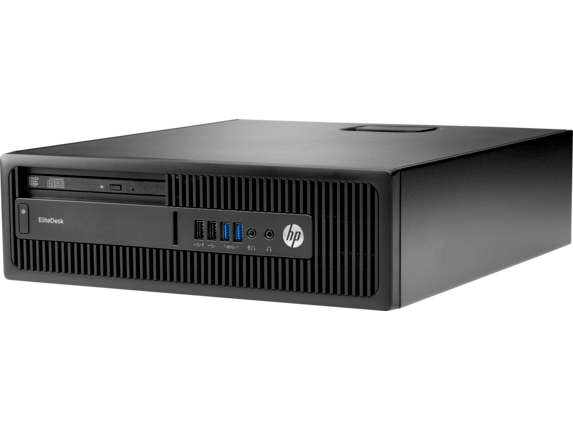
i just purchased a used small form factor computer, like this HP, that had an i5 processor, and was about the size of a dvd player, and was around $200 used. I then plugged external storage into the HP, and set up the plex media server on the HP. when you're setting up the Plex server, and the folders for movies/tv shows you just map the location of your media.
but it sounds like you want more storage, and a device that acts as the plex server in one, which pretty much means you want a QNAP or Synology type NAS, unless you wanted to build your own server. but again the processor used in nas devices is limited from what i've been told, however if it's just you and one stream at a time you might be ok. i'll leave that up to someone who uses as NAS device as their Plex server to answer.
Posted on 12/18/17 at 10:37 am to MSTiger33
quote:Correct, I believe the max internal storage of a Shield is 500GB. And just to be clear, the shield won't have an external USB drive attached... there will be a separate device on your network like the ones you linked in the OP, and the Shield will grab files from it via the network.
The Shield is the server and then I can connect an external drive to it with all of my media. I didn’t see a Shield with a large internal hard drive.
quote:It's possible, and Philip touched on most of the points I was going to bring up. If you have to have everything all in one, you're either going to have to get an expensive NAS with the power to run Plex server, or build your own little desktop machine with enough storage.
I would like a server and a HD with 4 TB minimum contained all in one if possible.
Posted on 12/18/17 at 1:02 pm to Korkstand
Can I attach my external drive via a usb cable to the Shield?
Posted on 12/18/17 at 1:40 pm to MSTiger33
yes
Posted on 12/18/17 at 2:39 pm to PhilipMarlowe
Thanks

 Page 1 of 2

Popular
Back to top
 Follow TigerDroppings for LSU Football News