




- My Forums
- Tiger Rant
- LSU Recruiting
- SEC Rant
- Saints Talk
- Pelicans Talk
- More Sports Board
- Fantasy Sports
- Golf Board
- Soccer Board
- O-T Lounge
- Tech Board
- Home/Garden Board
- Outdoor Board
- Health/Fitness Board
- Movie/TV Board
- Book Board
- Music Board
- Political Talk
- Money Talk
- Fark Board
- Gaming Board
- Travel Board
- Food/Drink Board
- Ticket Exchange
- TD Help Board
Customize My Forums- View All Forums
- Show Left Links
- Topic Sort Options
- Trending Topics
- Recent Topics
- Active Topics
Started By
Message
IOS Safari Forward And Back Buttons
Posted on 1/21/26 at 5:05 pm

Posted on 1/21/26 at 5:05 pm
With their latest update the buttons have disappeared. I have looked on the internet and everything I have found has not worked. I hate when Apple does shite like this. I realize they did it so you would able to see the entire screen but I don’t care about seeing the whole screen. I like the way it used to be TIA
 6
6


Posted on 1/21/26 at 6:03 pm to Miketheseventh
quote:
With their latest update the buttons have disappeared. I have looked on the internet and everything I have found has not worked. I hate when Apple does shite like this. I realize they did it so you would able to see the entire screen but I don’t care about seeing the whole screen. I like the way it used to be TIA
Do you want them to be visible constantly?
They are supposed to show back up whenever you drag thumb down on the screen just a little (making webpage scroll up back towards top of page a little).
Maybe it’s how I had it set up, but I don’t remember them constantly showing in the last iOS without using a similar motion. I also have not used 18 or 26 on an iPad for web browsing, so if that is your device I haven’t used safari on one yet (I know that technically ipadOS, but I still sometimes refer to it as iOS).
This post was edited on 1/22/26 at 3:15 pm
Posted on 1/21/26 at 6:14 pm to dallastigers
If I could figure out how this new update works I might be okay with that. I just haven’t figured out how you go backwards and forwards in the new update. If you can explain to me how this works in the new update I would probably be good with that. This is on a iPhone 15 Plus


Posted on 1/21/26 at 6:52 pm to Miketheseventh

Posted on 1/21/26 at 7:20 pm to Miketheseventh
Mine are still there

Posted on 1/21/26 at 8:52 pm to Miketheseventh
You can put the address bar back on top.

Posted on 1/21/26 at 9:02 pm to Miketheseventh
The old iPhone adage holds true. Smart phone for dumb people.
Posted on 1/22/26 at 8:50 am to lsuguy84
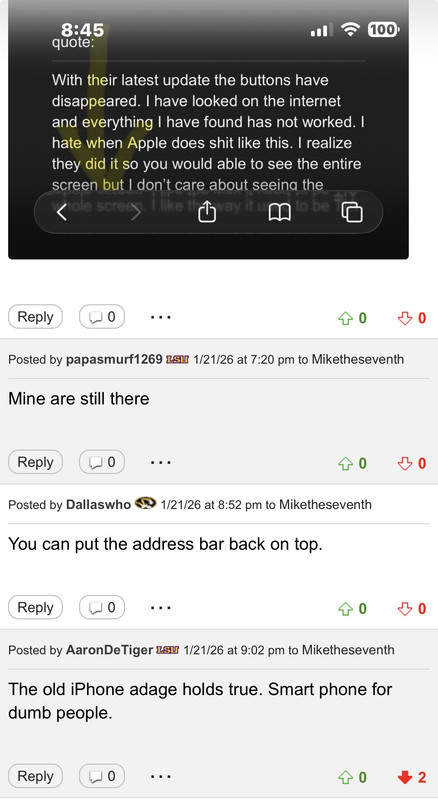
??I can point to. Where’s my buttons at a-hole
Posted on 1/22/26 at 3:14 pm to Miketheseventh
I explained how it works for me: “They are supposed to show back up whenever you drag thumb down on the screen just a little (making webpage scroll up back towards top of page a little).” Or tap the web address field at top or bottom of the screen. Also dragging down like above while keeping finger on the screen to make website scroll upwards or even a quick pull down or flick down of the website taking finger off the screen afterwards to scroll up should both work. You should be able to continuously drag thumb up and down on the screen a little making the web page scroll down & up in response and see the buttons and part of the bar disappear and reappear with same movement.
I don’t know of a way to make them always display, and I always need to do one of the above to make them redisplay when needed.
The only other things I can think off are:
-you have somehow locked in hiding the toolbar/search field on the websites you usually visit. I am not sure if that’s actually possible as it’s a temp setting that resets by just tapping top or bottom of screen (wherever your address/toolbar is) or restarting safari. Although unlikely maybe an extension if you have any installed could be causing the behavior. Outside of turning off all extensions to see if it helps I have no idea how to fix this if it’s the issue.
Or
-you are turned on reader mode for all websites and launch safari onto a site that supports it, but tapping top or bottom of screen or scrolling up like mentioned above should display them. That can be turned off in settings for safari, but again the back & forward buttons should still redisplay with actions mentioned.
If we are not on the same page, and you are seeking to permanently or constantly display the buttons all the time without any additional actions I don’t know of a solution and doubt there is one.
If the arrows are there when scrolling up or tapping address bar but you prefer buttons to show up better then that is a different conversation, but you can go to settings then accessibility then display & text size and turn on show borders, turn on increase contrast, and/or reduce transparency to better limit the glass look than using tinted under the display settings does.
Just in case you want to look at some of the settings and see if anything changes:
The below in bold instruction that hides the buttons and search field is not a permanent setting and resets tapping top or bottom if the screen (wherever you have the search/website bar).
But that is supposed to reset by tapping address bar at top of screen or at bottom of screen depending on where you have that displaying -> https://support.apple.com/guide/iphone/change-the-layout-ipha9ffea1a3/26/ios/26
I don’t know of a way to make them always display, and I always need to do one of the above to make them redisplay when needed.
The only other things I can think off are:
-you have somehow locked in hiding the toolbar/search field on the websites you usually visit. I am not sure if that’s actually possible as it’s a temp setting that resets by just tapping top or bottom of screen (wherever your address/toolbar is) or restarting safari. Although unlikely maybe an extension if you have any installed could be causing the behavior. Outside of turning off all extensions to see if it helps I have no idea how to fix this if it’s the issue.
Or
-you are turned on reader mode for all websites and launch safari onto a site that supports it, but tapping top or bottom of screen or scrolling up like mentioned above should display them. That can be turned off in settings for safari, but again the back & forward buttons should still redisplay with actions mentioned.
If we are not on the same page, and you are seeking to permanently or constantly display the buttons all the time without any additional actions I don’t know of a solution and doubt there is one.
If the arrows are there when scrolling up or tapping address bar but you prefer buttons to show up better then that is a different conversation, but you can go to settings then accessibility then display & text size and turn on show borders, turn on increase contrast, and/or reduce transparency to better limit the glass look than using tinted under the display settings does.
Just in case you want to look at some of the settings and see if anything changes:
The below in bold instruction that hides the buttons and search field is not a permanent setting and resets tapping top or bottom if the screen (wherever you have the search/website bar).
quote:https://support.apple.com/guide/iphone/customize-your-safari-settings-iphb3100d149/26/ios/26
Change the display controls for a website
You can hide the search field, switch to Reader, and more.
Go to the Safari app on your iPhone.
Tap the Page Menu button (icon with box & 2 lines underneath to the left of website address field), then do any of the following:
-Hide the search field: Tap the More button (…), then tap Hide Toolbar (tap the bottom of the screen to get it back).
-See a streamlined view of the webpage: Tap Show Reader (if available).
To return to the normal view, tap the Page Menu button, then tap Hide Reader.
But that is supposed to reset by tapping address bar at top of screen or at bottom of screen depending on where you have that displaying -> https://support.apple.com/guide/iphone/change-the-layout-ipha9ffea1a3/26/ios/26
This post was edited on 1/22/26 at 5:03 pm
Posted on 1/22/26 at 4:13 pm to dallastigers
Thanks for the reply. I don’t know what is going on with it. I tried to pull it down a little bit but that didn’t work. Like you said. I may have done something so they won’t show up because I previously have gone into the settings to try and fix this so I might have done something. I’ll let you know after I have time to go through my settings. I appreciate the help though
Posted on 1/22/26 at 5:47 pm to Miketheseventh
Probably should try DuckDuckGo or Brave browser and see if they have similar issues. They have to use WebKit, but they can can make the interface different along with allowing for more or less granular controls on that and ad blocking within the app.
Or just go with swiping “from the left edge of the screen to the right to go back and do the opposite to go forward.” But you obviously lose the ability to tap and hold the backward or forward button to see recent history in either direction and select one of them.
More extreme options are resetting all settings or erasing and reinstalling which could lose some stuff not in the cloud or saved elsewhere. Reinstalling from a backup could possibly just redo the same issue, but there is a chance if purely an iOS install bug that the reinstall fixes the bug and then using backup doesn’t recreate it while keeping things mostly as they are now.
Also for the full toolbar changes in iOS 26
https://www.cultofmac.com/how-to/full-safari-toolbar-iphone
The behavior I see and have been talking by scrolling up/dragging down or tapping the url/website address bar to get rest of toolbar to redisplay including the back & forward buttons has been around since 2014 which is why I feel like we are not quite on same page or if we are talking about same thing then you might have such a strange bug that you might to take it someone to look at it in person (or try the resetting & reinstalling)
https://osxdaily.com/2014/08/25/show-navigation-buttons-safari-iphone/
Or just go with swiping “from the left edge of the screen to the right to go back and do the opposite to go forward.” But you obviously lose the ability to tap and hold the backward or forward button to see recent history in either direction and select one of them.
More extreme options are resetting all settings or erasing and reinstalling which could lose some stuff not in the cloud or saved elsewhere. Reinstalling from a backup could possibly just redo the same issue, but there is a chance if purely an iOS install bug that the reinstall fixes the bug and then using backup doesn’t recreate it while keeping things mostly as they are now.
Also for the full toolbar changes in iOS 26
quote:
Missing Safari’s full Toolbar? Here’s how to bring it back to your iPhone.
In Safari, Apple downsized the browser toolbar with a minimal, content-first design. A back/forward button remains, as does the address bar and a more button. These dynamically adapt as you scroll, shrinking out of the way to prioritize web content, and then reappearing when needed.
However, certain controls got tucked behind menus rather than being always visible. That means getting to your bookmarks or tabs is an extra tap away, which is annoying if you use those things constantly.
New design vs. old design: Extra taps required
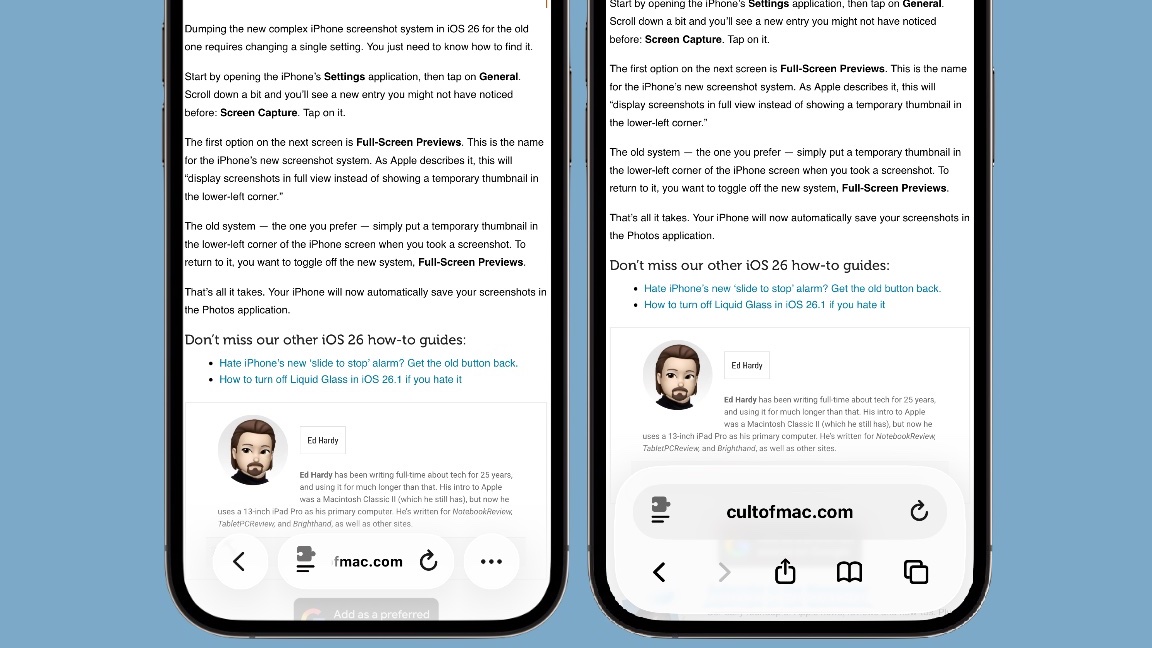
How to get the full Safari toolbar back on your iPhone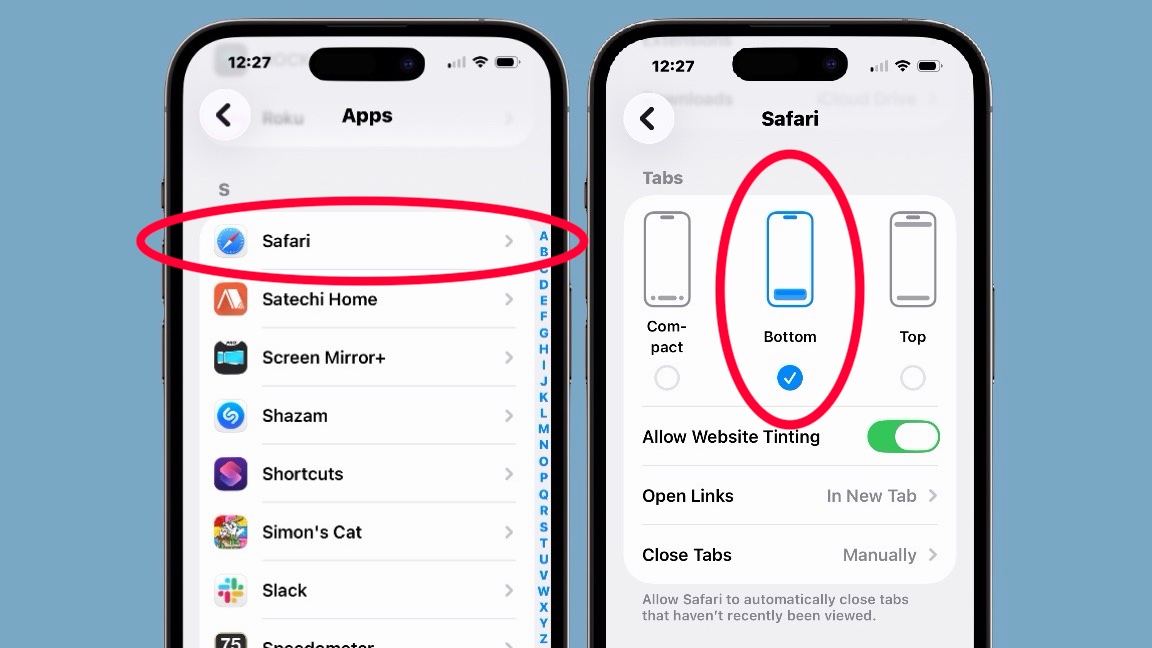
Start by opening the iPhone’s Settings app, then tap on Apps (it’s way at the bottom of the list). Then find Safari on the resulting alphabetical list of apps. Tap on it.
On the next screen, look for a section labeled Tabs. Under it, you’ll see three options: Compact, Bottom and Top.
Compact is the new version. The one you probably want is Bottom. That puts the iPhone’s Safari toolbar at the bottom of the screen, closer to your fingers, so it’s easier to tap on the controls. Alternatively, you can choose Top, which makes Safari look more like the Mac or iPad versions of the browser.
https://www.cultofmac.com/how-to/full-safari-toolbar-iphone
The behavior I see and have been talking by scrolling up/dragging down or tapping the url/website address bar to get rest of toolbar to redisplay including the back & forward buttons has been around since 2014 which is why I feel like we are not quite on same page or if we are talking about same thing then you might have such a strange bug that you might to take it someone to look at it in person (or try the resetting & reinstalling)
https://osxdaily.com/2014/08/25/show-navigation-buttons-safari-iphone/

Posted on 1/24/26 at 2:05 am to Miketheseventh
AI;
On recent iOS versions (especially iOS 26), Safari hides or shrinks the back/forward buttons depending on scroll and layout settings.
Common fixes:
1. Scroll or tap the address bar. If you scroll down, Safari hides the toolbar. Tap the URL bar or scroll slightly up — the back/forward buttons usually reappear.
2. Use swipe gestures. Swipe from the left edge of the screen to go back. Swipe from the right edge to go forward. This still works even when buttons are hidden.
3. Change Safari tab layout. Go to Settings > Safari > Tabs. Switch between Bottom and Top. This often restores a more visible toolbar with proper buttons. Tech sites report iOS 26 made the toolbar more compact by default.
4. Restart Safari or the phone. UI glitches after updates are common. A restart often brings the buttons back.
On recent iOS versions (especially iOS 26), Safari hides or shrinks the back/forward buttons depending on scroll and layout settings.
Common fixes:
1. Scroll or tap the address bar. If you scroll down, Safari hides the toolbar. Tap the URL bar or scroll slightly up — the back/forward buttons usually reappear.
2. Use swipe gestures. Swipe from the left edge of the screen to go back. Swipe from the right edge to go forward. This still works even when buttons are hidden.
3. Change Safari tab layout. Go to Settings > Safari > Tabs. Switch between Bottom and Top. This often restores a more visible toolbar with proper buttons. Tech sites report iOS 26 made the toolbar more compact by default.
4. Restart Safari or the phone. UI glitches after updates are common. A restart often brings the buttons back.
Posted on 1/24/26 at 12:05 pm to Miketheseventh
It appears that it works like you said unless I’m on TD. Thanks for your help

 Page 1 of 1


Popular
Back to top
 Follow TigerDroppings for LSU Football News