




- My Forums
- Tiger Rant
- LSU Recruiting
- SEC Rant
- Saints Talk
- Pelicans Talk
- More Sports Board
- Fantasy Sports
- Golf Board
- Soccer Board
- O-T Lounge
- Tech Board
- Home/Garden Board
- Outdoor Board
- Health/Fitness Board
- Movie/TV Board
- Book Board
- Music Board
- Political Talk
- Money Talk
- Fark Board
- Gaming Board
- Travel Board
- Food/Drink Board
- Ticket Exchange
- TD Help Board
Customize My Forums- View All Forums
- Show Left Links
- Topic Sort Options
- Trending Topics
- Recent Topics
- Active Topics
Started By
Message
Mobile mode
Posted on 12/24/25 at 2:10 pm


Posted on 12/24/25 at 2:10 pm
Reading TD on my phone used to be formatted for it...I feel like i hit something and now my phone is only pulling up the full web version which is a huge pain I. My arse and requiring me to zoom in on everything....did I break something or am I missing something??
 4
4

Posted on 12/24/25 at 2:18 pm to BrohemAlem11
scroll to the bottom of the page and choose either desktop or mobile, depending on which view you'd prefer...

Posted on 12/24/25 at 2:47 pm to BrohemAlem11
Circus posted this in another help thread, maybe it will help you:
Are you zooming? Tap on the “A” in the address bar
Are you zooming? Tap on the “A” in the address bar
Posted on 12/24/25 at 4:34 pm to pussywillows
That did it! Thanks

Posted on 2/9/26 at 12:13 pm to BrohemAlem11
Not sure what I did but now everything is all zoomed out on my phone and I cannot figure out what to do to fix it.
Cannot find a desktop/mobile tab, and nothing in the settings.
Would love some guidance on this; yes, I'm a senior but not a total moron on these sorts of things.
Thanks.
Cannot find a desktop/mobile tab, and nothing in the settings.
Would love some guidance on this; yes, I'm a senior but not a total moron on these sorts of things.
Thanks.
Posted on 2/17/26 at 6:40 am to RummelTiger
quote:
Circus posted this in another help thread, maybe it will help you:
Are you zooming? Tap on the “A” in the address bar
Where is this "A" that you speak of??
Posted on 2/17/26 at 5:08 pm to craynagin
quote:
Where is this "A" that you speak of??
Looks like it's since changed with the latest update maybe...if on an iPhone, at the bottom of the screen where the url is, there's a icon with a square and a couple of lines under it. Click on that and you will see a section that has a small A to the left and a large A to the right. That might help you change the font size if it has been changed.
As far as seeing mobile/desktop...it's down at the very bottom - next to View In.
Posted on 2/17/26 at 8:21 pm to RummelTiger
Rummy... thanks for responding.
Unfortunately I have a pretty old Samsung S9 (no pics). Can't find the font size tab or the desktop/mobile tab... I'm pretty much at a loss. Have no trouble on my laptop or PC, just my phone.
Have sent a few emails asking for suggestions but the last 2-3 have been unanswered. I wonder if there was a recent site update or something that caused the problem. All my other bookmarks are normal.
Like many others, I come here all the time, but now have to zoom in from a desktop view default to a mobile view, and none of the text wraps.
Thanks again.
Unfortunately I have a pretty old Samsung S9 (no pics). Can't find the font size tab or the desktop/mobile tab... I'm pretty much at a loss. Have no trouble on my laptop or PC, just my phone.
Have sent a few emails asking for suggestions but the last 2-3 have been unanswered. I wonder if there was a recent site update or something that caused the problem. All my other bookmarks are normal.
Like many others, I come here all the time, but now have to zoom in from a desktop view default to a mobile view, and none of the text wraps.
Thanks again.
Posted on 2/17/26 at 8:25 pm to craynagin
Are you able to log out?
Maybe you can log out, then log back in?
Sorry, man...
I don't think Kalunda has made any recent changes that would have an effect like that, but they don't trust me to buy the office toilet paper, much less involve me in site updates.
Hope you're able to figure it out!
Maybe you can log out, then log back in?
Sorry, man...
I don't think Kalunda has made any recent changes that would have an effect like that, but they don't trust me to buy the office toilet paper, much less involve me in site updates.
Hope you're able to figure it out!


Posted on 2/21/26 at 9:42 pm to BrohemAlem11
Any solution to this? It’s bull shite. Stuck in desktop mode on my iPhone. The only damned option when scrolling down is “dark mode”. Tried requesting mobile site and still get the same bs desktop view.
This post was edited on 2/21/26 at 9:44 pm

Posted on 2/22/26 at 7:58 pm to Ldogg123
Are you zooming in? Zoom out and you should see the link in the footer again
Posted on 2/22/26 at 10:07 pm to Circus Child
Here’s what I’ve got with no zoom:
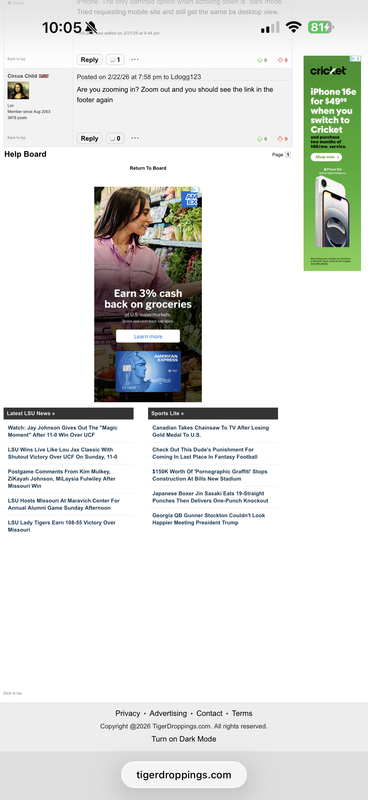
Posted on 2/23/26 at 7:44 am to Ldogg123
what iphone and ios is this?
Posted on 2/23/26 at 8:08 am to Circus Child
17 pro max iOS 26.3

Posted on 2/23/26 at 6:29 pm to craynagin
I too am experiencing the "zoomed in" issue. Doesn't matter what text size I select on my phone's browser settings, I have to zoom out to get all of the page content.
Not having this issue with any other pages.
Samsung S25 ultra
Not having this issue with any other pages.
Samsung S25 ultra
Posted on 2/23/26 at 8:36 pm to Shorty_price
Did this start today or been a problem for a while?
Posted on 2/23/26 at 8:37 pm to Circus Child
This started today.
Posted on 2/23/26 at 9:14 pm to Shorty_price
Are you using Samsung browser or Chrome? The issue does not go away if you reset text size to default? Is there a display size/zoom setting that you might have in place? Is this all pages or a specific page.
Posted on 2/23/26 at 9:24 pm to Circus Child
I use Samsung browser. The site runs fine in chrome. Text size adjustments have no effect on the problem. The issue is with TD / SECRant. All other websites appear normal.

 Page 1 of 2

Popular
Back to top
 Follow TigerDroppings for LSU Football News