




- My Forums
- Tiger Rant
- LSU Recruiting
- SEC Rant
- Saints Talk
- Pelicans Talk
- More Sports Board
- Winter Olympics
- Fantasy Sports
- Golf Board
- Soccer Board
- O-T Lounge
- Tech Board
- Home/Garden Board
- Outdoor Board
- Health/Fitness Board
- Movie/TV Board
- Book Board
- Music Board
- Political Talk
- Money Talk
- Fark Board
- Gaming Board
- Travel Board
- Food/Drink Board
- Ticket Exchange
- TD Help Board
Customize My Forums- View All Forums
- Show Left Links
- Topic Sort Options
- Trending Topics
- Recent Topics
- Active Topics
Started By
Message
re: Late 2011 Macbook Pro continued issues-Need advice
Posted on 9/28/15 at 8:08 pm to tiggerthetooth

Posted on 9/28/15 at 8:08 pm to tiggerthetooth
If it were me I'd return it. I've read several stories about Yosemite being a pain in the arse to use with non owc sad's and even bricking a few computers.
 1
1


Posted on 9/28/15 at 8:11 pm to shimanocurado
Well, Im going to try this chord that I ordered, and then I will consider that as a response. Thanks for the info.

Posted on 9/28/15 at 9:41 pm to shimanocurado
He's trying to install Lion anyway, based on his previous posts. Don't complicate this unnecessarily until he figures out what's causing the drive not to be recognized. The system not recognizing the drive has nothing to do with the TRIM support issue you're referring to.
Posted on 10/2/15 at 11:00 am to ILikeLSUToo
This is getting dragged out pretty long. So the first order I made ended up having a delivery date of October 23rd, so within about 5 hours I cancelled that order and ordered another with "expedited shipping" and that seems to a completely useless option seeing as the item is coming in the mail a week after I ordered it.
I can file a claim with Amazon for a bit of a refund on the delayed shipping, correct?
There was supposedly a "processing error" during the shipment in Florida, so its coming in next Tuesday (10/6) and I had ordered it Tues (10/29).
I can file a claim with Amazon for a bit of a refund on the delayed shipping, correct?
There was supposedly a "processing error" during the shipment in Florida, so its coming in next Tuesday (10/6) and I had ordered it Tues (10/29).
Posted on 10/3/15 at 7:06 am to tiggerthetooth
There is a recall program on some 2011 15" MacBook pros that won't boot up. They have been replacing MLB under this program for free.
Bring it to Nortech and let them repair it.
Bring it to Nortech and let them repair it.
Posted on 10/3/15 at 11:55 am to XxxSpooky1
The recall is unrelated to his issues.
Posted on 10/3/15 at 2:25 pm to ILikeLSUToo
It is with GREAT pleasure, I am able to say that my Macbook Pro successfully recognized and booted from the Hard Drive the instant my new HD cable was installed. The cable came sooner than expected, and it seems the amazon tracker was off. I am posting as we speak from said Macbook Pro. I am still being very cautious. Last question before this case is officially closed.
If you look at the picture below, on the white plastic piece of the hard drive cable, there is a little yellow/orange tab that slips under the piece in the hard drive cable.
I was not sent the entire hard drive bracket, but I did manage to slide the piece from the hard drive bracket under the cable.
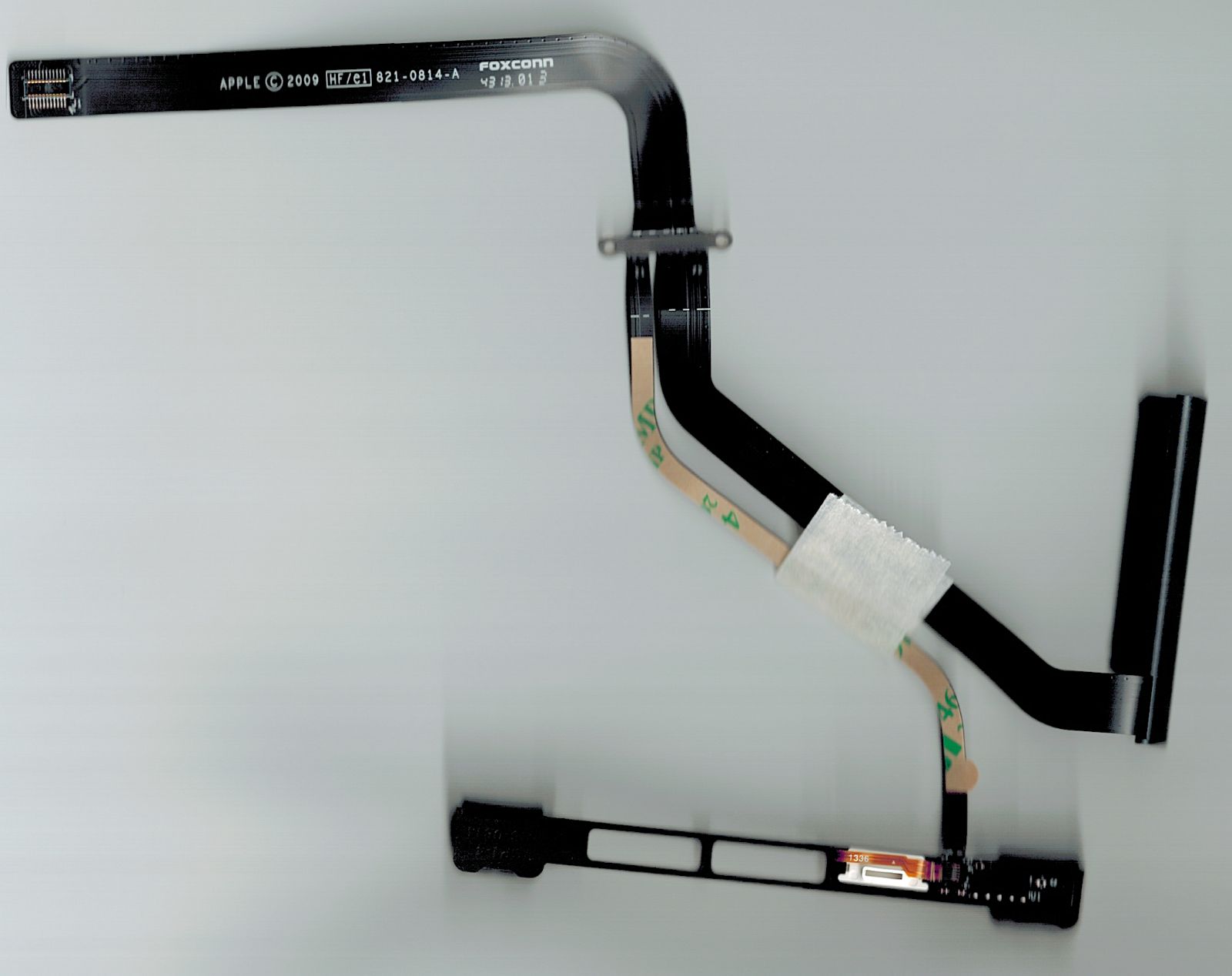
That piece seems rather susceptible to being jarred...or it just seems fragile....is that piece okay? I guess its been in that position before, but I just want to make sure.
If you look at the picture below, on the white plastic piece of the hard drive cable, there is a little yellow/orange tab that slips under the piece in the hard drive cable.
I was not sent the entire hard drive bracket, but I did manage to slide the piece from the hard drive bracket under the cable.
That piece seems rather susceptible to being jarred...or it just seems fragile....is that piece okay? I guess its been in that position before, but I just want to make sure.
Posted on 10/3/15 at 2:52 pm to tiggerthetooth
Looking at the iFixIt teardown, that cable appears to be an IR sensor to use with an Apple remote. Just a design decision to make it part of the hard drive cable and integrated with the hard drive assembly. If you don't use the remote, I suppose it shouldn't matter if that comes loose.
Glad it's fixed, but I wonder if something has been killing those hard drive cables, or if the cables weren't replaced at all when you had warranty service. If the latter, it's pretty pathetic that an Apple technician never tested the hard drives, especially the second time.
Glad it's fixed, but I wonder if something has been killing those hard drive cables, or if the cables weren't replaced at all when you had warranty service. If the latter, it's pretty pathetic that an Apple technician never tested the hard drives, especially the second time.
Posted on 10/3/15 at 7:10 pm to ILikeLSUToo
quote:
Glad it's fixed, but I wonder if something has been killing those hard drive cables, or if the cables weren't replaced at all when you had warranty service. If the latter, it's pretty pathetic that an Apple technician never tested the hard drives, especially the second time.
I'm not sure. They replaced that part multiple times, and at one point I was thinking that it might have been the battery that kept causing the same issue. They never even repaired the computer to a reasonable level where it lasted a year between repairs.
They replaced the motherboard and supposedly replaced that cable twice.
This post was edited on 10/3/15 at 10:14 pm
Posted on 10/3/15 at 9:51 pm to tiggerthetooth
Could overheating be an issue with that particular chord causing issues? I am on my computer A LOT, on the bed, and using it for school/work etc.
Could it have been that my computer was being used so much, coupled with the fact that it was often pretty hot, that might have caused not just the HDD to go down, but also the HD cable? They were just occurring interchangeably?
ETA: SSD looks to produce a lot less heat, and uses a lot less energy....so maybe it'll solve several problems along with being a more reliable HD.
Could it have been that my computer was being used so much, coupled with the fact that it was often pretty hot, that might have caused not just the HDD to go down, but also the HD cable? They were just occurring interchangeably?
ETA: SSD looks to produce a lot less heat, and uses a lot less energy....so maybe it'll solve several problems along with being a more reliable HD.
This post was edited on 10/3/15 at 10:16 pm

Posted on 10/3/15 at 10:21 pm to tiggerthetooth
Lastly, should i download OS X El Capitan? Will it do any harm?
Posted on 10/3/15 at 10:31 pm to tiggerthetooth
Very possible. The main sources of heat seem to be far enough away from that cable, but it doesn't mean the overall temps inside the chassis aren't a contributing factor. Hard drives can generate some heat, but their general safe operating conditions aren't hot enough to necessarily damage something. Reading a few random google results regarding MBP hard dive cables, it sounds like there may have just been bad batches of cables in MacBooks from around that generation, but there are plenty of others with older and newer models citing the same issue as well.
Also, it occurs to me that since your Macbook Pro was probably part of the recall due to overheating GPUs, that motherboard replacement in 2014 was probably Apple fulfilling the terms of the recall. And I said previously that Apple may not have replaced the cable each time, but I realize now that if they hadn't, the new hard drive wouldn't have worked, unless they were simply reseating the cable that was slowly becoming damaged over time (possibly due to heat), and it finally just gave out completely. Several possibilities here -- heat or something else damaging the cables over time, defect in the cables causing premature failure, or hell, maybe the hard drive really did fail one of those times, and then the cable failed later.
If the cable fails again in a year, all in all it's not the worst thing in the world to have to spend $40 a year to keep an otherwise perfectly functional laptop in service, particularly if the idea of dropping another $1k+ on a new Mac doesn't thrill you.
I'm not a regular user of Macs, so I'm unfamiliar with how new OS X revisions affect the performance of older hardware, but like Windows 7/8/10, OS X seems pretty good about reasonably supporting low-end specs, and your laptop is around the middle of the pack according to the compatible Mac list, so you're probably safe. In addition, El Capitan apparently doesn't have the issue with third-party TRIM support another poster was referring to above (the issue being that third-party TRIM enabling was not allowed unless you disabled kext signing). Read here: LINK
Garbage collection built into SSDs functions so well nowadays that TRIM is not absolutely necessary, but since you can now do it quickly and without disabling kernel-level security, might as well.
Also, it occurs to me that since your Macbook Pro was probably part of the recall due to overheating GPUs, that motherboard replacement in 2014 was probably Apple fulfilling the terms of the recall. And I said previously that Apple may not have replaced the cable each time, but I realize now that if they hadn't, the new hard drive wouldn't have worked, unless they were simply reseating the cable that was slowly becoming damaged over time (possibly due to heat), and it finally just gave out completely. Several possibilities here -- heat or something else damaging the cables over time, defect in the cables causing premature failure, or hell, maybe the hard drive really did fail one of those times, and then the cable failed later.
If the cable fails again in a year, all in all it's not the worst thing in the world to have to spend $40 a year to keep an otherwise perfectly functional laptop in service, particularly if the idea of dropping another $1k+ on a new Mac doesn't thrill you.
quote:
Lastly, should i download OS X El Capitan? Will it do any harm?
I'm not a regular user of Macs, so I'm unfamiliar with how new OS X revisions affect the performance of older hardware, but like Windows 7/8/10, OS X seems pretty good about reasonably supporting low-end specs, and your laptop is around the middle of the pack according to the compatible Mac list, so you're probably safe. In addition, El Capitan apparently doesn't have the issue with third-party TRIM support another poster was referring to above (the issue being that third-party TRIM enabling was not allowed unless you disabled kext signing). Read here: LINK
Garbage collection built into SSDs functions so well nowadays that TRIM is not absolutely necessary, but since you can now do it quickly and without disabling kernel-level security, might as well.
This post was edited on 10/3/15 at 10:54 pm
Posted on 10/3/15 at 10:52 pm to ILikeLSUToo
quote:
If the cable fails again in a year, all in all it's not the worst thing in the world to have to spend $40 a year to keep an otherwise perfectly functional laptop in service, particularly if the idea of dropping another $1k+ on a new Mac doesn't thrill you.
Funny you mention this, because i was just thinking the exact same thing today. I was thinking about ordering a couple of them just to have them in supply just in case it does happen again.
This post was edited on 10/3/15 at 10:54 pm
Posted on 10/3/15 at 10:54 pm to tiggerthetooth
Yep, see my edit above about El Capitan.
Posted on 10/3/15 at 11:04 pm to ILikeLSUToo
quote:
Yep, see my edit above about El Capitan.
Saw it. Thanks again. You were definitely a lifesaver on this one, and I actually learned a lot about this stuff in the process which will really weigh heavily when purchasing my next computer (I'm thinking I'd probably get a Toshiba next time around). Just crossing my fingers going forward.


Posted on 10/3/15 at 11:20 pm to tiggerthetooth
Glad to help. Ultimately, the SSD purchase was technically unnecessary, but in time I suspect you'll never want to do without one again.
Posted on 10/4/15 at 12:23 am to ILikeLSUToo
quote:
Glad to help. Ultimately, the SSD purchase was technically unnecessary, but in time I suspect you'll never want to do without one again.
I had my eye on an SSD awhile back. In fact, about the third time I brought my MBP in, I straight up asked the guy at what point do they just replace my HDD with an SSD?
He said there would never be a point. I was a bit PO'd, and eventually they put in $700 for the mother board, and related HDD replacement parts. Oh well.
Posted on 10/4/15 at 11:26 am to ILikeLSUToo
quote:
Glad to help. Ultimately, the SSD purchase was technically unnecessary, but in time I suspect you'll never want to do without one again.
What if I want to add RAM? I think I'm running on 4 GB RAM as of now.

This post was edited on 10/4/15 at 11:33 am
Posted on 10/4/15 at 11:37 am to tiggerthetooth
If you're coming close to using all 4GB under normal operations, that might be a worthwhile upgrade. Just remember that RAM does nothing unless you use it.
This post was edited on 10/4/15 at 11:38 am
Posted on 10/4/15 at 11:49 am to ILikeLSUToo
quote:
If you're coming close to using all 4GB under normal operations, that might be a worthwhile upgrade. Just remember that RAM does nothing unless you use it.
How do I figure out how much I am currently using? I'm looking at the System Report.
Looks like it can support up to 8GB.


This post was edited on 10/4/15 at 11:52 am

 Page 3 of 4

Popular
Back to top
 Follow TigerDroppings for LSU Football News