




 2
2


- My Forums
- Tiger Rant
- LSU Recruiting
- SEC Rant
- Saints Talk
- Pelicans Talk
- More Sports Board
- Fantasy Sports
- Golf Board
- Soccer Board
- O-T Lounge
- Tech Board
- Home/Garden Board
- Outdoor Board
- Health/Fitness Board
- Movie/TV Board
- Book Board
- Music Board
- Political Talk
- Money Talk
- Fark Board
- Gaming Board
- Travel Board
- Food/Drink Board
- Ticket Exchange
- TD Help Board
Customize My Forums- View All Forums
- Show Left Links
- Topic Sort Options
- Trending Topics
- Recent Topics
- Active Topics
Started By
Message
Raspberry Pi emulation revisited
Posted on 7/23/16 at 2:51 pm
Posted on 7/23/16 at 2:51 pm
I kneaux there have been threads on this in the past, but how easy/hard is it to set up a Raspberry Pi to play Atari or NES games?
Posted on 7/23/16 at 3:01 pm to Bestbank Tiger
I can post my build later but it is super easy. Can purchase everything off Amazon for under $70 bucks.
1. Pi (Bundle w/ wall wart)
2. SD Card
3. Encloser
4. Get a USB SNES controller instead of NES. You will end up downloading a lot of SNES ROMs also. Plus you can use the SNES controller for Gameboy games like Pokemon.
Emulator Installer
1. Pi (Bundle w/ wall wart)
2. SD Card
3. Encloser
4. Get a USB SNES controller instead of NES. You will end up downloading a lot of SNES ROMs also. Plus you can use the SNES controller for Gameboy games like Pokemon.
Emulator Installer
Posted on 7/23/16 at 4:23 pm to LSU Coyote
Thanks!! Can you switch out controllers based on the system? Like a joystick for Atari and an SNES for Super Nintendo?
Posted on 7/23/16 at 4:57 pm to Bestbank Tiger
Yes but find its difficult. Once you get a controller set up to a usb port it's better to not switch it. It's buggy usually and sometimes I would have to fresh install.
Reason I said just get the SNES controller and use it for Sega, NES, SNES and Gameboy titles.
Reason I said just get the SNES controller and use it for Sega, NES, SNES and Gameboy titles.
Posted on 7/23/16 at 5:11 pm to LSU Coyote
Thats lame. I would want the proper controller for each system.
Posted on 7/23/16 at 6:04 pm to Bestbank Tiger
very easy, read about it here last week, ordered it, had mame, nes, snes, n64 and sega on it same day it arrived.
Posted on 7/23/16 at 6:28 pm to Mr Gardoki
quote:
Thats lame. I would want the proper controller for each system
The usb controllers are buggy because firmware for these knockoffs really suck.
I rather use the SNES anyway. IMO it's the better controller. What benefit do you get from using the a Sega or NES controller?
Posted on 7/23/16 at 6:30 pm to LSU Coyote
If rather use the nes controller for the nes games for a more authentic experience. That's why I'm buying a mini controller when it comes out.
This post was edited on 7/23/16 at 6:31 pm
Posted on 7/23/16 at 6:37 pm to Mr Gardoki
Yeah I guess.
I just ditched those square ones once the new NES released. So authentic to me is actually these. But it was those rounded non-square ones.

So stopped using the square ones once these came out.
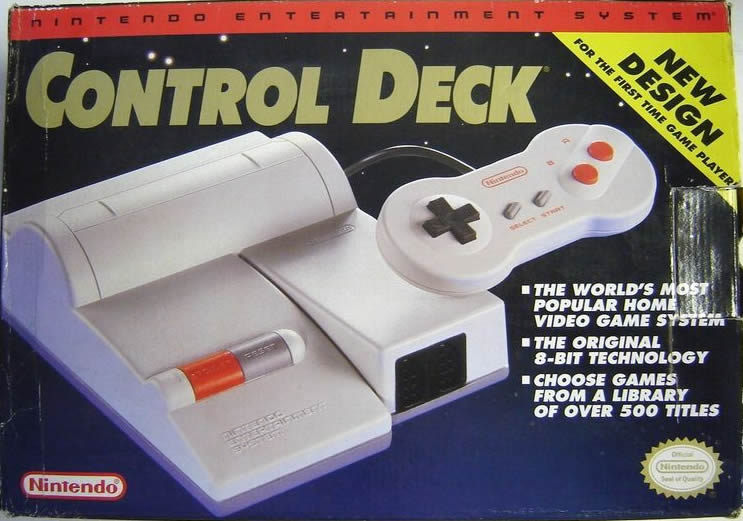
I just ditched those square ones once the new NES released. So authentic to me is actually these. But it was those rounded non-square ones.
So stopped using the square ones once these came out.
This post was edited on 7/23/16 at 6:42 pm
Posted on 7/23/16 at 6:48 pm to LSU Coyote
I'll never understand why Nintendo didn't release classic controllers for their virtual console. I usually don't understand Nintendo though.
Posted on 7/23/16 at 7:10 pm to LSU Coyote
quote:
The usb controllers are buggy because firmware for these knockoffs really suck.
I have an NES controller I use on my PC. Works well for Super Tecmo, Zelda, etc. But not quite for Tyson Punchout. I've beaten Tyson on a real NES and I can't get past Soda Popinski on an emulator. Timing might be too important for Punchout.
Posted on 7/23/16 at 7:13 pm to Bestbank Tiger
quote:
I have an NES controller I use on my PC. Works well for Super Tecmo, Zelda, etc. But not quite for Tyson Punchout. I've beaten Tyson on a real NES and I can't get past Soda Popinski on an emulator. Timing might be too important for Punchout.
There is lag. Use a PS2 adapter so the input is analog and not digital.
Edt: Also latency from your monitor, put in gaming mode.
This post was edited on 7/23/16 at 7:14 pm

 Page 1 of 1



Popular

Back to top
 Follow TigerDroppings for LSU Football News