




- My Forums
- Tiger Rant
- LSU Recruiting
- SEC Rant
- Saints Talk
- Pelicans Talk
- More Sports Board
- Fantasy Sports
- Golf Board
- Soccer Board
- O-T Lounge
- Tech Board
- Home/Garden Board
- Outdoor Board
- Health/Fitness Board
- Movie/TV Board
- Book Board
- Music Board
- Political Talk
- Money Talk
- Fark Board
- Gaming Board
- Travel Board
- Food/Drink Board
- Ticket Exchange
- TD Help Board
Customize My Forums- View All Forums
- Show Left Links
- Topic Sort Options
- Trending Topics
- Recent Topics
- Active Topics
Started By
Message
Google Assistant/Google Cast Help Needed
Posted on 8/23/18 at 8:50 am

Posted on 8/23/18 at 8:50 am
So I'm pretty much a Google junkie. I have Chromecasts on all my TV's and several google homes or minis throughout my house. Trying to figure out the best way to stream music outside by the pool area. Do I have to get a receiver with speakers and plug a chromecast into it or are there other options? Any help is appreciated. Thanks.
 2
2

Posted on 8/23/18 at 8:58 am to rhmyhand
I think maybe getting an outdoor speaker and plugging in the Chromecast Audio device would work or just bringing a Google Home outside.
Google Store - Chromecast Audio
Google Store - Chromecast Audio

Posted on 8/23/18 at 10:30 am to rhmyhand
I have one of these (which sounds amazing) in my kitchen, another in my upstairs loft, and another on the patio (I bring it in during bad weather).
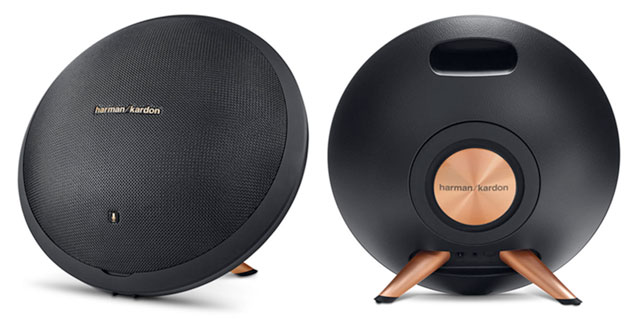
I have a google home mini in each of those areas that I set to output through the Harmon Kardons in the google home app.
Hope that helps.
ETA: Found an article that breaks down how to do this.
LINK
I have a google home mini in each of those areas that I set to output through the Harmon Kardons in the google home app.
Hope that helps.
ETA: Found an article that breaks down how to do this.
quote:
Google has heard your complaints. Starting today, you can hook up a Bluetooth speaker to your Google Home without needing to purchase a separate Chromecast dongle. Once you pair a compatible Bluetooth speaker with one of your Homes, you can make it the default for playing music, so you won’t have to fiddle with controls or tell your Home where to send your favorite songs.
Pairing a speaker is simple. Here's how to do it:
Make sure your Bluetooth speaker is in pairing mode.
Head to the Devices tab inside the Home app on your phone.
Tap Settings in the overflow menu.
Scroll down to Default music speaker and tap Pair Bluetooth Speaker.
Tap the name of the speaker you want to pair your Google Home with.
Once the link is established, you can then go back a screen to make sure it is set as a default for whenever music is played.
LINK
This post was edited on 8/23/18 at 10:37 am

Posted on 8/23/18 at 11:00 am to Green Chili Tiger
Yep. I don't have that speaker, but a Bose bluetooth speaker I use outside and can control with Google Homes. Though outside I just use the phone to control the music.
Posted on 8/23/18 at 1:16 pm to Green Chili Tiger
quote:
I have one of these (which sounds amazing) in my kitchen, another in my upstairs loft, and another on the patio (I bring it in during bad weather).
Those things are $500 each!


 Page 1 of 1


Popular
Back to top
 Follow TigerDroppings for LSU Football News