




 1
1



- My Forums
- Tiger Rant
- LSU Recruiting
- SEC Rant
- Saints Talk
- Pelicans Talk
- More Sports Board
- Fantasy Sports
- Golf Board
- Soccer Board
- O-T Lounge
- Tech Board
- Home/Garden Board
- Outdoor Board
- Health/Fitness Board
- Movie/TV Board
- Book Board
- Music Board
- Political Talk
- Money Talk
- Fark Board
- Gaming Board
- Travel Board
- Food/Drink Board
- Ticket Exchange
- TD Help Board
Customize My Forums- View All Forums
- Show Left Links
- Topic Sort Options
- Trending Topics
- Recent Topics
- Active Topics
Started By
Message
Subwoofer not working w/ new amp
Posted on 5/18/26 at 3:24 pm
Posted on 5/18/26 at 3:24 pm
I recently upgraded my amp to a Yamaha RX A6A and my SVS sub wont work.
I am using the bluetooth wireless bridges but tt's not the sub nor the connections because when I touch the outside ring of the output, I get feedback. It's something in my Yamaha settings and I cannot figure it out.
Set up the front speakers to small.
Set up the Sub
Now I haven't done my YPAO yet but I don't think that shoulder matter?
When I test the speakers in the test settings, all speakers but sub test fine.
Thoughts?
I am using the bluetooth wireless bridges but tt's not the sub nor the connections because when I touch the outside ring of the output, I get feedback. It's something in my Yamaha settings and I cannot figure it out.
Set up the front speakers to small.
Set up the Sub
Now I haven't done my YPAO yet but I don't think that shoulder matter?
When I test the speakers in the test settings, all speakers but sub test fine.
Thoughts?
This post was edited on 5/18/26 at 8:52 pm
Posted on 5/18/26 at 4:07 pm to Neauxla
Here's some AI.
1. Verify the Yamaha actually sees a subwoofer
On the Yamaha:
Setup ? Speaker ? Configuration
Make sure:
Subwoofer = Use
Fronts = Small
Crossover = 80Hz (good starting point)
If “Subwoofer” somehow says “None,” the AVR will never send test tones or bass.
2. Use the correct output jack
The RX-A8A has multiple sub outputs.
He should try:
SUB1 only
not SUB2
not Zone outputs
A lot of Yamaha owners accidentally use the wrong RCA out.
3. Bypass the wireless bridge temporarily
This is the biggest suspect.
Tell him:
Run a regular RCA cable directly from SUB1 on the Yamaha to the SVS sub input just for testing.
Because many wireless sub kits:
don’t wake properly with Yamaha low-level LFE voltage,
hate auto-standby,
or have grounding issues.
If the sub suddenly works wired, the receiver is fine and the wireless bridge is the culprit.
4. Turn OFF “Extra Bass”
Yamaha menu:
Setup ? Speaker ? Configuration ? Extra Bass = Off
Sometimes Yamaha routing gets weird before YPAO.
5. Run YPAO
Oddly enough, on some Yamahas the sub behaves inconsistently before calibration.
Tell him:
plug in mic
run full YPAO
then recheck test tones
6. Increase sub trim temporarily
Go to:
Setup ? Speaker ? Levels
Raise subwoofer level to like:
+6dB to +10dB temporarily
Wireless kits sometimes need more signal voltage to trigger.
7. Check SVS settings
On the sub itself:
Low pass filter = Disabled / LFE
Phase = 0
Auto standby = OFF temporarily
Gain = around 1/3 to 1/2
Most likely diagnosis
Honestly, based on the symptoms:
The wireless bridge isn’t waking up from the Yamaha’s sub output signal.
That happens a LOT with Yamaha + wireless kits.
The direct wired RCA test will identify it in 30 seconds.
1. Verify the Yamaha actually sees a subwoofer
On the Yamaha:
Setup ? Speaker ? Configuration
Make sure:
Subwoofer = Use
Fronts = Small
Crossover = 80Hz (good starting point)
If “Subwoofer” somehow says “None,” the AVR will never send test tones or bass.
2. Use the correct output jack
The RX-A8A has multiple sub outputs.
He should try:
SUB1 only
not SUB2
not Zone outputs
A lot of Yamaha owners accidentally use the wrong RCA out.
3. Bypass the wireless bridge temporarily
This is the biggest suspect.
Tell him:
Run a regular RCA cable directly from SUB1 on the Yamaha to the SVS sub input just for testing.
Because many wireless sub kits:
don’t wake properly with Yamaha low-level LFE voltage,
hate auto-standby,
or have grounding issues.
If the sub suddenly works wired, the receiver is fine and the wireless bridge is the culprit.
4. Turn OFF “Extra Bass”
Yamaha menu:
Setup ? Speaker ? Configuration ? Extra Bass = Off
Sometimes Yamaha routing gets weird before YPAO.
5. Run YPAO
Oddly enough, on some Yamahas the sub behaves inconsistently before calibration.
Tell him:
plug in mic
run full YPAO
then recheck test tones
6. Increase sub trim temporarily
Go to:
Setup ? Speaker ? Levels
Raise subwoofer level to like:
+6dB to +10dB temporarily
Wireless kits sometimes need more signal voltage to trigger.
7. Check SVS settings
On the sub itself:
Low pass filter = Disabled / LFE
Phase = 0
Auto standby = OFF temporarily
Gain = around 1/3 to 1/2
Most likely diagnosis
Honestly, based on the symptoms:
The wireless bridge isn’t waking up from the Yamaha’s sub output signal.
That happens a LOT with Yamaha + wireless kits.
The direct wired RCA test will identify it in 30 seconds.
Posted on 5/18/26 at 4:30 pm to FnTigers
Guess I'll see if I still have a long cable but I got sub feeback when I touched the outside of the output jack.
Will run YPAO.
Pretty sure I'm in Sub 1, not Sub 2.
Will check the extra bass.

Will run YPAO.
Pretty sure I'm in Sub 1, not Sub 2.
Will check the extra bass.
Posted on 5/18/26 at 5:09 pm to Neauxla
Keep us posted on the fix!
Posted on 5/18/26 at 8:05 pm to FnTigers
I didn’t have a cable to run to do it directly but I ran YPAO and it detected sub when I did that but it still won’t detect it on test tone or when playing anything.
Look above the screen, it has the large bubble selected but I keep selecting small in the configuration tab but it doesn’t change the bubble up top. Thats gotta be it but I cannot figure out how to change that
[url=LINK ]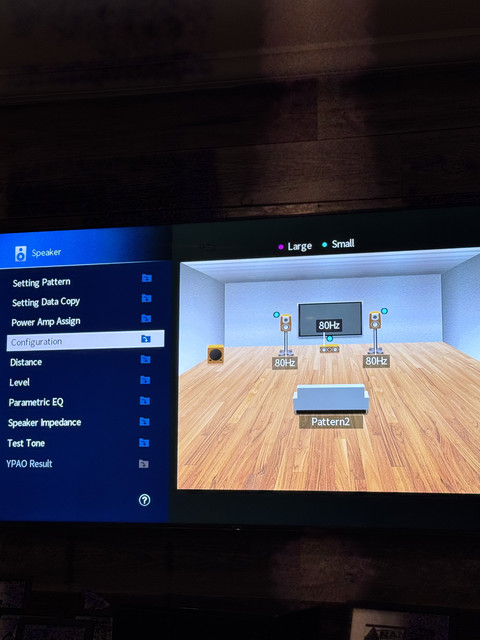 [/url]
[url=LINK ]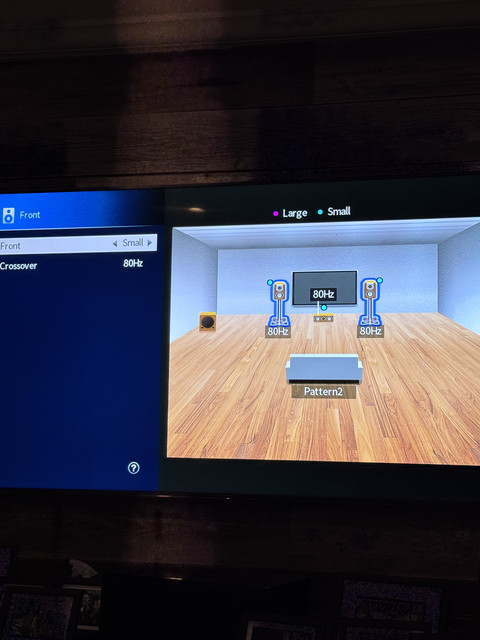 [/url]
Look above the screen, it has the large bubble selected but I keep selecting small in the configuration tab but it doesn’t change the bubble up top. Thats gotta be it but I cannot figure out how to change that
[url=LINK ]
[/url] [url=LINK ]
[/url] Posted on 5/18/26 at 8:40 pm to Neauxla
You’re close — YPAO seeing the sub means the receiver CAN communicate with it.
The issue now is bass routing.
Go check these EXACT settings:
1. Turn OFF “Extra Bass”
This is the big one on Yamahas.
Go to:
Setup ? Speaker ? Configuration ? Extra Bass
Set:
OFF
If Extra Bass is on, Yamaha can do weird full-range routing and sometimes effectively starve the sub output.
2. Set Bass Out correctly
Go to:
Setup ? Speaker ? Configuration ? Bass Out
Set it to:
SWFR
NOT:
Front
Both
If it’s set to Front or Both, the AVR may keep bass in the mains.
3. Ignore the bubble colors at top
Those dots at the top are NOT live indicators.
The actual important part is:
Front = Small
Crossover = 80Hz
And your second screenshot already shows that correctly.
So don’t chase the purple/blue dots.
4. Try changing listening mode
Very important.
If he’s playing:
Stereo
Direct
Pure Direct
…the sub may NOT engage.
Tell him to try:
Dolby Surround
Standard
Movie
Multi Channel Stereo
Yamaha disables bass management in some direct modes.
This especially explains:
no bass during content
even though YPAO sees the sub
5. Test with actual LFE content
YouTube stereo videos won’t reliably trigger the sub.
Tell him to:
play a movie
or use a bass test tone video
or use Yamaha’s internal speaker test AFTER changing Bass Out
6. Wireless adapter still suspicious
Even if YPAO detected it, the wireless kit can still fail during normal playback because:
LFE voltage is low
auto standby doesn’t trigger
signal threshold too weak
So:
turn OFF auto standby on SVS
raise sub gain to halfway
raise AVR sub trim to +6dB temporarily
Most likely fix:
Bass Out is set wrong OR he’s listening in Pure Direct/Stereo mode.
The issue now is bass routing.
Go check these EXACT settings:
1. Turn OFF “Extra Bass”
This is the big one on Yamahas.
Go to:
Setup ? Speaker ? Configuration ? Extra Bass
Set:
OFF
If Extra Bass is on, Yamaha can do weird full-range routing and sometimes effectively starve the sub output.
2. Set Bass Out correctly
Go to:
Setup ? Speaker ? Configuration ? Bass Out
Set it to:
SWFR
NOT:
Front
Both
If it’s set to Front or Both, the AVR may keep bass in the mains.
3. Ignore the bubble colors at top
Those dots at the top are NOT live indicators.
The actual important part is:
Front = Small
Crossover = 80Hz
And your second screenshot already shows that correctly.
So don’t chase the purple/blue dots.
4. Try changing listening mode
Very important.
If he’s playing:
Stereo
Direct
Pure Direct
…the sub may NOT engage.
Tell him to try:
Dolby Surround
Standard
Movie
Multi Channel Stereo
Yamaha disables bass management in some direct modes.
This especially explains:
no bass during content
even though YPAO sees the sub
5. Test with actual LFE content
YouTube stereo videos won’t reliably trigger the sub.
Tell him to:
play a movie
or use a bass test tone video
or use Yamaha’s internal speaker test AFTER changing Bass Out
6. Wireless adapter still suspicious
Even if YPAO detected it, the wireless kit can still fail during normal playback because:
LFE voltage is low
auto standby doesn’t trigger
signal threshold too weak
So:
turn OFF auto standby on SVS
raise sub gain to halfway
raise AVR sub trim to +6dB temporarily
Most likely fix:
Bass Out is set wrong OR he’s listening in Pure Direct/Stereo mode.
Posted on 5/18/26 at 8:51 pm to FnTigers
I cannot find extra bass anywhere in my settings
Posted on 5/18/26 at 8:53 pm to Neauxla
hat’s because Yamaha hid/renamed it on the newer Aventage models.
On the RX-A8A, tell him to look for this instead:
Setup ? Speaker ? Configuration ? LFE/Bass Out
or sometimes just:
Bass Out
And set it to:
SWFR
NOT:
Front
Both
That’s the modern Yamaha equivalent of the old “Extra Bass” behavior.
Also tell him this:
VERY IMPORTANT:
Make sure he is NOT in:
Pure Direct
Direct
Straight stereo
Those modes can bypass sub management.
Have him press:
Movie
or
Standard
on the remote.
Then retry the test tone.
Also from his screenshots:
Fronts ARE already set to Small correctly
80Hz crossover is correct
YPAO detecting the sub means the AVR sees it
So now this is almost certainly:
listening mode issue,
Bass Out routing,
or wireless adapter not waking during playback.
Honestly at this point I’d bet on:
He’s listening in a mode that bypasses bass management.
On the RX-A8A, tell him to look for this instead:
Setup ? Speaker ? Configuration ? LFE/Bass Out
or sometimes just:
Bass Out
And set it to:
SWFR
NOT:
Front
Both
That’s the modern Yamaha equivalent of the old “Extra Bass” behavior.
Also tell him this:
VERY IMPORTANT:
Make sure he is NOT in:
Pure Direct
Direct
Straight stereo
Those modes can bypass sub management.
Have him press:
Movie
or
Standard
on the remote.
Then retry the test tone.
Also from his screenshots:
Fronts ARE already set to Small correctly
80Hz crossover is correct
YPAO detecting the sub means the AVR sees it
So now this is almost certainly:
listening mode issue,
Bass Out routing,
or wireless adapter not waking during playback.
Honestly at this point I’d bet on:
He’s listening in a mode that bypasses bass management.
Posted on 5/19/26 at 1:36 pm to FnTigers
need to hardwire the sub to the AVR to properly diagnose the issue
You can buy a 20ft RCA for the sub on Amazon for $10,and return if want.
If the settings are correct
Speakers to Small
LFE only - NOT LFE + Mains
You can buy a 20ft RCA for the sub on Amazon for $10,and return if want.
If the settings are correct
Speakers to Small
LFE only - NOT LFE + Mains
Posted on 5/19/26 at 3:41 pm to BuzzdLightBeer
I'm pretty sure it's in the settings of the amp. I had a Yamaha RX 3080 before this with the same SVS wireless adapter and it worked fine. Video board kept blipping so I upgraded.
I ordered an RCA cable just to make sure.
I ordered an RCA cable just to make sure.
Posted on 5/22/26 at 7:08 pm to Neauxla
So I finally figured it out. Put the rca cable in and still nothing. So I was like f it turned the sub up to max volume and it could just barely hear a rumble. Went back into settings and saw the sub was set to -10db on the receiver.
But then I noticed that my two fronts are at different volumes and cannot figure out why. The left is much quieter at the same settings.
Both are paradigm pro p80-iw
I put the svs bridge back in and sub is fine.
Now I gotta figure out why my speakers are different volumes.
But then I noticed that my two fronts are at different volumes and cannot figure out why. The left is much quieter at the same settings.
Both are paradigm pro p80-iw
I put the svs bridge back in and sub is fine.
Now I gotta figure out why my speakers are different volumes.

 Page 1 of 1




Popular

Back to top
 Follow TigerDroppings for LSU Football News