




- My Forums
- Tiger Rant
- LSU Recruiting
- SEC Rant
- Saints Talk
- Pelicans Talk
- More Sports Board
- Fantasy Sports
- Golf Board
- Soccer Board
- O-T Lounge
- Tech Board
- Home/Garden Board
- Outdoor Board
- Health/Fitness Board
- Movie/TV Board
- Book Board
- Music Board
- Political Talk
- Money Talk
- Fark Board
- Gaming Board
- Travel Board
- Food/Drink Board
- Ticket Exchange
- TD Help Board
Customize My Forums- View All Forums
- Show Left Links
- Topic Sort Options
- Trending Topics
- Recent Topics
- Active Topics
Started By
Message
How does one upload an image/gif. Please don't kill me.
Posted on 11/19/25 at 2:07 pm


Posted on 11/19/25 at 2:07 pm
(no message)
 1
1



Posted on 11/19/25 at 2:51 pm to White Tiger
First, Go Here Post Images
Click on Choose Images
Choose your image.
Scroll down and Then click on….
Come back here and click the “img” box on the right.
Paste the url that you copied, back out the [img] [url] at the end of the code and click submit
Click on Choose Images
Choose your image.
Scroll down and Then click on….
Come back here and click the “img” box on the right.
Paste the url that you copied, back out the [img] [url] at the end of the code and click submit
Posted on 11/19/25 at 3:13 pm to Wulfgar
So would these need to be images from my own computer? BTW I think you people on the FARK are fire. Thanks.
Posted on 11/19/25 at 3:23 pm to Wulfgar
 [/url][/img]
Posted on 11/19/25 at 3:27 pm to White Tiger
quote:
would these need to be images from my own computer?
Yes they would

Posted on 11/20/25 at 4:15 pm to White Tiger
quote:
So would these need to be images from my own computer? BTW I think you people on the FARK are fire. Thanks.
If it's one you're doing, like a Farked image you did, yes. But you need some kind of hosting service to store it. I use Photobucket, a cloud-based platform where you can store, organize, and share your pictures and videos. Think of it as your personal photo vault with easy tools to keep memories safe and accessible anywhere. You have to pay an annual subscription, but I've done that for years. Not that much. Example:

There are other storage sites as well. The most popular free image hosting site today is Google Photos.
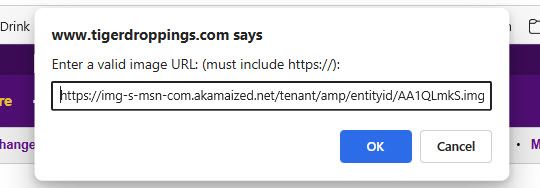
But if you want to just share another photo you found online, copy a direct link or embed code for the image (right click/copy image link). Here, select the img button and paste the image code. Like below.

Posted on 11/21/25 at 9:04 am to Nole Man
When I did the latter there were too many characters
Thank you
Thank you
Posted on 11/21/25 at 9:27 am to White Tiger
Right click image.
Copy image link
img
Paste:
Copy image link
img
Paste:
Posted on 11/21/25 at 10:55 am to Nole Man
Seems easy enough. Many thanks.

 Page 1 of 1


Popular
Back to top
 Follow TigerDroppings for LSU Football News